61 Compound types: values that belong together
Three arrays for one soccer team, four for one screen full of bubbles. Since the Arrays part you have been keeping several rows in step by hand, and you have read the warnings that come with that job. The soccer field chapter said that swapping two entries in lastNames without swapping the first names sends player 1 onto the field as Lucas Rüdiger (Section 42.2). The bubbles chapter added a rule in a callout, push into all parallel arrays together, because one forgotten push moves every color onto the wrong circle from there on (Section 43.3).
Both warnings exist for the same reason. Nothing you have written so far can say “these values belong to one thing”, so the belonging lives in your discipline instead of in your code. This chapter closes that gap. Afterwards a position is one value, a bubble is one value, and that whole class of bug becomes impossible to write. You also pick up something bigger than a bug fix along the way, because you learn how to invent your own types.
61.1 AI tutor
Rewriting a working program to use compound types feels different from writing new code. You change one line, a dozen red squiggles appear at once, and the program is broken for a few minutes on purpose. That is normal, and the tutor is a good partner while it lasts. Paste one squiggle together with the function it sits in and ask what the type of that value should be now.
Hints and questions instead of finished programs, in English or German.
61.2 Why compound types
Take a position on the canvas. It is two numbers, an x and a y, and neither of them says anything on its own. An x of 10 fits every point on a vertical line through the canvas, and only the y next to it picks one of them. The two numbers describe one thing and are useful only together.
Parallel arrays store such a thing by taking it apart. The x values go into one row, the y values into another, and the only thing tying them back together is the index. Nothing in the program states that circlesX[3] and circlesY[3] describe the same bubble. You know it, the compiler does not, and a rule the compiler cannot check is a rule that breaks sooner or later.
A compound type is a type built out of several values, each with a name of its own. Values that describe one thing then sit in one place and travel together, so one variable is one position and one element is one bubble. The connection between the x and the y stops being a promise you keep and becomes part of the value.
61.3 An object in one box
TypeScript writes a compound value as an object, a set of named parts inside one pair of braces. Here is a position:
let position: { x: number, y: number } = { x: 10, y: 20 };Read the line in two halves. Everything between the colon and the = is the type, and it lists which names the object has and what each of them holds. Everything after the = is the value, and it fills those names with 10 and 20. The named parts are called properties, so this position has a property x and a property y.
You reach a property with a dot. position.x is 10 and behaves like any other number, so circle(position.x, position.y, 20) draws a circle where the position says. A dot on the left of an = writes instead of reads, as in position.y = 50;.
The console you met in the value-or-reference chapter (Section 45.2) is the magnifying glass for all of this. Open a fresh sketch, type this program, and write on paper what you expect on each of the three output lines before you press Run:
function setup(): void {
    let position: { x: number, y: number } = { x: 10, y: 20 };
    position.y = 50;

    console.log(position.x);
    console.log(position.y);
    console.log(position);
}
Nothing is drawn here and the canvas stays empty, which is fine. The first two lines show 10 and 50. The third one shows [object Object], and knowing that now saves you confusion later. The output area turns every value it gets into text, and an object has no useful text form of its own. An array does have one, which is why logging a whole array printed 99,20,30 in the array experiment (Section 45.4). So log an object’s properties by name, and the magnifying glass works again.
Vary it. Delete y: 20 from the value, so the braces hold only x: 10, and watch the editor before you run anything. The red squiggle says that the property y is missing. An object either has everything its type promises or the program does not compile, and that check is exactly what parallel arrays could never give you. Put the y back.
61.4 Objects are references
This section teaches no new rule. Objects behave exactly like the arrays of the array experiment (Section 45.4), and running that experiment once more with an object is the fastest way to see it. Replace the body of setup, and write your prediction down first:
const a: { x: number, y: number } = { x: 10, y: 20 };
const b: { x: number, y: number } = a;
b.x = 99;

console.log(a.x);
console.log(b.x);
The console shows 99 and 99. The box of b never held the object, because an object is far too big for a variable box. The box holds an arrow that says where the object lives. const b = a copies what sits in a’s box, which is the arrow, so afterwards two boxes hold two arrows to one single object. b.x = 99 follows an arrow and changes the one object that exists, and a.x reads that same property through the other arrow. Objects are reference types.
The const rule from the const puzzle (Section 45.5) carries over word for word. const nails down the box, and the box holds the arrow, so const means that this arrow never changes again. Writing b.x = 99 is allowed, because it never touches the arrow. Adding this line is not:
b = { x: 0, y: 0 };The squiggle appears before you run anything, and it complains about the variable, not about the object. Delete the line again.
A real copy of an object needs a brand new object, and here objects are easier than arrays. Copying an array took a loop (Section 45.6), because a loop is the only way to move an unknown number of elements. An object has a fixed set of properties whose names you know, so one line is enough:
const copy: { x: number, y: number } = { x: a.x, y: a.y };The braces build a new object with an arrow of its own, and each property is filled with a number, a value type, so both values are copied across. Two objects, two arrows, no connection. Add copy.x = 0; below the line and log a.x and copy.x to watch the two numbers go their separate ways.
=== between two object variables asks whether the two boxes hold the same arrow, just as it does for two array variables. Two separate objects with the same property names and the same values are still false under ===, because they are two objects. Comparing the contents means comparing the properties one by one, for example with a.x === copy.x && a.y === copy.y.
61.5 Invent your own types: the type keyword
Writing { x: number, y: number } once is fine. Writing it as a variable type, a parameter type, and a return type in the same program is three chances to write it slightly differently, and the better way carries a bigger idea with it.
Until this chapter, the set of types was fixed. number, boolean, and string came with the language, arrays of them came with the square brackets, and that was the whole list. The type keyword lets you add to the list. You give a shape a name, and from then on that name is a type like any other:
type Position = { x: number, y: number };The line belongs at the top of your file, next to the global variables and outside every function. Type names start with a capital letter, which is how a reader tells Position the type from position the variable.
Your new type works in all three places a type can appear. In a variable declaration:
let target: Position = { x: 400, y: 300 };As a parameter type, so a function takes a whole position instead of two loose numbers:
function drawMarker(p: Position): void {
    circle(p.x, p.y, 20);
}
And as a return type, which closes a loose end from the target game. That chapter had to warn you that a function returns one value and not two, so a position finder either hands back a number[] or gets split into two functions (Section 60.5). With Position in the language, a random position is one value:
function randomPosition(): Position {
    return { x: random(width), y: random(height) };
}
The return builds a fresh object right there and hands it back, so the caller keeps a whole position in one variable with const p: Position = randomPosition();. The rule that a function returns one value has not changed at all. You widened what one value can be.
61.6 Arrays of compound types
A bubble in Bubble Buster is a position and a size, so it takes three numbers, and a type of its own says so:
type Bubble = { x: number, y: number, diameter: number };Once Bubble exists, Bubble[] is a type too, a row of bubbles, and the whole game state becomes one array:
const bubbles: Bubble[] = [];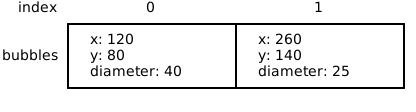
Every operation the game needs gets shorter. Creating a bubble is one push of one object instead of three pushes into three arrays:
bubbles.push({
    x: random(width),
    y: random(height),
    diameter: random(10, 50)
});
Removing a bubble is one splice instead of three, because bubbles.splice(i, 1); takes the whole bubble out. Drawing walks the single array, with bubbles[i] as the whole bubble and a dot for the part you want:
for (let i: number = 0; i < bubbles.length; i++) {
    circle(bubbles[i].x, bubbles[i].y, bubbles[i].diameter);
}
Read bubbles[i].x from left to right, element i of bubbles, then its x. And bubbles.length counts bubbles now, not numbers. No second array can fall out of step with the first, because there is no second array.
61.7 Your exercise: Bubble Buster, rebuilt
This chapter brings no new exercise. You reopen Bubble Buster (Section 53.8) and rebuild its engine on one array of objects, starting from your own working solution. If your solution never got finished, paste the sample solution of that exercise into the playground and work on that instead.
What you are doing has a name. A refactoring is a rewrite that changes how a program is built without changing what it does. Work through the tasks in order and run the game after each one.
- Task 1: the type. Add
type Bubbleat the top of the file, with the three propertiesx,y, anddiameter, all of themnumber. - Task 2: one array. Replace
circlesX,circlesY, andcirclesDiameterwithconst bubbles: Bubble[] = [];. Every line that used the old arrays now shows a squiggle, so fix them one at a time, including the drawing loop indrawand the game over check, which becomesbubbles.length >= 10. - Task 3: one push. Rewrite
addRandomCircleso it pushes a single object with all three properties filled in, instead of pushing three numbers into three separate arrays. - Task 4: one splice. In
mouseClicked, the backwards loop stays exactly as it is, because a loop that removes elements from the array it walks always has to go backwards (Section 43.7). Only the removal changes, from threesplicecalls to one. - Task 5: a bubble instead of an index. Change
isInsideso its third parameter is aBubbleinstead of an index, and read the center and the diameter from that parameter. The Bubble Buster chapter had to explain that index parameter and why the bubble data stayed behind in the arrays (Section 53.4), and with a compound type the explanation disappears. The call turns intoisInside(mouseX, mouseY, bubbles[i]).
You are done when the game plays exactly as before. Same bubbles, same popping, same score, same game over screen, and far fewer ways for the program to break.
61.8 Check your understanding
When your Bubble Buster runs on one array of bubbles and you can say out loud what type Bubble gave the program, take the short quiz below. You answer six questions about this chapter in your own words, and an AI reads your answers and tells you what you already understand and what you should read again. The quiz is anonymous, and answering in German is fine too.