49 Switch again: a domino of symbols
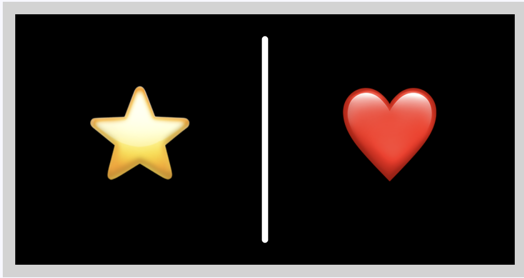
Take a domino tile and replace the dots with a star, a heart, or a triangle. The tile is still a tile, the dividing line is still in the middle, and the two halves are still filled by the same code called twice. That is the quiet lesson of this chapter, and it is worth more than the drawing. The structure of a program does not depend on what its functions paint. Before you get there, you need a way to pick one of six symbols, and the tool for that job is the switch statement from the Conditions part.
49.1 AI tutor
With six cases in a row, a forgotten break is the mistake to expect. The usual sign is a symbol drawn on top of another one, so a star with a triangle through it. The other classic here is a drawing setting that one case turns on and never turns off again. Describe what you see and paste the case you suspect.
Hints and questions instead of finished programs, in English or German.
49.2 The switch statement, in short
A switch statement compares one value against a list of exact values. It replaces a chain of else if lines that all ask about the same variable, and the Conditions part introduced it with a dice program (Section 27.2). The shape looks like this:
switch (symbol) {
    case 1:
        // what to do when symbol is exactly 1
        break;
    case 2:
        // what to do when symbol is exactly 2
        break;
}
Keep three things in your head before you write six cases in a row.
switch (symbol)names the value once, and everycasebelow asks about that same value. The linecase 3:means the same assymbol === 3.- Every case ends with
break. Without it the computer runs straight into the statements of the next case without checking whether that case matches, which is how one symbol ends up drawn on top of another. - A
defaultcase runs when nothing matched, and it is optional. The switch in this chapter has none, because the value is a roll from 1 to 6 and every one of those has its own case.
49.3 Drawing one symbol out of six

The six symbols are a square, a circle, a triangle, a star, a heart, and a four leaf clover, numbered 1 to 6. Each one is drawn white and centered on the point (centerX, centerY), at a width of size pixels. All three of those values are prepared for you in the starter code.
The first two symbols are shapes you know:
switch (symbol) {
    case 1:
        // square
        fill("white");
        stroke("white");
        strokeWeight(2);
        rectMode(CENTER);
        rect(centerX, centerY, size, size);
        rectMode(CORNER);
        break;
    case 2:
        // circle
        fill("white");
        noStroke();
        circle(centerX, centerY, size);
        break;
}
One command in there is new. rect(x, y, w, h) normally reads x and y as the top left corner of the rectangle, and rectMode(CENTER) switches that to the center, which is what a symbol sitting on (centerX, centerY) needs. rectMode(CORNER) switches it back afterwards.
The triangle is case 3, and triangle takes three corner points, so six numbers. Centered on the point and size pixels wide and high, it has its tip at (centerX, centerY - size / 2) and its two base corners half a size to the left and to the right, both at height centerY + size / 2.
Cases 4, 5, and 6 work differently. A star, a heart, and a four leaf clover are not shape commands; they are characters, so you print them with text. Set textAlign(CENTER, CENTER) so the character sits centered on the point instead of starting there, set textSize(size) so it comes out as large as the other symbols, and then call text with the character and the center point. The three characters are hard to type, so copy them out of the exercise description.
rectMode(CENTER) and stroke("white") stay in effect after the case that set them, and they follow the program into everything drawn afterwards. Switch them back in the same case, with rectMode(CORNER) and noStroke(), and every case stays independent of which one ran before it.
49.4 Your exercise: symbols with switch
The starter code draws a black square and rolls a number from 1 to 6 into the variable symbol. Your job is the switch that turns that number into a picture.
- Write the switch with one case. Start with
switch (symbol) {and the square, and replace the roll withconst symbol: number = 1;for the moment so you can actually see it. - Add the cases one at a time, each with its
break, forcing the matching number before every run. One case, one run. - Work out the triangle on paper. Write down the three corner points as offsets from
(centerX, centerY)before you type thetrianglecall, because six numbers in one line are hard to debug by staring. - Put the roll back and run the program ten times. Every symbol has to show up, and none of them may be drawn on top of another.
49.5 The same skeleton, a different body
With a working symbol switch, the domino is the refactoring you have already done once. First extract the drawing into a function of its own, drawSymbol, then wrap a drawDomino around it that calls it twice.
function drawSymbol(symbol: number): void {
    const centerX: number = diceSize / 2;
    const centerY: number = diceSize / 2;
    const size: number = 80;

    switch (symbol) {
        // ... the six cases, unchanged ...
    }
}
The three constants move into drawSymbol instead of to the top of the file, because no other function needs them. A value that only one function uses belongs inside that function, and only values that several functions share, like diceSize, live at the top.
Now the interesting part:
function drawDomino(symbol1: number, symbol2: number): void {
    push();

    fill("black");
    noStroke();
    rect(0, 0, diceSize * 2, diceSize);

    drawSymbol(symbol1);

    translate(diceSize, 0);
    drawSymbol(symbol2);

    stroke("white");
    strokeWeight(5);
    line(0, 20, 0, diceSize - 20);

    pop();
}
Hold that function next to the drawDomino of the dice domino (Section 48.5). The tile, the translate between the halves, the dividing line at x = 0, the push and pop around everything, all identical. Two lines in the body differ, and in both of them only a name changed from drawDice to drawSymbol.
That is the point of this chapter. drawDomino never knew what a dice face is, and it does not know what a star is either. All it knows is that a tile has two halves and that something gets drawn in each of them. You build programs out of such skeletons, and once you have one, you can hang a new body on it in minutes. Look for that shape whenever two of your programs feel similar.
49.6 Your exercise, part 2: Domino With Symbols
The starter code is the finished symbol switch, all of it inside setup. Refactor it into the domino, in the same two moves as the dice chapter.
- Extract
drawSymbol. Move the switch and its three constants into the new function, movediceSizeto the top of the file, give the function its parameter and its: void, and call it fromsetup. Run it. The picture has to be the same single symbol as before. - Add
drawDominowith its two parameters, the wide black tile, twodrawSymbolcalls with atranslatein between, and the white dividing line. Make the canvas wide enough for the whole tile. - Roll in setup. Pick the two random numbers in
setupand pass them down as arguments. Test withdrawDomino(1, 4);first, so you know which half is which, and then put the rolls back. - Check the cleanup. Run the program twenty times. If a square ever comes out with a stroke it should not have, or a symbol comes out in the wrong size, a case forgot to put a drawing setting back.
49.7 Practice on your own: a row of symbol pieces

There is one more exercise for this chapter, and this time there is no walkthrough. Domino With Symbols (Advanced) asks for the five pieces 1:2, 2:3, 3:4, 4:5, and 5:6 in a row, drawn with a for loop that calls your drawDomino. You have done exactly this with the dice domino (Section 48.8), and everything you need is either in your own code or in that section.
Work it out yourself, and use the tutor when you get stuck rather than looking for a finished answer. Independent practice is what turns a chapter you understood into something you can do.
49.8 Check your understanding
When your symbol domino runs and you can name the two lines that differ between the two drawDomino functions, take the short quiz below. You answer six questions about this chapter in your own words, and an AI reads your answers and tells you what you already understand and what you should read again. The quiz is anonymous, and answering in German is fine too.