22 Rolling dice: random numbers and exact comparisons
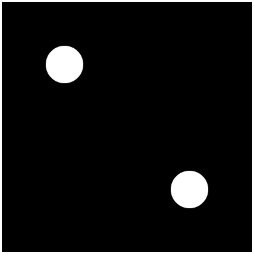
This program is a die you can roll as often as you like. Every time it runs, the computer picks a number from 1 to 6 that nobody, not even you as the programmer, knows in advance, and then draws the matching dice face. One centered point for a one, two corner points for a two, and so on up to six. To pull that off, you need two new tools: a way to produce random numbers, and a comparison that asks “is it exactly this value?”.
22.1 AI tutor
Two AIs appear in this chapter, with different jobs. The tutor of this part answers your questions about random numbers, rounding, and comparisons, with hints. The advanced section at the end has an AI of its own that writes code from your prompt, so you can have your finished program improved and then take the improvement apart.
Hints and questions instead of finished programs, in English or German.
22.2 A number nobody knows in advance
Everything your programs computed so far was predictable. The same input always led to the same picture. Games need the opposite: dice rolls, shuffled cards, surprise positions. p5.js provides it with the function random. A call like random(1, 7) returns a random number that is at least 1 and less than 7. The lower bound is included, the upper bound is not. Every call produces a fresh number, so running your program again means rolling again.
There is a catch. random returns a decimal number, and a call to random(1, 7) might give 3.874 or 6.999. There is no die in the world that shows 3.874 points.
22.3 Rounding down with floor
To turn 3.874 into a proper dice value, you need to cut off the decimal part, and that’s a kind of rounding you haven’t used yet. You know round from the snapping exercise; its sibling floor always rounds down to the next whole number. floor(3.874) is 3, and floor(6.999) is 6. Combined with random, the roll becomes one line:
const dice: number = floor(random(1, 7));Follow a value through. random(1, 7) produces something between 1 and 6.999…, and floor maps everything from 1 up to 1.999… onto 1, everything from 2 up to 2.999… onto 2, and so on up to 6. Six equally wide ranges, six equally likely results: a fair die.
It looks tempting, but play computer with it. round sends everything from 1 to 1.499… to 1, a range of width 0.5, while 2 gets everything from 1.5 to 2.499…, a range of width 1. The same squeeze happens at the top for the 6. With round, the 1 and the 6 would appear only half as often as the other numbers: a loaded die. The pattern floor(random(min, max + 1)) is the standard recipe for fair whole-number randomness, worth memorizing.
22.4 Asking “is it exactly this value?”
The comparisons you’ve used so far, <, >, <=, and >=, ask about order. The dice program needs a different question: did I roll exactly a 1? The comparison table in the color areas chapter has the operator for it. The equality operator === asks “are the two values exactly equal?”, and its counterpart !== asks “are they different?”. Both produce a boolean, like every comparison.
Here is the question that decides whether the die shows a one. All points of a dice face have the same size, so their diameter sits in a constant named dicePointDiameter, and a one is a single point in the middle of the canvas:
if (dice === 1) {
  circle(width / 2, height / 2, dicePointDiameter);
}
The count of equals signs matters. A single = is an assignment, an order that says “put this value into the box”. The triple === is a comparison, a question: “are these equal?”. Writing if (dice = 1) instead of if (dice === 1) is one of the most classic mistakes in programming. TypeScript catches many of these slips with a red squiggle, but not all of them, so train your eyes now. Inside a condition, an = alone is almost always wrong. You may also spot a two-character == in code on the web; in this course, we always compare with === and !==.
With === in hand, the whole program becomes one chain that picks exactly one face out of six:
if (dice === 1) {
  // draw one point
} else if (dice === 2) {
  // draw two points
} else if (dice === 3) {
  // draw three points
} else if (dice === 4) {
  // draw four points
} else if (dice === 5) {
  // draw five points
} else {
  // must be 6: draw six points
}
Look at the last branch. It’s a plain else, without a condition. That’s safe reasoning, not laziness: dice can only hold 1 to 6, and if five questions have been answered with no, only the 6 is left. The final else in a chain is the “everything else” branch, and here “everything else” happens to be exactly one value.
22.5 The geometry of a dice face
Now for the creative half. Look closely at a real die. All six faces place their points on the same invisible grid of three columns and three rows. On your 200 by 200 canvas, the columns sit at width / 4, width / 2, and 3 * width / 4, and the rows at the matching heights:
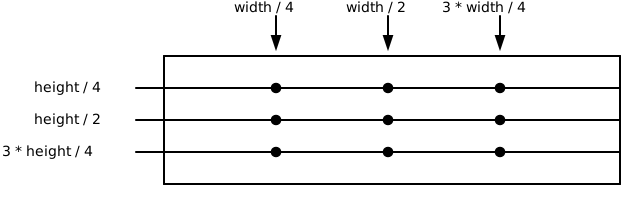
Each face is just a selection of these nine anchors: the 1 uses only the center, the 2 takes two opposite corners, the 4 takes all four corners. And the faces reuse each other. A 3 is a 2 plus the center, a 5 is a 4 plus the center, and a 6 is a 4 plus the two middle anchors of the left and right columns. Spotting this reuse on paper first will save you a lot of typing and a lot of mistakes.
22.6 Your exercise: Dice
The starter code rolls the die and already draws the faces for 1 and 2. Your job is the cases 3 to 6.
Paper first. Give every anchor point a short name: the column first (
L,C,Rfor left, center, right), then the row (T,M,Bfor top, middle, bottom). SoLTis the upper left anchor at (50, 50),CMis the center at (100, 100), andRBis the lower right anchor at (150, 150). Now sketch the six faces on paper and complete this table. The faces for 1 and 2 are filled in because the starter code already draws them, and the 3 is filled in to show you what the last column is for.Face Anchors it uses Built from an earlier face 1 CM— 2 LT,RB— 3 LT,RB,CMthe 2 plus the 1 4 5 6 The last column is where the work gets saved: every face you still have to build is an earlier face plus one or two extra anchors. Find those before you type anything.
Read the starter code. Find the roll, the chain, and the two finished cases. Check the code for the 2 against your paper sketch: it uses
width / 4and3 * width / 4, exactly your corner anchors. Add the missing data type to thedicedeclaration while you’re there; every declaration gets one, as always.Add the cases 3 to 6 to the chain, one
circlecall per point. Work on one case at a time.Test each case deliberately. A random program is awkward to test, because you can’t tell it what to roll. So force the roll: replace the right side of the
dicedeclaration with a fixed value, for exampleconst dice: number = 3;, check the face, then test 4, 5, and 6 the same way. When every face is right, put therandomline back and roll a few times for the joy of it. Professionals test exactly like this. Make the random part predictable for a moment, check every case, then switch the randomness back on.
22.7 Advanced: the same dot, drawn five times
Get your paper sketches of the six faces out again and look at them as a group instead of one by one. The dot in the upper left corner appears on the 2, the 3, the 4, the 5, and the 6. Five faces share it, and your finished chain draws it with five separate circle statements. The center dot appears on the 1, the 3, and the 5. Count all the calls in your chain and you land at 21 circle statements for only nine distinct anchor points. Repetition like that is a warning sign in any program, and the conditions you already know are enough to remove it: the chain can be rewritten with far fewer circle statements.
You won’t do the rewrite alone: this is a job for an AI, used the way you learned in the elephant exercise (Section 5.4). This exercise has its own AI, and you’ll find it in the box below. The two rules from the elephant exercise apply word for word. Paste your complete, working dice program into the prompt, because running code is the most precise description of your environment. And say that you are a beginner and that the code shows everything you have learned so far, so the answer stays inside what you can understand. Then ask the AI to rewrite the program so that it needs as few circle statements as possible.
This AI writes code from your prompt. Like the genie in the lamp, it grants what you say, not what you mean.
The AI will solve this, no surprise there. The real exercise is what happens next: don’t just accept the answer. Read the new code line by line, and every time something is unclear, ask a follow-up question. Why is this comparison suddenly >= instead of ===? Which faces does this circle call serve? What happened to the final else? Keep asking until you could have written the improvement yourself.
There’s a reason to be that strict: be prepared to describe your optimization in class, without the AI and without your notes. You should be able to explain which dots the faces share and how the rewritten conditions use that overlap. When you can do that, the code is yours, no matter who typed it first.
22.8 Check your understanding
When all six faces roll correctly, take the short quiz below. You answer six questions about this chapter in your own words, and an AI reads your answers and tells you what you already understand and what you should read again. The quiz is anonymous, and answering in German is fine too.