40 Scale: bigger and smaller
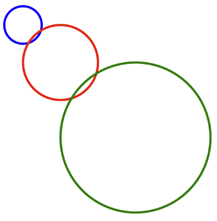
This short chapter takes a break from strings and arrays, on purpose, because the exercises after it need one more drawing tool. Back in the practice projects of part 1, the soccer field recipe contained three magic words: push, translate, and scale. The Loops part explained the first two. scale is the last one, and after this chapter the recipe holds no secrets. scale makes everything you draw bigger or smaller by a factor, and, as the goal picture shows, it does something to positions that surprises almost everyone.
40.1 AI tutor
“I scaled my circle and it jumped somewhere else” is one of the most common confusions in this course, and this chapter exists to clear it up. If the pictures still surprise you after reading, ask the tutor to walk through one example with you, step by step.
Hints and questions instead of finished programs, in English or German.
40.2 Scale multiplies everything
scale(2) tells the canvas to multiply everything by 2 from now on. Like translate and rotate, it changes the coordinate system for everything drawn after it, and pop undoes it. But “everything” really means everything:
scale(2);
circle(50, 50, 50);
The circle’s diameter becomes 100, and its center lands at (100, 100), because the coordinates are multiplied too. The call still says (50, 50); the scaled coordinate system puts that point twice as far from the origin.
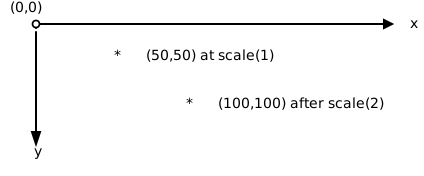
Even the stroke is multiplied: a strokeWeight(3) line drawn under scale(2) comes out 6 pixels wide. The cure is compensation. Set strokeWeight(3 / 2) instead, and the scaling doubles the one and a half pixels back to the 3 the eye expects; the exercise code below plays this trick for every scaled circle. Factors below 1 work as well; scale(0.5) shrinks everything to half size, and decimals like scale(2.5) are fine.
40.3 Your exercise: Scaled Circles
The first exercise is a type-in. Here is the code; the three blocks draw the three circles of the goal picture:
stroke("blue");
strokeWeight(3);
circle(50, 50, 50);

push();
stroke("red");
scale(2);
strokeWeight(3 / 2);
circle(50, 50, 50);
pop();

push();
stroke("green");
scale(4);
strokeWeight(3 / 4);
circle(50, 50, 50);
pop();- Predict first. Before you run it, write down where the red and green circles will land and how big they will be. Center and diameter, both times.
- Type it in and run. Compare with your prediction and with the goal picture. The first block needs no
push/popbecause it never touches the coordinate system; the other two clean up after themselves, as every transformation should (Section 34.4). - Experiment. Change the factors, try
scale(0.5), and remove onestrokeWeightcompensation to see the fat outline. One thing you cannot fix by experimenting yet: making the circles share a center. That is the second exercise.
40.4 The point that cannot move
Why did the circles drift? Because their center (50, 50) is a distance away from the origin, and scaling multiplies that distance. Which point does not drift? The origin itself: multiplying 0 by any factor gives 0. The origin is the fixed point of scaling, the one spot that stays exactly where it is.
That observation turns into a recipe you already know from rotate (Section 38.3): put the origin where the action should happen, then draw at (0, 0).
translate(150, 150);  // the shared center

circle(0, 0, 50);     // blue, scale 1

push();
scale(2);
circle(0, 0, 50);     // red: bigger, but NOT moved
pop();
A circle whose center is (0, 0) sits on the fixed point: scale multiplies its diameter, but its center, 0 away from the origin in both directions, stays put. Translate once, draw everything at the origin, and scaling changes only the size. That is precisely how the part 1 soccer field recipe worked; translate placed the field, and scale turned meters into pixels around it.
40.5 Your exercise, part 2: Scaled Circles (Centered)
The starter code is the finished first exercise. The goal picture shows the fix: three concentric rings, blue inside red inside green.
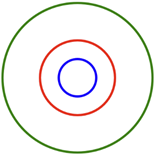
- Pick the center. The biggest circle has diameter 50 times 4, which is 200 pixels, so the shared center must stay at least 100 pixels away from every edge of the 400 by 400 canvas. The goal picture uses (150, 150), but any spot with that safety margin works.
- One translate for all. Move the origin to your center once, at the top, before the blue circle. This translate stays outside every
push/poppair on purpose: all three circles should share it. - Draw at the origin. Change all three
circlecalls tocircle(0, 0, 50)and run. The scale factors stay as they are; only the coordinates change. If your rings are still not concentric, one of your circles is not being drawn at (0, 0).
40.6 Check your understanding
When your rings sit inside each other and you can say why the blue circle never moves, take the short quiz below. You answer six questions about this chapter in your own words, and an AI reads your answers and tells you what you already understand and what you should read again. The quiz is anonymous, and answering in German is fine too.