51 Functions that answer: return values
getRandomInt in two directions: the parameters carry values in, and the return value carries one value back out.Every function you have written so far was a painter. You handed it a few values, it drew something, and that was the end of the story. This chapter adds the missing direction. A function can also work out an answer and hand it back to the code that called it, and once it can do that, you can wrap any calculation you use often into a tool with a name.
51.1 AI tutor
The word return looks harmless and hides two effects at once, so if a line after your return never seems to run, that is worth asking about. Describe to the tutor what your function should hand back, what type you wrote after the parentheses, and what the editor underlines.
Hints and questions instead of finished programs, in English or German.
51.2 A function that hands a value back
Up to now, every function you wrote ended its signature with : void, which is the promise “I give nothing back”. A function that answers replaces void with the type of its answer:
function getRandomInt(min: number, max: number): number {
  return floor(random(min, max));
}
Read the head from left to right. The function is called getRandomInt, it wants two numbers, and after the closing parenthesis stands number, so it hands a number back. The course rule for signatures has not changed (Section 47.4), every parameter and the result still get a type. Only the result type is no longer void.
The word return does two things in one move. It works out the value on its right and hands that value to whoever called the function, and it ends the function immediately. You have seen the second half of that before, as a bare return; that left mouseClicked early (Section 44.5). The version with a value behind it is the same jump, only with luggage.
Statements below a return in the same block are never executed. If you write a return in the middle of a function and wonder why the drawing below it stays invisible, that is why. Compute first, return last.
51.3 The call jumps away and comes back
You know the jump from the definition chapter (Section 47.3). The computer remembers where it was, runs the body of the function, and comes back to the line after the call. A function with a return value makes that trip in both directions. The arguments travel over, the function works, and the answer travels back to exactly the spot where the call stood:

That is why a call to such a function can stand wherever a value is allowed. It behaves like a number:
const diameter: number = getRandomInt(10, 50);The right side of the assignment is not “a function”; it is whatever getRandomInt handed back, so diameter ends up holding a plain number like 27. The same call could sit inside a circle call or inside a calculation, in every place where you could have typed 27 yourself.
51.4 One recipe, one name
Look at what the body of getRandomInt actually does. Nothing in it is new, because floor(random(min, max)) is the dice recipe from the Conditions part (Section 22.3), which turns a random decimal into a whole number. What is new is that the recipe now has a name.
Naming an idea is what makes it reusable. The program of this chapter needs random whole numbers three times, and thanks to the name, all three read like plain sentences:
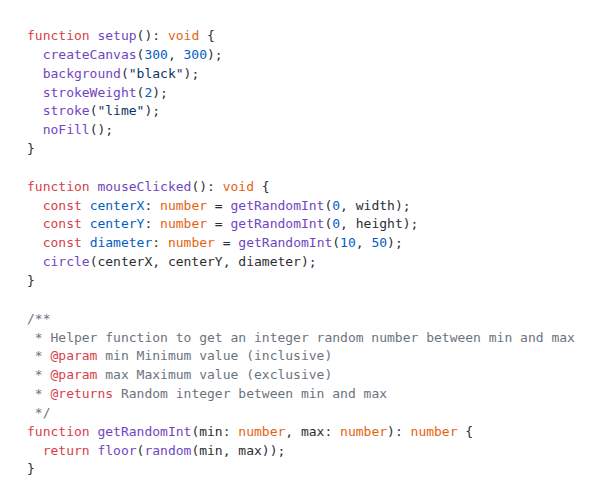
function mouseClicked(): void {
  const centerX: number = getRandomInt(0, width);
  const centerY: number = getRandomInt(0, height);
  const diameter: number = getRandomInt(10, 50);
  circle(centerX, centerY, diameter);
}
Three calls, one shared body. If you ever decide that the numbers should be rounded differently, you change one line in one place and all three calls follow. And a reader who has never seen your program understands getRandomInt(10, 50) at a glance, while floor(random(10, 50)) always needs a moment of thought.
The bounds are not symmetric, and that is worth knowing before you use the tool. random(10, 50) produces a decimal that is at least 10 and always stays below 50, and floor then cuts the decimals away. So getRandomInt(10, 50) gives you 10 at the lowest and 49 at the highest. The lower bound is included, the upper bound is not, exactly like the last index of an array is length - 1.
51.5 Doc comments explain a function to its user
A function you want to reuse deserves one more thing, a comment that describes it from the outside. TypeScript has a special comment form for that, written above the function and starting with /**:
/**
 * Helper function to get an integer random number between min and max
 * @param min Minimum value (inclusive)
 * @param max Maximum value (exclusive)
 * @returns Random integer between min and max
 */
function getRandomInt(min: number, max: number): number {
  return floor(random(min, max));
}
The first line says what the function is for. Each @param line explains one parameter by name, and @returns describes the answer. Notice that the comment is the place where “inclusive” and “exclusive” get written down, because the signature alone cannot say it.
The payoff is immediate. Type getRandomInt( somewhere in the playground editor and stop, or point the mouse at a call you already wrote. The editor shows your own text in a small box, right where you need it. This is where all those helpful tooltips for random and circle come from, and from this chapter on your own functions get them too.
51.6 Your exercise: Return Values
This exercise is a type-in. The complete program is in the exercise description as a picture, and the pieces are all in the sections above.
- Type in the program. The starter code already contains
setupwith the black background and the lime outline. AddgetRandomIntwith its doc comment, thenmouseClickedwith the three calls and thecircle. Type it, don’t paste it. - Hover over your own call. Point the mouse at
getRandomIntinsidemouseClickedand read the box that pops up. Then change one word in the doc comment and hover again. - Play computer. On paper, answer these three questions for
getRandomInt(10, 50). What is the smallest number it can hand back, what is the largest, and what doesrandomproduce if the answer turns out to be 27? - Watch the circles pile up. Click ten times. Nothing repaints the background after
setup, and the program has nodraw, so every circle stays where it was painted. - Experiment. Give the circles a random line color by writing a second function that returns a color name, or make the diameter depend on the position by passing
centerYinto a function of your own. Whatever you build, keep the rule: one function, one job, one clear answer.
51.7 Check your understanding
When your circles appear on every click and you can explain what return hands back and where it hands it to, take the short quiz below. You answer six questions about this chapter in your own words, and an AI reads your answers and tells you what you already understand and what you should read again. The quiz is anonymous, and answering in German is fine too.