53 A game from functions: Bubble Buster
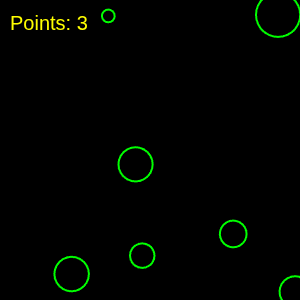
Bubbles are back. In the Arrays part you built a program where bubbles appeared, waited, and burst on their own (Section 43.6); this chapter turns the same bubbles into a game you play with the mouse. The bubbles have not changed; the engine underneath them has. Everything the program does now lives in a function with a name, and each of those functions has exactly one job.
53.1 AI tutor
Bubble Buster is the first program in this course where five or six of your own functions work together, so a bug can hide in the cooperation instead of in a single line. If a click pops the wrong bubble or nothing happens at all, tell the tutor which function you think is responsible and paste it.
Hints and questions instead of finished programs, in English or German.
53.2 The same bubbles, a new engine
Bubble Buster keeps its bubbles in three parallel arrays, one for each thing a bubble needs:
const circlesX: number[] = [];
const circlesY: number[] = [];
const circlesDiameter: number[] = [];
Three arrays instead of the five from the Arrays part, because a bubble in this game has no color of its own and no lifetime. Every bubble is drawn with the same lime outline, and bubbles disappear when the player pops them, not when a clock says so.
The clock changes too. In the Arrays part, draw compared millis() against a deadline sixty times a second (Section 43.4). Bubble Buster hands that job to setInterval instead (Section 52.8), so draw never thinks about time at all:
circleInterval = setInterval(addRandomCircle, waitingTime);Remember the rule for handing a function over. addRandomCircle without parentheses passes the function itself; with parentheses you would call it once yourself and hand over its result.
53.3 One function, one job
The guiding idea of this chapter is small enough to write on one line. Every function you write does one job, and its name says which one. When you can describe a function’s job without the word “and”, the split is right.
Look at the first job, creating a bubble. It needs nothing from the caller, and it gives nothing back; it just adds one bubble to the arrays:
/**
 * Helper method that adds a random circle to the screen.
 */
function addRandomCircle(): void {
  circlesX.push(random(width));
  circlesY.push(random(height));
  circlesDiameter.push(random(10, 50));
}
No parameters between the parentheses, and : void as the return type, because there is no answer to hand back. The function reaches straight into the global arrays, which is exactly why it works both as an interval callback and as a normal call from setup.
Drawing the bubbles is a different job, and it stays in draw, which wipes the canvas each frame and repaints every bubble the arrays remember.
53.4 Answering a question: isInside
The second function has the opposite shape. It takes three values in, it draws nothing, and it hands back an answer. The question it answers is whether a point lies inside a bubble, and the answer is a boolean.
A point is inside a circle when its distance from the center is smaller than the radius, so the function needs that distance. The click and the center form a right triangle, with one horizontal leg and one vertical leg:
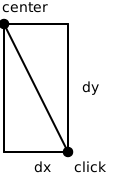
The Pythagorean theorem from math class turns the two legs into the diagonal, so a * a + b * b is the square of the distance and sqrt brings it back down to a length:
/**
 * Helper method that checks if a point is inside a circle.
 * @param x The x-coordinate of the point.
 * @param y The y-coordinate of the point.
 * @param circleIndex The index of the circle in the circles array.
 * @returns True if the point is inside the circle, false otherwise.
 */
function isInside(x: number, y: number, circleIndex: number): boolean {
  const dx: number = x - circlesX[circleIndex];
  const dy: number = y - circlesY[circleIndex];
  const distance: number = sqrt(dx * dx + dy * dy);
  return distance < circlesDiameter[circleIndex] / 2;
}
The last line deserves a slow read. The comparison distance < circlesDiameter[circleIndex] / 2 produces true or false, and return hands that value straight to whoever asked. The diameter is halved because the radius is what a distance has to beat.
Note the third parameter. x and y are a point anywhere on the canvas, while circleIndex says which bubble to compare against, so the bubble data stays in the arrays where it belongs.
p5.js has a built-in function dist(x1, y1, x2, y2) that computes the distance between two points in one call. Bubble Buster does the math by hand on purpose, because the Pythagorean theorem shows up in graphics programming again and again. Once you have seen it work, dist is a fair shortcut in your own projects.
53.5 Popping bubbles, backwards
Clicking is handled by mouseClicked, the callback p5.js calls for you. It walks all bubbles, asks isInside about each one, and removes the ones that were hit:
function mouseClicked(): void {
  for (let i: number = circlesX.length - 1; i >= 0; i--) {
    if (isInside(mouseX, mouseY, i)) {
      circlesX.splice(i, 1);
      circlesY.splice(i, 1);
      circlesDiameter.splice(i, 1);
      points++;
    }
  }
}
The loop header runs from length - 1 down to 0, and that is the same rule you met with the bursting bubbles (Section 43.7). Any loop that may splice elements out of the array it is walking has to walk backwards, or it silently skips the element that slid into the freed index.
Two overlapping bubbles under one click are both removed, because the loop keeps going after a hit. Every removal also raises points, which draw prints in the top left corner.
53.6 Stopping the game
Bubbles that nobody pops pile up, and when ten of them are on the canvas the game is over. The check belongs at the very top of draw, before any drawing happens:
function draw(): void {
  background("black");

  // If more than 10 circles are on the screen, stop the game.
  if (circlesX.length >= 10) {
    stopGame();

    // Note that the return statement stops the execution of the function.
    return;
  }

  // ... draw the bubbles and the score ...
}
A bare return; inside a void function means “I am done here”. The rest of draw never runs, so the game over screen that stopGame painted stays on the canvas instead of being covered by bubbles.
stopGame clears both intervals, paints the final message, and ends with a p5.js function that is new here, noLoop(). A call to noLoop() tells p5.js to stop calling draw altogether, so draw stops running sixty times a second just to check the same if forever. Its partner is loop(), which starts the calls again, for example when you add a restart to the game.
53.7 Leveling up by replacing an interval
The game gets harder over time, and the trick is that an interval can be thrown away and replaced. A second interval fires every ten seconds and does exactly that:
/**
 * Helper method that is called when the player advances to the next level.
 */
function nextLevel(): void {
  clearInterval(circleInterval);
  waitingTime /= 2;
  circleInterval = setInterval(addRandomCircle, waitingTime);
}
Three lines, one job. clearInterval stops the old bubble timer, waitingTime /= 2 halves the pause, and setInterval starts a new timer with the shorter pause. Storing the new id back into circleInterval matters, because the next level has to be able to stop the timer that is actually running.
53.8 Your exercise: Bubble Buster
The starter code gives you the three arrays, the timer variables, the score, and empty setup and draw functions. Everything else is yours, and the exercise description lists five tasks. Work through them in order and run the program after each one.
- Random bubbles. Write
addRandomCircleas described in Section 53.3, call it once insetupso the first bubble is there immediately, and start the interval that calls it every three seconds. Draw all bubbles in a loop indraw. - Popping. Write
isInsidewith its three parameters and itsbooleanreturn value, then writemouseClickedwith the backwards loop that splices out every bubble under the pointer. - Points. Count each popped bubble and print the score in the top left corner with
text. - Levels (advanced). Add the second interval that calls
nextLevel, so the bubbles come twice as fast every ten seconds. - Game over (advanced). Add the early
return;indrawand thestopGamefunction that clears both intervals, shows the final score, and callsnoLoop().
When your game runs, read the sample solution and compare its decomposition with yours. That comparison is the real lesson here.
53.9 Check your understanding
When your bubbles pop under the mouse and you can say out loud what each of your functions is responsible for, take the short quiz below. You answer six questions about this chapter in your own words, and an AI reads your answers and tells you what you already understand and what you should read again. The quiz is anonymous, and answering in German is fine too.