43 Arrays that grow and shrink
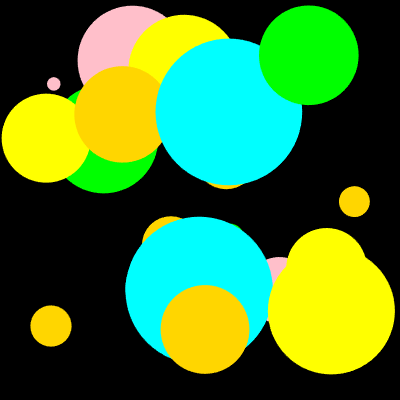
The soccer arrays were fixed, eleven players at the start, eleven at the end. This chapter cuts arrays loose. The bubbles program starts with empty arrays and grows them while it runs; every second or two, push appends a new bubble. Then the follow-up exercise teaches the opposite move, splice, which removes a bubble whose time is up. Along the way you meet millis, the program’s clock, and the biggest idea of the chapter, the one that carries every animated program from now on: the arrays are the program’s memory, and the canvas is just a picture of them, repainted sixty times a second.
43.1 AI tutor
Growing and shrinking arrays are the first data that changes while you watch. If your bubbles change color mid-flight or vanish in the wrong order, something knocked your arrays out of step; describe to the tutor what you see and paste the lines that change your arrays.
Hints and questions instead of finished programs, in English or German.
43.2 The empty array
An array does not need its elements at the declaration. This is an array of numbers that holds nothing yet:
const circlesDiameter: number[] = [];The type annotation number[] now really earns its place. With no elements between the brackets, the annotation is the only clue about what the array will hold. From an empty start, push appends elements at the end:
circlesDiameter.push(80);   // length is now 1
circlesDiameter.push(35);   // length is now 2, at indexes 0 and 1
push on an array and pop for the drawing settings share a name family by accident; they have nothing to do with each other. The array push simply means: hang this value on the end. Each push raises length by one, and the new element gets the next free index.
const circlesDiameter and then push into it, without a red squiggle? Yes. const forbids reassigning the variable, like circlesDiameter = [1, 2, 3];. What is stored inside the array may change freely. The box is nailed down; the content is not. This is normal TypeScript style: an array variable is const unless you plan to replace the whole array.
43.3 Four arrays, one bubble
A bubble has a position, a size, and a color, so the program keeps four parallel arrays, circlesCenterX, circlesCenterY, circlesDiameter, and circlesFill. Creating one bubble means one push into each of them; the size comes first, drawn up to a constant maxDiameter:
const d: number = random(10, maxDiameter);
circlesDiameter.push(d);
circlesCenterX.push(random(d / 2, width - d / 2));
circlesCenterY.push(random(d / 2, height - d / 2));
circlesFill.push(random(availableColors));
The position uses the diameter: the center stays at least half a bubble away from every edge, so no bubble is ever cut off. The color comes from random(availableColors), the pick-an-element random from Word Swirrel level 3, applied to a little palette array of color names.
Parallel arrays that grow have a new way to break: forget one of the four pushes, and from that bubble on, every color belongs to the wrong circle, and the last bubble reads undefined. Whenever you push, push into all parallel arrays, in one place, together.
43.4 The program’s clock: millis
New bubbles should appear every half second to two seconds, not sixty times a second. For that, the program needs a clock. millis() returns the number of milliseconds since the program started. The scheduling trick is to store a deadline:
if (millis() >= nextCircle) {
    // ... push the four values ...
    nextCircle = millis() + random(500, 2000);
}
nextCircle holds the time at which the next bubble is due. Every frame, draw checks the clock against the deadline. As long as the bubble is not due, nothing happens. Once it is due, the code creates the bubble and sets a new deadline half a second to two seconds into the future. The wall clock keeps running; the program just compares against it. The deadline pattern is a good fit whenever the pause changes from round to round and the work belongs to the drawing anyway, and both are true here. A later chapter adds a second way to say “every so often”, for jobs that need a fixed rhythm instead.
43.5 The arrays are the truth
Here is draw, with the push details folded into a comment, because its shape matters more than any line:
function draw() {
    background("black");

    if (millis() >= nextCircle) {
        // push a new bubble, set the next deadline
    }

    noStroke();
    for (let i: number = 0; i < circlesDiameter.length; i++) {
        fill(circlesFill[i]);
        circle(circlesCenterX[i], circlesCenterY[i], circlesDiameter[i]);
    }
}
background("black") wipes the canvas every frame, sixty times a second, and yet no bubble is ever lost. Why not? Because the bubbles don’t live on the canvas; they live in the arrays. The loop redraws every stored bubble from scratch each frame, so the picture looks constant even though it is repainted constantly.
Compare that with the colored rays back in the Loops part, where the canvas itself was the memory; the program never repainted the background and the rays piled up. Both styles work, but the array style is stronger: the program can change its memory, and the picture follows. That is exactly what the second half of this chapter does, when bubbles start to burst.
43.6 Your exercise: Bubbles
The exercise is a type-in of the bubbles program; the complete code is in the exercise description as a picture, so your fingers type every bracket themselves.
- Type it in, in three sittings. First the five global declarations and the palette array, then the deadline
ifindraw, then the drawing loop. Run after each sitting; after the second one you’ll see nothing yet, and that is fine, because nothing reads the arrays so far. - Watch it grow. Run the finished program for a minute. New bubbles keep coming, old ones never leave. The arrays only ever grow, and after a while the canvas is packed. Remember that sight; the second exercise fixes it.
- Experiment. Add your favorite colors to the palette, make the deadlines shorter, and try
random(10, 40)for tiny bubbles only. Each change touches exactly one line, because everything else follows the data.
43.7 Removing elements: splice
Bubbles should burst. The removing tool is splice. myArray.splice(i, 1) removes one element at index i. The elements after it slide one index to the left, and length shrinks by one:
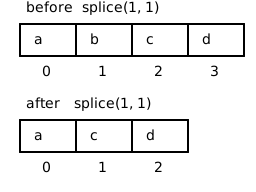
For bursting, every bubble gets a lifetime. A fifth parallel array holds it, filled at creation with its personal deadline, the same pattern as nextCircle:
circlesLifetime.push(millis() + random(2000, 4000));Every frame, a loop checks which bubbles are overdue and splices them out of all five arrays, so the columns stay aligned:
for (let i: number = circlesLifetime.length - 1; i >= 0; i--) {
    if (millis() >= circlesLifetime[i]) {
        circlesCenterX.splice(i, 1);
        circlesCenterY.splice(i, 1);
        circlesDiameter.splice(i, 1);
        circlesFill.splice(i, 1);
        circlesLifetime.splice(i, 1);
    }
}
Look at the loop header: it runs backwards, from the last index down to 0. That is not a matter of taste. When splice removes index 2, the old index 3 becomes index 2. A forward loop would step on to index 3 next and never look at the element that just slid into position 2. It skips a bubble, every time it removes one. Walking backwards, the sliding happens only in the part of the array the loop has already visited, and nothing is skipped.
Any loop that may splice elements out of the array it is walking must walk from length - 1 down to 0. Forwards it silently skips the element after each removal; you will not get an error, just bubbles that burst one frame too late, or never. This rule applies to every remove-while-looping situation, not just bubbles.
43.8 Your exercise, part 2: Bubbles (Splice)
The starter code is the finished Bubbles program. You add the bursting.
- The fifth array. Declare
circlesLifetime: number[], and push a deadline of two to four seconds into it wherever a bubble is created, next to the other four pushes. - Paper first. Take the array picture above (Section 43.7) and walk a forward loop over
[a, b, c, d]that removes every element: which elements does it actually visit? Then walk it backwards. Now you know why the header looks the way it does. - The removal loop. Write the backwards loop with the five splice calls and run it; bubbles now appear, live for a few seconds, and pop. The canvas stays alive instead of filling up.
- Experiment. Give bubbles ten seconds to live, then half a second. Then break it on purpose: turn the loop forwards, run it, and watch bubbles overstay. Turn it back.
43.9 Check your understanding
When your bubbles come and go and you can explain the backwards loop to a classmate, take the short quiz below. You answer six questions about this chapter in your own words, and an AI reads your answers and tells you what you already understand and what you should read again. The quiz is anonymous, and answering in German is fine too.