45 Value or reference: what an assignment copies
This chapter paints no new picture on the canvas. Instead you play detective and look inside the boxes of your variables, with four small experiments that you type yourself. One of them ends with a result that surprises almost everybody the first time. For the detective work you pick up a new tool, console.log, a command that lets a program write plain lines of text into an output area of its own. And two loose ends from earlier chapters, the const array that happily grows and the substring that changes nothing, stop being magic along the way.
45.1 AI tutor
Predictions are the whole point of this chapter, and a prediction that misses is worth a question. When the console shows something your paper did not, describe both sides to the tutor: what you expected, what appeared, and which lines you typed. “My two variables changed together and I don’t know why” is exactly the kind of question this tutor is built for.
Hints and questions instead of finished programs, in English or German.
45.2 A window into the program: the console
Detectives need a way to look at values, and drawing every suspect with text on the canvas would be clumsy. The playground has a better tool for this. Below the drawing area sits the console, an output area for plain lines of text, and the command console.log(...) writes one line into it. Hand it any value you have, a number, a boolean, a string, and the value appears as a line in the console. You can even hand it several values, separated by commas, and they land in one line together:
console.log("three times seven is", 3 * 7);Two practical details. The console keeps the lines of earlier runs, and its Clear button wipes it empty again. And console.log has two louder siblings, console.warn for warnings in orange and console.error for errors in red; you will meet them properly in later programs, and for the detective work of this chapter, the plain log is all you need.
45.3 Assignment copies the value
Start with the world you have known since the Variables part. Open a fresh sketch in the playground and type this program:
function setup() {
    let a: number = 10;
    let b: number = a;
    b = 99;

    console.log(a);
    console.log(b);
}
There is no createCanvas here and nothing is drawn; the program talks only through the console, and the canvas staying empty is fine. Before you press Run, write two numbers on your sheet of paper, the one you expect on the first console line and the one you expect on the second. Every experiment in this chapter starts that way.
The console shows 10 and 99, and that is what everybody predicts. The interesting line is let b: number = a;. It reads the value in a’s box, which is 10, and puts a copy of that value into b’s box. From then on the two boxes have nothing to do with each other, so b = 99 reaches b’s box alone.
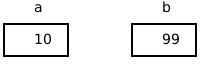
number and boolean are value types: the box of such a variable holds the value itself, and an assignment copies that value. Afterwards there are two independent boxes, always.
Vary it. Replace the two numbers with let a: boolean = true; and let b: boolean = a;, then set b = false; and log both. Booleans behave exactly like numbers here.
Hold on to that “obviously 10” for a minute. The next experiment looks almost the same and does something else.
45.4 The array experiment
Now the same shape with an array. Keep the setup frame and replace its body:
const first: number[] = [10, 20, 30];
const second: number[] = first;
second[0] = 99;

console.log(first[0]);
console.log(second[0]);
Write the prediction down before you run it, and be honest with yourself. What does first[0] show, and what does second[0] show? Most people write 10 and 99. The console shows 99 and 99.
Here is what really happens. The box of an array variable is far too small for a whole row of values, and it never holds one. It holds a reference, an arrow that says where the array lives. The array itself lies somewhere else, on its own.
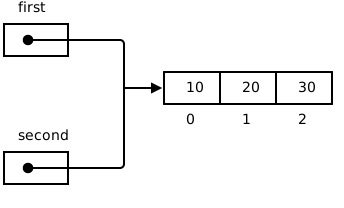
The picture shows the situation after the experiment’s assignment. second = first copies what sits in first’s box, and what sits in first’s box is the arrow. So second gets an arrow to the very same row. One array, two names for it. Arrays are reference types.
The line second[0] = 99 then touches neither of the two variable boxes. It follows the arrow and changes element 0 of the one array that exists. first[0] reads that same element through the other arrow, so it reads 99 as well.
By the way, console.log also takes a whole array. console.log(first); prints 99,20,30, every element in one line, which makes it a handy magnifying glass for the experiments below.
Vary it, twice.
- Add
second.push(40);after the assignment and logfirst.length. The length is 4, becausepushfollows the arrow too. Growth is shared, not just element changes. - Change
first[1]instead ofsecond[0], and read the value back throughsecond[1]. It changed the same way. Neither variable is the original and neither is the copy; the two arrows are worth exactly the same.
45.5 The const puzzle, solved
The bubbles chapter carried a callout named “A const that changes?” (Section 43.2). It said that const circlesDiameter can still be pushed into, because const nails the box down while the content stays free. That was a rule to accept, and now it has a reason.
const forbids exactly one thing, putting something else into the box. The box of an array variable holds the arrow, so const means “this arrow never changes again”. And push never changes an arrow. It follows the arrow and hangs a value on the end of the row over there, which const does not care about.
Add this line to the array experiment and watch the editor:
second = [1, 2, 3];The red squiggle appears before you run anything, and the message is worth two seconds of reading. “Cannot assign to ‘second’ because it is a constant.” That is the box complaining, not the array. Delete the line again.
45.6 A real copy takes a loop
If an assignment only copies the arrow, how do you get a second array that is truly independent? Three tools you already own are enough, an empty array, a for loop, and push. Here they copy the array first from the array experiment (Section 45.4):
const copy: number[] = [];
for (let i: number = 0; i < first.length; i++) {
    copy.push(first[i]);
}
Read the shape of it. The [] creates a brand new array, so copy starts with a brand new arrow to a row of its own. The loop then walks the old row and pushes every element into the new one, and each of those elements is a number, a value type, so each push copies a value across. Two rows, two arrows, no connection.
Try it. Put the loop into the array experiment, add copy[0] = 0; below it, and log first[0] and copy[0]. This time the two numbers differ, and now you can say exactly why.
=== between two array variables asks whether the two boxes hold the same arrow, not whether the two rows look alike. For the two variables of the array experiment, first === second is true, because both arrows lead to one array. But first === copy is false even when every single element matches, because those arrows lead to two different rows. Comparing contents takes a loop as well.
45.7 Strings: a row you can never change
A string looks exactly like the array picture. It is a row of boxes, the indexes start at 0, word.length counts them, and word[i] reads one of them. So does a string variable hold an arrow too?
Replace the body of setup once more, and write your prediction down before you run it:
let word: string = "apple";
let copy: string = word;
word = word + "s";

console.log(word);
console.log(copy);
The console shows “apples” and “apple”, without the quotes, because the console prints a string’s characters and nothing else. The string behaved like the two numbers at the start of this chapter (Section 45.3), not like the shared array (Section 45.4).
The reason is a rule without exceptions. No operation ever changes an existing string. word + "s" does not append an “s” to anything; it builds a completely new string "apples", and the assignment puts that new string into word’s box. What copy holds is the old string, untouched, because nothing was ever able to touch it.
You have met that rule once before without a name. Word Swirrel said that substring never changes the string it is called on and hands you a copy of the piece instead (Section 37.4). Every string method works that way.
Type one more line and let the compiler show you the rule:
word[0] = "A";Reading a character with word[0] is allowed, writing one is not. The squiggle says “Index signature in type ‘String’ only permits reading”. Delete the line again.
Now the two words for all of this. An array can be changed after it is created, with push, splice, or a write through an index, so an array is mutable. A string can never be changed after it is created, so a string is immutable, and every string operation that looks like a change really hands back a new string. Because nothing can ever change a string, sharing one is harmless. A string variable behaves like a value type in every assignment, and JavaScript indeed files strings with the value types, next to number and boolean.
Other languages model strings differently. In C# and in Java, a string variable does hold an arrow, and the thing at the end of the arrow is immutable. A running program cannot tell the two models apart, and immutability is the reason: when nothing can change the thing the arrow leads to, it makes no difference whether an arrow is there.
45.8 Check your understanding
When your predictions and the console agree, and you can say out loud what second = first copies, take the short quiz below. You answer six questions about this chapter in your own words, and an AI reads your answers and tells you what you already understand and what you should read again. The quiz is anonymous, and answering in German is fine too.