33 The for loop: four steps on one line
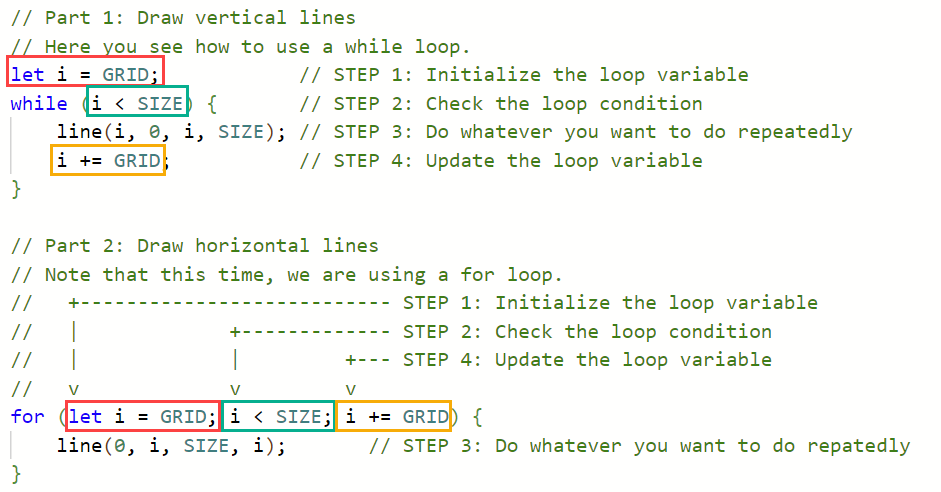
Count your while loops. The grid, the staircases, the rays, the X, the zebra, the mesh, the chessboard. Every single one had the same skeleton, initialize above the loop, check in the parentheses, update at the bottom of the body, and by now your fingers type it half asleep. Programmers noticed this repetition a long time ago and built a loop for it: the for loop. Like the switch chapter, this chapter teaches you nothing new to compute, only a tidier way to write what you already write. And because the pattern is the point, the second half of the exercise sends you back to your own programs to convert them.
33.1 AI tutor
Converting a loop is mechanical once you see the mapping, and confusing until then. If your for loop draws nothing or TypeScript complains about the header, paste the while version and your for version and let the tutor compare them with you.
Hints and questions instead of finished programs, in English or German.
33.2 Packing the four steps
Here is the horizontal-line loop of the grid, first as the while loop you wrote, then as a for loop:
let i: number = GRID;    // STEP 1: Initialize the loop variable
while (i < SIZE) {       // STEP 2: Check the loop condition
    line(0, i, SIZE, i); // STEP 3: Do whatever you want to do repeatedly
    i += GRID;           // STEP 4: Update the loop variable
}
// +----------------------------------- STEP 1: Initialize the loop variable
// | +------------- STEP 2: Check the loop condition
// | | +--- STEP 4: Update the loop variable
// v v v
for (let i: number = GRID; i < SIZE; i += GRID) {
line(0, i, SIZE, i); // STEP 3: Do whatever you want to do repeatedly
}Steps 1, 2, and 4 move into the parentheses, the header of the for loop, separated by two semicolons. Only step 3, the work, stays in the body. Read the header as a sentence: “starting with i at GRID, as long as i < SIZE, stepping i by GRID.”
Nothing about the execution changes. The computer still initializes once, then checks, works, updates, checks, works, updates, exactly like the while loop. Your loop tables work unchanged, an endless loop is still possible (leave the update slot empty and nothing moves), and the condition is still checked before every round. The for loop is packaging, not new machinery.
The header always has exactly three slots and two semicolons: for (initialize; check; update). The slots are separated by semicolons, not commas, because initialize and update are ordinary statements. When a for loop won’t compile, count the semicolons in the header first.
33.3 The loop variable belongs to the loop
The let i inside the header comes with a pleasant surprise. A variable declared in a for header exists only inside that loop: it is born when the loop starts and gone after the closing brace.
Remember the grid chapter, where the second while loop was not allowed to say let i again and had to reset the existing variable with a plain assignment (Section 28.6)? With for loops, that worry disappears. Two loops in a row may each declare their own let i in their own header, and TypeScript is happy, because the two variables never exist at the same time:
for (let i: number = GRID; i < SIZE; i += GRID) {
    line(i, 0, i, SIZE);
}

for (let i: number = GRID; i < SIZE; i += GRID) {
    line(0, i, SIZE, i);
}
Each loop brings its own variable and cleans it up afterward. No leftovers, no accidental reuse, one reason less for a red squiggle.
33.4 Nested loops love for
The conversion works for nested loops too, and there it pays off double. Here is the mesh with both loops converted:
for (let left: number = MARGIN; left <= SIZE - MARGIN; left += MARGIN) {
    for (let right: number = MARGIN; right <= SIZE - MARGIN; right += MARGIN) {
        line(MARGIN, left, width - MARGIN, right);
    }
}
Look at the inner header: let right = MARGIN runs every time the inner loop starts, which is once per outer round. The initialization sits inside the outer loop automatically, because the header belongs to the loop. The classic nested-loop bug from the mesh chapter, the forgotten reset that leaves only the first fan (Section 31.3), cannot even be written this way. The for loop’s shape puts the initialization where it belongs.
33.5 while or for?
Both loops can do everything the other can, so this is a question of style, and the course’s rule of thumb is simple. When a loop counts, with a clear start, a clear condition, and a fixed step, write a for loop; from this chapter on, that is the default for drawing loops. The while loop stays in your toolbox for loops that don’t count, where the update isn’t a fixed step or you can’t say in advance how many rounds it takes. You’ll meet loops like that later in the course.
The counting-style loops convert nicely too: the zebra’s counter becomes for (let i: number = 0; i * STRIPE_THICKNESS < SIZE; i++), with the ++ shortcut (Section 30.4) sitting naturally in the update slot.
33.6 Your exercise: While to For
The starter code is the finished grid, with the horizontal lines already converted to a for loop.
- Read the given for loop. It carries the same STEP comments as the picture at the top of this chapter; match each header slot to its comment until the mapping feels obvious.
- Convert the vertical-line loop. Move the three while parts into a for header, delete the old
let iline and the update line, and run. The grid must look exactly as before. - Say both loops out loud. “Starting at GRID, while below SIZE, stepping by GRID.” If the sentence matches for both, you are done.
33.7 Your exercise, part 2: convert your own programs
Task 2 of the same exercise sends you back to your own work. Pick at least three of your earlier loop exercises and convert your while solutions to for loops. Choose so that every kind of loop shows up once:
- A measuring loop: Pixel X or Step Lines, where the variable is a coordinate.
- A counting loop: Zebra Stripes, where the header ends in
i++. - A nested loop: Mesh or your chessboard, where the inner header takes over the re-initialization (Section 33.4).
After each conversion, run the program. The picture must not change at all; the loop table of the for loop is the same as the while loop’s. Converting your own working code is the fastest way to make the new shape feel like home.
33.8 Check your understanding
When your grid runs on for loops and three old friends are converted, take the short quiz below. You answer six questions about this chapter in your own words, and an AI reads your answers and tells you what you already understand and what you should read again. The quiz is anonymous, and answering in German is fine too.