55 Finish the game: logic functions
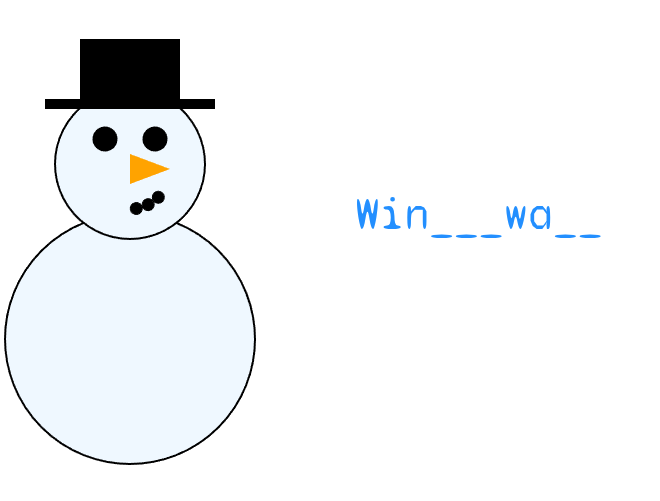
The snowman can melt, but nothing yet decides when it should. This chapter adds the guessing to Melting Snowman, and the interesting part is where that guessing lives. The functions that work out what a keystroke means take strings in and hand strings back without touching the canvas, which makes them the first functions in this course you can check without running the program.
55.1 AI tutor
The bugs in this exercise are quiet ones. A letter that refuses to show up, or a game that counts a correct guess as wrong, almost always comes from a comparison rather than from the drawing. Paste the function you suspect together with the word you tested it with, and say what you expected the return value to be.
Hints and questions instead of finished programs, in English or German.
55.2 Functions that think and functions that draw
Melting Snowman is now spread over three files. index.ts holds the game state and the callbacks, snowman.ts draws the snowman, and textGuesser.ts holds everything about the word. Inside that third file, two very different kinds of function sit next to each other.
Logic functions take values and return values. They compute an answer and change nothing you can see. getInitialCurrentWord and guessKey are of this kind, and both of them take strings and return a string.
Drawing functions put pixels on the canvas and return nothing. drawResult and drawSnowman are of this kind, and their return type is : void.
Keeping the two apart pays off immediately, because a logic function can be checked on paper. You write down what you pass in, you follow the code line by line, and you compare the result with what you expected. No canvas, no timing, no guessing. A drawing function can only be judged by looking at the picture.
55.3 The word status string
The game shows the player how much of the word is already known, and it keeps that picture in a single string called currentWordStatus. The string is exactly as long as the word to guess. Every letter that is still secret stands there as an underscore, every letter already guessed stands there as itself, and a space stays a space so the player can see where one word ends and the next begins.
For the word "ice cream" the game starts with "___ _____", which is three underscores, a space, and five more underscores.
Building that first string is the job of one function, and its signature is given in the starter code:
function getInitialCurrentWord(wordToGuess: string): string {One string goes in, one string comes out. The way there is the accumulator you know from Word Swirrel (Section 37.3). Start with the empty string, walk the characters of wordToGuess from index 0 to length - 1, and hang one character onto the result each round, an underscore for a letter and a space for a space.
55.4 Guessing a letter
The second logic function is the heart of the game. It gets the key the player pressed, the secret word, and the current status, and it returns what the status should look like afterwards:
function guessKey(key: string, wordToGuess: string, currentWordStatus: string): string {The function does not change currentWordStatus and it does not know whether the guess was good or bad. It builds a new string of the same length, position by position. Where the secret word has the guessed letter, the new string shows that letter; everywhere else it keeps whatever the old status had.
Follow four rounds with the short word "ice". The status starts as three underscores, and every row shows one key press:
| key pressed | status before | returned status |
|---|---|---|
i |
___ |
i__ |
x |
i__ |
i__ |
e |
i__ |
i_e |
c |
i_e |
ice |
Look at the second row. The function does not report a wrong guess; it simply produces a string identical to the one that went in. The caller in index.ts uses precisely that:
const newCurrentWordStatus: string = guessKey(key, wordToGuess, currentWordStatus);
if (currentWordStatus === newCurrentWordStatus) {
    wrongGuesses++;
}
currentWordStatus = newCurrentWordStatus;
Nothing changed means nothing was found, so the guess was wrong. One small function, one clear answer, and the decision stays with the caller.
55.4.1 Capital letters must not matter
The word to guess in the starter code is "Winterwald", with a capital W, and the player will type a small w. Comparing the two with === fails, and the player would never be able to reveal the first letter.
Every string has a method toLowerCase() that returns a copy in small letters and leaves the original alone, the same way substring hands you a copy. Comparing key.toLowerCase() with wordToGuess[i].toLowerCase() makes the guess work no matter which shift key was involved.
When the comparison matches, put the character from wordToGuess into the new status, not the key the player pressed. The game recognizes a win by testing currentWordStatus === wordToGuess, and a status that reads "winterwald" never equals a word that reads "Winterwald".
55.5 Waiting for the font
The word status is drawn in a monospace font that the program loads from the internet, and that download takes time. A program cannot draw with a font that has not arrived yet, so setup waits for it:
async function setup(): Promise<void> {
    font = await loadFont("https://cddataexchange.blob.core.windows.net/images/SyneMono-Regular.ttf");

    currentWordStatus = getInitialCurrentWord(wordToGuess);

    createCanvas(800, 500);
    angleMode(DEGREES);

    redraw();
    noLoop();
}
Read await as “wait here until it has arrived”. The line pauses until loadFont is finished, and the font lands in the global variable font before any of the following lines run. A function that contains an await must be marked async, and its return type becomes Promise<void> instead of void, which is TypeScript’s way of writing “returns nothing, but not immediately”. You do not need the theory behind promises today. The next chapter uses the very same move for loading images.
55.6 Who decides that the game is over
All the state of the game sits in global variables in index.ts, and draw reads them to pick one of three pictures:
function draw(): void {
    background("white");

    if (currentWordStatus === wordToGuess) {
        acceptKeys = false;
        drawResult(true, wrongGuesses);
    } else if (wrongGuesses === MAX_WRONG_GUESSES) {
        acceptKeys = false;
        drawResult(false, wrongGuesses);
    } else {
        drawSnowman(wrongGuesses);
        drawCurrentWordStatus(font, currentWordStatus);
    }
}
The status equal to the secret word means the player has won. Ten wrong guesses mean the snowman has melted away. Anything else means the round continues, so the snowman and the word appear. In the two end states acceptKeys becomes false, and keyPressed leaves immediately with a bare return; while that flag is down, so a finished game ignores the keyboard.
drawResult is the drawing counterpart of the two logic functions. It gets a boolean saying whether the player won and the number of wrong guesses, and it writes one sentence in the middle of the canvas. A loss reads “Game Over” in red. A win reads “No wrong guesses!”, “One wrong guess!”, or something like “4 wrong guesses.”, depending on the count. Choosing between those three sentences is a job for the switch statement you know from the Conditions part.
55.7 Your exercise: Melting Snowman (2)
The starter code contains the finished index.ts, a complete snowman.ts that melts correctly, and a textGuesser.ts with three empty function bodies. If your snowman from the previous exercise never quite melted in the right order, compare it with the one you get here before you start.
- The initial status. Implement
getInitialCurrentWordas described in Section 55.3, then run the program. The underscores appear next to the snowman. Change the word inindex.tsto one with a space in it and check that the space stays a space. - The guess. Implement
guessKey. Work it through on paper first with the table above (Table 55.1), then write the loop. Correct letters appear, wrong ones melt the snowman. - The result text. Implement
drawResultfollowing the requirements in its doc comment.
Test the finished game in all four states before you call it done.
- Win without a single wrong guess.
- Win with exactly one wrong guess, so the text reads “One wrong guess!”.
- Win with several wrong guesses, so the number appears in the text.
- Lose by making ten wrong guesses on purpose and watch the snowman disappear completely.
55.8 Check your understanding
When your game can be won and lost and you can explain why a wrong guess is recognized by comparing two strings, take the short quiz below. You answer six questions about this chapter in your own words, and an AI reads your answers and tells you what you already understand and what you should read again. The quiz is anonymous, and answering in German is fine too.