21 Color quadrants: a decision inside a decision

The second decision program looks like a close relative of the first one, and it is: the canvas is now split into four colored quadrants, and a click anywhere makes a black box in the center announce the color’s name. But there is a twist hiding in the geometry. Three stripes could be sorted with questions about mouseX alone. Four quadrants can’t, because no single question about one coordinate can tell all four areas apart.
21.1 AI tutor
An if statement inside another one is where many beginners lose track of which branch runs when. The AI tutor of this part walks through your decision with you, condition by condition.
Hints and questions instead of finished programs, in English or German.
21.2 Two questions, four answers
Think about how you would decide as a human. Someone points at a spot on the canvas, and you want to name the quadrant. You’d naturally ask two questions, one after the other: is the spot in the left half or the right half? And is it in the upper half or the lower half? Each of the two questions has two possible answers, so two times two makes four combinations. That’s exactly one combination per quadrant.
The first question is a comparison you could write immediately: mouseX < width / 2. The second one is its twin on the other axis, mouseY < height / 2. What’s new is how the two questions work together. The second question is only asked after the first one is answered, inside the branch that the first answer picked.
21.3 An if statement inside an if statement
The block of an if statement can contain any statements, and that includes other if statements. Putting one if statement inside another is called nesting. The whole decision looks like this:
if (mouseX < width / 2) {
  // Left half
  if (mouseY < height / 2) {
    message = "Orange";
  } else {
    message = "Blue";
  }
} else {
  // Right half
  if (mouseY < height / 2) {
    message = "Green";
  } else {
    message = "Red";
  }
}
The outer if statement splits the canvas into left and right. Each of its two branches contains a complete inner if statement that splits its half into top and bottom. Four leaves at the end, one for each quadrant:
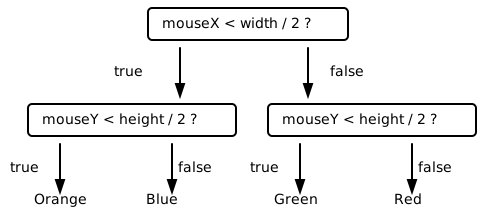
Play computer with one click before you code. Say the canvas is 400 by 200 and the click lands at (300, 60). The outer condition asks: is 300 smaller than 200? No, so the whole first block is skipped and the program enters the else branch. There, the inner condition asks: is 60 smaller than 100? Yes, so message becomes "Green". Two questions answered, one quadrant found.
Watch the indentation as the nesting grows: the inner if statement is indented one step, its blocks two steps. Every opening brace pushes the code one step to the right, every closing brace comes back one step. Without that discipline, nested code becomes a riddle; with it, you can see the structure of the decision at a glance.
You might feel that “left half and upper half” should be a single condition, and you’re right. TypeScript can combine two comparisons into one question. Those combining operators are worth their own chapters, and they’re coming: the first one appears with the bouncing ball, the second one in the binary guesser project.
21.4 The message box in the center
One more difference to the color areas is the message box. It now sits in the middle of the canvas, on top of the quadrant boundaries. Its position is a centering job, and you know the formula from the responsive robot: the box’s corner sits half the box’s width left of the canvas center, and half its height above it. Give the box its size as two constants, for example textAreaWidth and textAreaHeight, and use them both for drawing the box in setup and for clearing it in mouseClicked, so the previous message disappears before the new one is written.
21.5 Your exercise: Color quadrants
The color areas chapter walked you through the code. This time the logic is yours to build; the previous chapter is your reference if you get stuck.
Pick your four colors and decide which quadrant gets which. On the 400 by 200 canvas,
width / 2is 200 andheight / 2is 100, so the two boundary lines run right through the middle.Play computer on paper. Copy the table below and walk both questions through five clicks, one per quadrant plus one that lands exactly on the center. The first row is filled in as a model.
Click at mouseX < width / 2mouseY < height / 2Quadrant Message (50, 50) 50 < 200 -> true 50 < 100 -> true upper left Orange (350, 50) (350, 150) (50, 150) (200, 100) The last row is the tricky one. A click exactly on the center belongs to one single quadrant, and your two conditions decide which. Work out on paper which one it is, then remember the answer for the test.
Set the stage in
setup. Draw the four quadrants as rectangles and the black message box centered on the canvas.Write
mouseClicked. Clear the message box, set up the text formatting, then write the nested if statements that fillmessagewith the name of the clicked color. Onetextstatement at the end draws it.Test against your notes. Click once in each quadrant and compare the message with your prediction. The fifth row is the interesting one, and you can’t hit the center pixel by feel: add debug output
- by writing
mouseXandmouseYinto the message box next to the message. Then click near the center, read the numbers, nudge, and click again until the debug output says exactly 200/100. The message next to it decides whether your two conditions are exact.
- by writing
21.6 Check your understanding
When your quadrants answer every click correctly, take the short quiz below. You answer six questions about this chapter in your own words, and an AI reads your answers and tells you what you already understand and what you should read again. The quiz is anonymous, and answering in German is fine too.