58 The earned shortcut: split
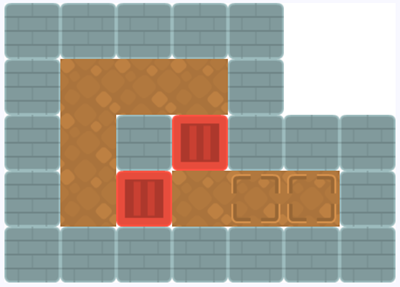
Sokoban is a puzzle game from the early 1980s. You push crates through a warehouse until every crate stands on a marked spot, and you can only push, never pull, which is what makes it hard. This chapter builds the board, not the game. A level arrives as one long string, your program turns it into a grid, and the grid turns into images. Along the way you finally get the tool the Arrays part kept from you.
58.1 AI tutor
Grid programs fail in visible ways, which is good news. A row too far right, a level squeezed into a corner, or one wrong tile type all point straight at the code that placed them. Tell the tutor which level string you used and describe what the canvas shows, and check your loop order first when rows and columns look swapped.
Hints and questions instead of finished programs, in English or German.
58.2 A shortcut you have earned
In the parsing chapter of the Arrays part, one rule was strict. You had to walk through the string character by character, collect characters in a buffer, and handle the leftover after the loop (Section 41.3 and Section 41.4). The Train Station chapter made you do it twice more, for commas and for semicolons. That was on purpose, because parsing by hand is the skill, and now you get the tool.
Until now, cutting a string into pieces meant writing the collecting loop yourself. From this chapter on, split is allowed for simple separators, and you should use it. You have built that loop by hand several times and you can explain what it does, so the shortcut hides nothing from you any more. Two things stay as they are. When the data needs more than “cut at this character”, the character loop is still the right answer. And in an exam, a task may forbid split, exactly like the exercises in the Arrays part did.
split takes a separator and returns an array of the pieces. The separator itself is thrown away. And if you pass the empty string as the separator, split cuts between every pair of characters, so you get an array of single characters.
const line: string = "TLB,TCCG,TCW";
const parts: string[] = line.split(",");
// parts is ["TLB", "TCCG", "TCW"]

const word: string = "box";
const letters: string[] = word.split("");
// letters is ["b", "o", "x"]
58.3 A level made of characters
A Sokoban level is a small map, and the file levels.ts writes each map as a picture made of characters.
const levels: string[] = [
  `XXXXX__
X   X__
X@XbXXX
X b ..X
XXXXXXX`,
  // ... four more levels
];
Two things about that string. It is written with backticks, and a template string may run over several lines. Every line break you type inside it becomes one \n character in the value, the line break character you met in Word Swirrel (Section 37.6). So the level above is a single string, and \n sits between its rows.
Each character says what stands on one square of the map.
| symbol | meaning |
|---|---|
X |
wall |
| space | floor you can walk on |
@ |
the player |
b |
a box |
. |
a target spot |
B |
a box that already stands on a target |
_ |
nothing at all, outside the warehouse |
In the goal picture at the top of this chapter, the white corner is where the _ characters sit. Nothing is drawn there.
58.4 From one string to a grid
The map has rows and columns, but the string that holds it is one long row of characters. The starter code puts one map into the constant levelString, and making its rows real means cutting twice, once at the line breaks and once between the characters. The result is a grid you can index with two numbers.
let level: string[][] = [];
let maxWidth: number = 0;

for (const line of levelString.split('\n')) {
    const chars: string[] = line.split('');
    // Track the maximum width to properly size the canvas
    if (chars.length > maxWidth) {
        maxWidth = chars.length;
    }

    level.push(chars);
}
The type string[][] is the two-dimensional array from the train station chapter (Section 57.7), filled with characters this time. level[2] is the third row, and level[2][3] is the character in its fourth column. Row first, column second, because that is the order the rows were pushed.
split('\n') returns the rows and split('') cuts a row into its characters. The code writes these two strings with single quotes; single and double quotes make exactly the same string in TypeScript, and both are common in real code.
maxWidth grows to the length of the longest row, because rows may differ in length. With that number the canvas fits the level exactly.
createCanvas(maxWidth * cellSize, level.length * cellSize);cellSize is 64, the pixel size of one square, and level.length is the number of rows. So the canvas is as wide as the widest row and as tall as the level has rows.
58.5 From a symbol to an image
Five image files cover all the tiles. Their addresses are given in the array imageNames, and the loaded pictures go into the array images, with the same loop shape as the train wagons.
for (const imageName of imageNames) {
    const loadedImage: p5.Image = await loadImage(imageName);
    images.push(loadedImage);
}
The order in imageNames decides the position of every picture in images, so index 0 is the wall, 1 the floor, 2 the target, 3 the box, and 4 a box on a target. Translating a character into one of them is a job for switch, the tool from the Conditions part.
function getBlockImageBySymbol(type: string): p5.Image {
    switch (type) {
        case "X":  // Wall
            return images[0];
        case ".":  // Target spot
            return images[2];
        case "b":  // Box/Crate
            return images[3];
        case "B":  // Box on target
            return images[4];
        default:   // Floor or player (currently rendered as floor)
            return images[1];
    }
}
Each case ends with return instead of break, because returning leaves the function immediately. The default branch catches everything not listed, which here means the space and the @ of the player. Both are drawn as floor, so the player is invisible in this exercise.
58.6 Walking the grid with the origin
Every tile could be placed by calculating its x and y from the row and column number. The sample solution takes the other road from the move-the-origin chapter and walks the origin instead (Section 34.4).
for (const row of level) {
    push();
    for (const cell of row) {
        if (cell !== '_') {
            const img: p5.Image = getBlockImageBySymbol(cell);
            image(img, 0, 0, cellSize, cellSize);
        }

        translate(cellSize, 0);
    }

    pop();
    translate(0, cellSize);
}
Every tile is drawn at 0, 0, and the origin does the walking. Inside a row, each round moves it one cell to the right. push saves the position at the start of the row and pop brings it back, so the next row starts at the left edge again, one translate(0, cellSize) lower. The if skips the _ characters, which leaves the canvas white and produces the empty corner of the goal picture.
One thing is unusual in this exercise. All of this runs in setup, and there is no draw function at all. A level does not move, so it is drawn once and stays on the canvas.
58.7 Your exercise: Sokoban Levels
The starter code gives you the image names, the empty arrays, and an unfinished getBlockImageBySymbol. Build it in the order below and run after every step.
- Load the images. Loop over
imageNames,await loadImagefor each one, and push the result intoimages. - Parse the level. Cut
levelStringinto rows and each row into characters, push each row intolevel, and remember the longest row inmaxWidth. - Size the canvas. Create the canvas from
maxWidth,level.length, andcellSize, and paint a white background. - Finish getBlockImageBySymbol. Replace the placeholder body with the
switchover the symbols. - Draw the grid. The two loops with
push,pop, and the twotranslatecalls. - Try other levels.
levelsholds five maps. Change the index inlevels[0]and run again. The last map is much wider than the others, which is where yourmaxWidthline proves itself.
58.8 Build the whole game
The big optional challenge of this part is the game itself. You have a board on the screen, and the game is what happens when the player presses a key. Nobody walks you through this one, which is the point. You know every construct it needs, so the steps below are a sketch and no more.
- Read the keys.
keyPressedand the variablekeytell you which key was pressed. Turn a key into a direction, one step in x and one step in y. - Find the player. The
@is still in your grid. Two loops over rows and columns find its row and column. - Look at the target square. Player position plus direction gives the square the player wants to enter, and what stands there decides everything. An
Xblocks the move, so nothing happens at all. - Pushing moves two things. If a box stands on the target square, look one more square in the same direction. Only if that one is free do both the box and the player move, and both grid cells change.
- Redraw after a change. Put the drawing code into its own function and call it again after every move, or move it into
drawand use thenoLoopandredrawpattern from the melting snowman. - Check for the win. The player has won when no target spot is left uncovered. Walk the grid and count.
One hint on symbols. A box that moves onto a target becomes a B, and a box that leaves a target becomes a b again, so you have to remember which squares were targets. The simplest fix is a second grid that never changes and holds only the targets. Give each of these jobs its own function with a clear name, and you get a game you can show to anyone.
58.9 Check your understanding
When your level stands on the canvas and you can say why split is allowed now and what it does with the separator, take the short quiz below. You answer six questions about this chapter in your own words, and an AI reads your answers and tells you what you already understand and what you should read again. The quiz is anonymous, and answering in German is fine too.