38 Letters criss-cross: rotate
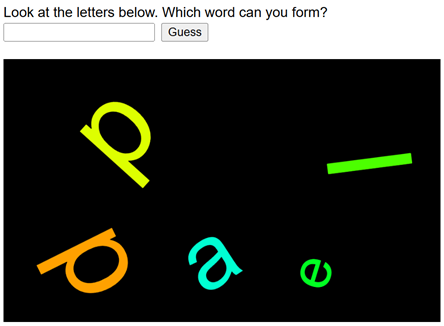
In the first Word Swirrel, the scrambled word sat in the middle of the canvas as one block of text. Level 2 makes it look scrambled too. Every letter gets its own place, its own size, its own color, and its own tilt. Two ideas carry the whole chapter. First, a for loop that visits a string one character at a time; you will write this exact loop shape for the rest of the course. Second, a new transformation: rotate, the missing sibling of translate, which tilts everything you draw. Scrambling is not even needed anymore; letters thrown all over the canvas are puzzle enough.
38.1 AI tutor
Rotation is famous for surprising beginners: you rotate a letter and it swings to a completely different place. If that happens, tell the tutor which transformation calls you make in which order, and where the letter lands.
Hints and questions instead of finished programs, in English or German.
38.2 One letter at a time
The scramble loop of the last chapter ate the word up. This chapter needs something gentler. Visit every character once, in order, and draw it. That is a for loop over the indexes:
for (let i: number = 0; i < wordToGuess.length; i++) {
    // wordToGuess[i] is the character of this round
}
Read the header with the indexes in mind: i starts at 0, the first index. The loop runs while i < wordToGuess.length, and stops exactly when i reaches the length, which is one past the last index. For "apple" (length 5), i takes the values 0, 1, 2, 3, and 4, every index once and no undefined. The < does the off-by-one thinking for you; with <= the loop would run once too often and read past the end.
Learn this loop by heart. “From 0, while less than length, one step at a time” is the pattern for walking through anything that has indexes, and the coming array chapters use it on every page.
38.3 rotate: turning the paper
You know translate; it moves the origin, and everything drawn afterwards moves with it. rotate is its sibling: it turns the whole coordinate system, and everything drawn afterwards is tilted. The angle is in degrees, clockwise, as long as angleMode(DEGREES) stands in setup, the same setting you used for arc in part 1. Every program in this chapter sets it.
The catch is that rotate turns the paper around the current origin, the point (0, 0). A shape close to the origin tilts almost in place; a shape far from the origin swings around it like a hammer thrower. That is why rotation almost always comes as a team of three:
translate(x, y);   // 1. move the origin to where the shape belongs
rotate(angle);     // 2. turn the paper around that point
text(letter, 0, 0); // 3. draw AT the origin
Move first, then turn, then draw at (0, 0). The letter sits at (x, y) and is tilted by angle, and because it sits on the pivot point, it tilts in place instead of swinging away. You met the same draw-at-the-origin idea in the pattern recipe (Section 34.3); rotation makes it essential.
Like translate, rotate does not touch any shape that is already drawn. It changes the coordinate system for everything that comes after it, and a second rotate adds to the first. That is also why the order matters: translate-then-rotate pins the letter to its spot; rotate-then-translate makes the move itself happen in a tilted direction.
38.4 The scatter recipe
Now the loop and the transformation team up. One round of the loop places one letter, and everything about the letter is random:
for (let i: number = 0; i < wordToGuess.length; i++) {
    const x: number = random(MARGIN, WIDTH - MARGIN);
    const y: number = random(MARGIN, HEIGHT - MARGIN);
    const charSize: number = random(50, 150);
    const textColor: number = random(0, 360);
    const angle: number = random(-90, 90);

    push();
    translate(x, y);
    rotate(angle);
    fill(textColor, 100, 100);
    textSize(charSize);
    text(wordToGuess[i], 0, 0);
    pop();
}
A few details are worth a second look:
- push and pop wrap every letter. Translate and rotate calls add up, so without the note-taking, letter 2 would be measured from letter 1’s tilted position, and the scatter would drift off the canvas. Each round starts fresh from the saved origin.
- The random values are decimals. So far you mostly wrapped
randominfloorto get whole numbers, like dice. Positions, sizes, and angles don’t need whole numbers:rotate(23.7)is a perfectly fine tilt, so thefloorstays away. - Negative angles are allowed.
random(-90, 90)tilts letters up to a quarter turn in either direction; a negative angle turns counterclockwise. - The color is HSB. With
colorMode(HSB)insetup,fill(textColor, 100, 100)with a hue from 0 to 360 gives full saturation and brightness, like in the colored rays. - MARGIN keeps letters visible. The random position stays
MARGINpixels away from every edge, so even a big rotated letter is not cut off.
One more thing will greet you when you open level 2: the guess function comes finished in the starter code. You built it yourself last chapter; this time it is simply there, and your work happens in setup.
38.5 Your exercise: Word Swirrel (Level 2)
- The loop without rotation. Write the for loop with the random position, size, and color, but leave
rotateout: translate, then draw the letter at (0, 0). Run it; the letters scatter, still standing upright. - Add the tilt. Put
rotate(angle)betweentranslateandtext, run, and compare with the goal picture. If a letter seems to vanish, check the order of your three steps (Section 38.3). - Break it on purpose. Comment out
push()andpop()and predict the picture before you run. The transformations pile up, and the letters wander away. Put them back. - Run it a few times. Every run scatters differently, because
setupruns once per start and asksrandomfor fresh values each time. Play the game with a classmate: they guess, you check.
38.6 Check your understanding
When your letters scatter and tilt like in the goal picture, take the short quiz below. You answer six questions about this chapter in your own words, and an AI reads your answers and tells you what you already understand and what you should read again. The quiz is anonymous, and answering in German is fine too.