37 Strings have parts: Word Swirrel
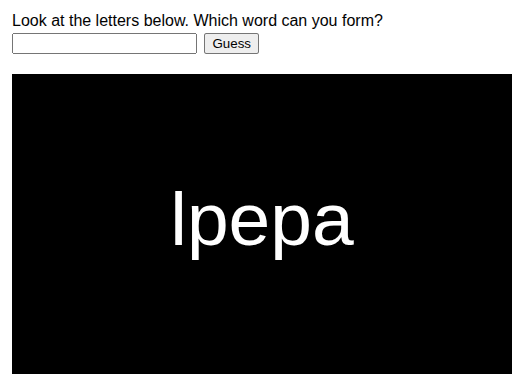
So far, every variable in your programs has held exactly one thing, one number, one color, one string. This part of the book changes that. You will learn about arrays, variables that hold a whole list of things: eleven player names, a hundred bubbles, all the fill levels of a factory. Before the first array appears, you start with something you have used since part 2 without ever looking inside. The string is itself a list, a row of characters, and in this chapter you take one apart and put it back together in a new order. The result is a little game. Word Swirrel scrambles a secret word, and the player has to guess what it was.
37.1 AI tutor
Picking a string apart character by character is new territory, and everyone stumbles over the counting once. If a letter comes out that you did not expect, or the word “undefined” shows up on your canvas, tell the tutor what you wrote and what appeared.
Hints and questions instead of finished programs, in English or German.
37.2 Look inside a string
Take the string "apple". You know it as one value, but the computer stores it as a row of five characters, and every character has a number, called its index:
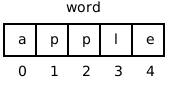
Two new tools let you work with that row. First, word.length tells you how many characters the string has. Second, square brackets pick out a single character by its index:
const word: string = "apple";
// word.length is 5
// word[0] is "a"
// word[1] is "p"
// word[4] is "e"
The index of the first character is 0, not 1. So the last character does not sit at index word.length but at word.length - 1: five characters, indexes 0 to 4. Read word[i] out loud as “the character at position i”.
The index answers the question “how many characters do I have to jump over to reach the one I want?” To reach the first character you jump over none, so its index is 0; to reach the fifth you jump over four, so its index is 4. Programmers count like this everywhere, and from now on you will too.
word[5] for "apple" is not an error message, it is worse: the program keeps running and gives you the value undefined, which then shows up as the text “undefined” on your canvas or breaks a comparison much later. When a strange undefined appears, check your indexes first; the largest valid one is word.length - 1.
37.3 Growing a string piece by piece
You have built strings before, with template strings like `Clicks: ${clickCount}`. This chapter adds the second way. You glue strings together with +, and you grow a variable with +=, exactly like adding numbers to a running total:
let scrambledWord: string = "";
scrambledWord += "p";   // scrambledWord is now "p"
scrambledWord += "a";   // scrambledWord is now "pa"
The starting point is "", the empty string you know as the “nothing yet” value. Each += hangs one more piece on the right end. A variable that collects results round by round is called an accumulator, and you have met one before: the running hue of the colored rays worked the same way, only with numbers.
In the Variables part, the course rule said that strings grow only through template strings, never with +. That rule protected you while types were new, because + between a number and a string can produce surprises like "1" + 1 being "11". You know types well enough now: from this part on, + and += on strings are allowed and normal. Template strings stay the best choice when you mix text and variables in one sentence.
37.4 Cutting pieces out: substring
The opposite of gluing is cutting. Every string has the method substring(start, end). It copies the part that begins at index start and ends just before index end. The character at end is not included:
const flower: string = "flower";
// flower.substring(2, 4) is "ow"
// flower.substring(2) is "ower"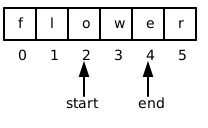
If you leave out the second number, substring(start) copies everything from start to the end of the string. And here is the trick this chapter is built on. Combining two cuts removes a single character. Everything before index i, glued to everything after index i, is the string without the character at i:
// word is "aple", i is 2
word = word.substring(0, i) + word.substring(i + 1);
// word.substring(0, 2) is "ap", word.substring(3) is "e"
// word is now "ape"
One thing substring never does is change the string it is called on. It hands you a copy of the piece, and the original stays as it is. To keep the shorter word, you assign the result back to the variable, as in the line above.
37.5 The scramble recipe
Now the pieces click together into the heart of Word Swirrel. The secret word waits at the top of the program, in a constant the player never sees on screen, const wordToGuess = "apple";. The idea of the scramble is drawing letters out of a bag: pick a random letter of the word, append it to the scrambled result, remove it from the bag, and repeat until the bag is empty.
let wordToScramble: string = wordToGuess;
let scrambledWord: string = "";

while (wordToScramble.length > 0) {
    let letterIndex: number = floor(random(wordToScramble.length));
    scrambledWord += wordToScramble[letterIndex];
    wordToScramble = wordToScramble.substring(0, letterIndex)
        + wordToScramble.substring(letterIndex + 1);
}
Check the loop against the four steps from the Loops part. The loop variable is unusual: it is the string wordToScramble itself.
- Initialize. The bag starts as a copy of the secret word.
- Check. The loop keeps going as long as characters are left.
- Do the work. One random character moves over to
scrambledWord. - Update. The substring line makes the bag one character shorter, so
lengthsinks by one each round and the loop is guaranteed to end.
Here is one possible run with the word "tea". random decides the indexes, so your run will differ:
| round | wordToScramble |
letterIndex |
scrambledWord afterwards |
|---|---|---|---|
| 1 | "tea" |
1 | "e" |
| 2 | "ta" |
1 | "ea" |
| 3 | "t" |
0 | "eat" |
One small novelty hides in the random call: with a single argument, random(n) is short for random(0, n). The bag holds wordToScramble.length characters, so floor(random(wordToScramble.length)) is a random valid index, the dice recipe from the Conditions part with the upper bound taken from the data instead of written as a number.
37.6 A function you fill in: guess
Word Swirrel needs one more piece. The player types a guess and clicks a button. The playground page for this exercise has a text box and a Guess button above the canvas, and the starter code contains this:
// This method will be called automatically when the user clicks "Guess".
// The guessed text will be in "textInput".
function guess(textInput: string) {
    // <<< Add your code here
}
This works like mouseClicked. You do not call guess yourself; the playground calls it for you when the button is clicked. The part between the parentheses is new. textInput is a parameter, a variable that the playground fills with the typed text before your code runs. Inside the braces you use textInput like any string variable. Treat this as a cliffhanger, left open on purpose. What a function really is, what the line with the parentheses means, and how you write functions of your own is a big enough story that a later part of this book covers it in full. Until then, signatures like this one are always given, and your job is only the body:
if (textInput === wordToGuess) {
    background("green");
    text("Correct!", WIDTH / 2, HEIGHT / 2);
} else {
    background("red");
    text(`Wrong!\nIt was "${wordToGuess}"`, WIDTH / 2, HEIGHT / 2);
}
You know comparing strings with === from rock, paper, scissors, including the catch that capitalization matters. The only new character is \n inside the template string: it is not shown as text but stands for a line break, so “Wrong!” and the solution appear on two lines.
37.7 Your exercise: Word Swirrel
This exercise is a type-in: the code is given, and your job is to type it, run it, and understand every line.
- Type in the program. Use the listings above. The scramble loop goes into
setup; after it, drawscrambledWordcentered on the canvas withtext, and the comparison goes intoguess. Type, don’t paste, because your fingers learn the index and substring syntax now, before the array chapters need it. - Play computer. Take the word
"ape"and scramble it on paper like in the table above (Table 37.1), choosing the random indexes yourself. Write downwordToScramble,letterIndex, andscrambledWordfor every round. - Experiment. Change the secret word to your own word. Then print
scrambledWord.lengthsomewhere on the canvas. Then trytext(wordToGuess[10], ...)with a short word and watch theundefinedappear, so you recognize it when it happens by accident. - Read the sample solution. It is the same program with long comments that explain it, including a picture of how the two substring calls split the word. Read it line by line.
37.8 Check your understanding
When your Word Swirrel runs and the paper scramble of "ape" holds no more questions, take the short quiz below. You answer six questions about this chapter in your own words, and an AI reads your answers and tells you what you already understand and what you should read again. The quiz is anonymous, and answering in German is fine too.