41 Parsing: numbers hidden in a string
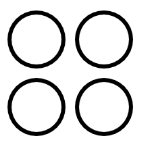
The string "50,50 50,100 100,50 100,100" describes four circles, and any person can read it. A program can too, but it has to work for it, because a string is just a row of characters, and "5" next to "0" is not yet the number 50. Pulling information out of a string is called parsing, and it is everyday programmer work: files, web addresses, and chat messages all arrive as strings. In this chapter you write your first parser, with the tools you already own, one character at a time. The reward is a program that draws whatever the string tells it to.
41.1 AI tutor
Parsers are precise little machines, and a single confused index or a forgotten reset produces numbers like 5010 instead of 50 and 10. If your circles land in strange places, tell the tutor your input string and what got drawn; together you can trace where the digits went.
Hints and questions instead of finished programs, in English or German.
41.2 Numbers hidden in characters
The string "42" and the number 42 look alike but are different values with different types, and the difference matters. You can multiply the number, but not the string. The bridge between them is parseInt:
const n: number = parseInt("42"); // n is the number 42parseInt reads a string of digits and returns the whole number they spell. It is the missing half of a pair you already know: a template string turns a number into text for text(...), and parseInt turns text back into a number you can calculate and draw with.
41.3 The collecting loop
Now to the parser. The plan sounds like something a person would do: walk through the string character by character, and sort every character into one of three cases.
- A digit belongs to the number currently being spelled out; remember it.
- A comma says that the x coordinate is complete.
- A space says that the y coordinate is complete, and with x and y known, a circle can be drawn.
“Remember it” is a job for an accumulator string, called a buffer: it collects digits until a separator arrives, then the program converts it and empties it for the next number. The input string itself waits in a constant named circles, holding exactly the goal picture’s "50,50 50,100 100,50 100,100".
let x: number = 0;
let y: number = 0;
let coordinates: string = "";   // the buffer

for (let ix: number = 0; ix < circles.length; ix++) {
    switch (circles[ix]) {
        case ",":
            x = parseInt(coordinates);
            coordinates = "";
            break;
        case " ":
            y = parseInt(coordinates);
            circle(x, y, 40);
            coordinates = "";
            break;
        default:
            coordinates += circles[ix];
            break;
    }
}
The loop is the letter loop from the criss-cross chapter, and the new part is what the body does with each character. The switch compares the character against "," and " ", and its default branch catches everything else, which here means the digits. Trace the start of "50,50 ..." by hand: "5" and "0" fall into default, so the buffer grows to "50". The comma converts it into x = 50 and empties the buffer. Two more digits, then the space completes y = 50, and the first circle appears.
41.4 The leftover after the loop
Play computer with the loop on the full string and count the circles it draws: three, not four. The last pair "100,100" has no space after it; the string simply ends. The comma still sets x = 100, the digits of the y coordinate fill the buffer, and then the loop is over. Nothing ever told the program “the last number is complete”.
The fix is two lines after the loop:
y = parseInt(coordinates);
circle(x, y, 40);
Parsers meet this pattern constantly: separators come between values, so the loop handles every value except the last one, and you finish the last one after the loop. When you trace your parser on paper, always check what the buffer still holds when the loop ends.
41.5 Your exercise: Parse Coordinates
- Paper first. Take the short string
"7,8 9,4"and play computer: one table row per character, with columns for the character, the case it falls into, the buffer afterwards, and what happens to x and y. Two circles should fall out, at (7, 8) and (9, 4), the second one only in your after-the-loop step. - One pair by hand. In code, extract the first pair of the real string without a loop:
circles[0],circles[1], glue them,parseInt, and draw one circle. This warms up the indexing. - The loop. Replace the hand extraction with the collecting loop and the after-loop flush. Run it; four circles should appear, like the goal picture.
- Stress test. Change the string: five circles, coordinates with one and with three digits. Your parser must not care, because the buffer collects any number of digits.
One rule from the exercise: you must not use the split function. split exists, and one day it will do this job in a single line for you, but it would also do the thinking for you. The character loop is the skill this chapter is about.
41.6 Remembering the previous point
The second exercise feeds your parser a new string, seven points that outline a hexagon, and changes the job. Don’t draw a circle per point; connect the points with lines. A line needs two points, the current one and the one before it, so the parser must remember the previous point across rounds. The following snippet does that, and it contains one operator you have not met yet, the !; its explanation comes right below the code:
if (!isFirstPoint) {
    line(x1, y1, x2, y2);
}

x1 = x2;   // the current point becomes
y1 = y2;   // the next line's start point
isFirstPoint = false;
This replaces the circle call in the space case: (x2, y2) is the point just parsed, (x1, y1) the one from the previous round, and after drawing, the current point slides into the “previous” role.
The very first point is special; nothing comes before it, so there is nothing to connect it to yet. A boolean variable isFirstPoint, starting as true, guards the line call, and here you meet one last new operator: !, spoken “not”, flips a boolean around. !isFirstPoint reads as “not the first point”, so the line is drawn for every point except the first. Until now the course wrote comparisons like isFirstPoint === false; from this chapter on, the short ! form is allowed and preferred.
When you read the sample solution later, notice one more choice: it sorts the characters with if / else if / else instead of switch. Both fit; comparing a character against a few fixed values is exactly what both were made for. Pick the one you find easier to read, but be able to read both.
41.7 Your exercise, part 2: Parse Coordinates 2
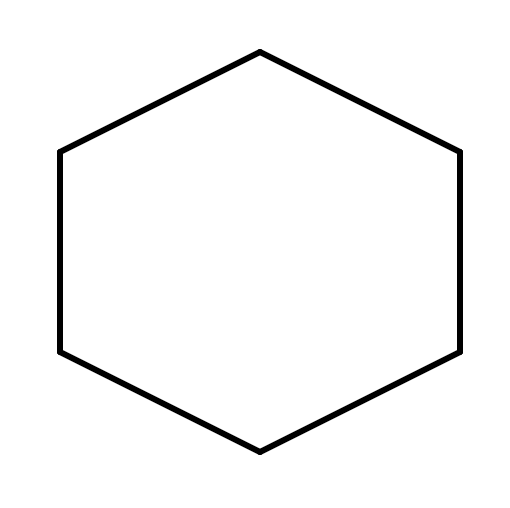
- Look at the data. The starter string has seven points, and the first and the last are the same:
200,100. Six lines connect seven points, and the repeated point is what closes the ring. No special “close the shape” code needed. - Paper first. Trace
"50,50 150,100 100,200"through the new space case: which line is drawn at each space, what do x1, y1, x2, y2 hold afterwards, and what happens after the loop? - Convert your parser. Start from your circle parser: the comma case now fills
x2, the space case draws the guarded line and shuffles current into previous. Don’t forget the flush; the last line is drawn after the loop. - Your own shape. Write a point string for a triangle or a star, first on graph paper, then in the constant. The parser draws whatever you feed it; that is the whole point of parsing.
41.8 Check your understanding
When your hexagon closes and your paper trace of "7,8 9,4" comes out right, take the short quiz below. You answer six questions about this chapter in your own words, and an AI reads your answers and tells you what you already understand and what you should read again. The quiz is anonymous, and answering in German is fine too.