60 Drag and drop: Target Game
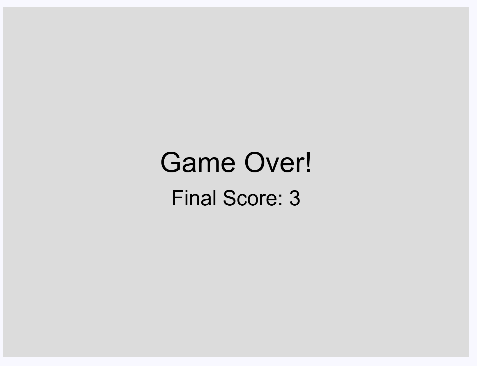
You grab things with the mouse every day. You move a file into a folder, pull a photo into a chat, drag a window across the screen. That move is called drag and drop, and the Target Game builds it from scratch. A filled circle waits somewhere on the canvas, an empty target circle waits somewhere else, and you have 60 seconds to drag the filled circle into the target as often as you can.
60.1 AI tutor
Drag and drop breaks in ways that are hard to read from the canvas, because a circle that does not move looks exactly like a circle whose hit test is wrong. Tell the tutor which of the three mouse functions you are working on and what happens when you press, move, and release. This exercise is an exam task, so the tutor gives hints instead of finished code, which is what you want here anyway.
Hints and questions instead of finished programs, in English or German.
60.2 Three moments and one variable
Dragging looks like one smooth movement, but for the program it is three separate moments, and p5 has a function for each of them. mousePressed runs the moment a button goes down, mouseDragged runs on every mouse movement while the button stays down, and mouseReleased runs when the button comes back up. None of them knows anything about the others, and that is the problem to solve.
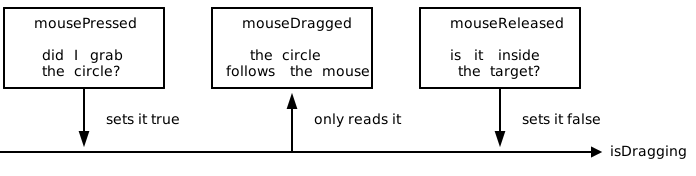
The connection is a single global variable, a boolean that remembers whether a drag is going on right now. The circle’s own position lives in two more globals, circleX and circleY, and grabbedTheCircle is the hit test you build in the next section:
let isDragging: boolean = false;

function mousePressed(): void {
    if (grabbedTheCircle(mouseX, mouseY)) {
        isDragging = true;
    }
}

function mouseDragged(): void {
    if (isDragging) {
        circleX = mouseX;
        circleY = mouseY;
    }
}

function mouseReleased(): void {
    isDragging = false;
}
Read the three bodies as one sentence. Pressing on the circle turns the drag on, moving the mouse takes the circle along as long as the drag is on, and releasing turns it off again. Without the variable, mouseDragged would have no way of telling a real drag from a mouse that was pressed somewhere else on the canvas, and the circle would jump under the pointer whenever you swipe across the canvas.
State that lives between events is the idea worth keeping from this chapter. Every drag and drop you have ever used works this way, and so does the rest of the game. The score, the remaining time, and the positions of both circles are variables, and draw paints whatever they currently say.
60.3 Did I grab the circle?
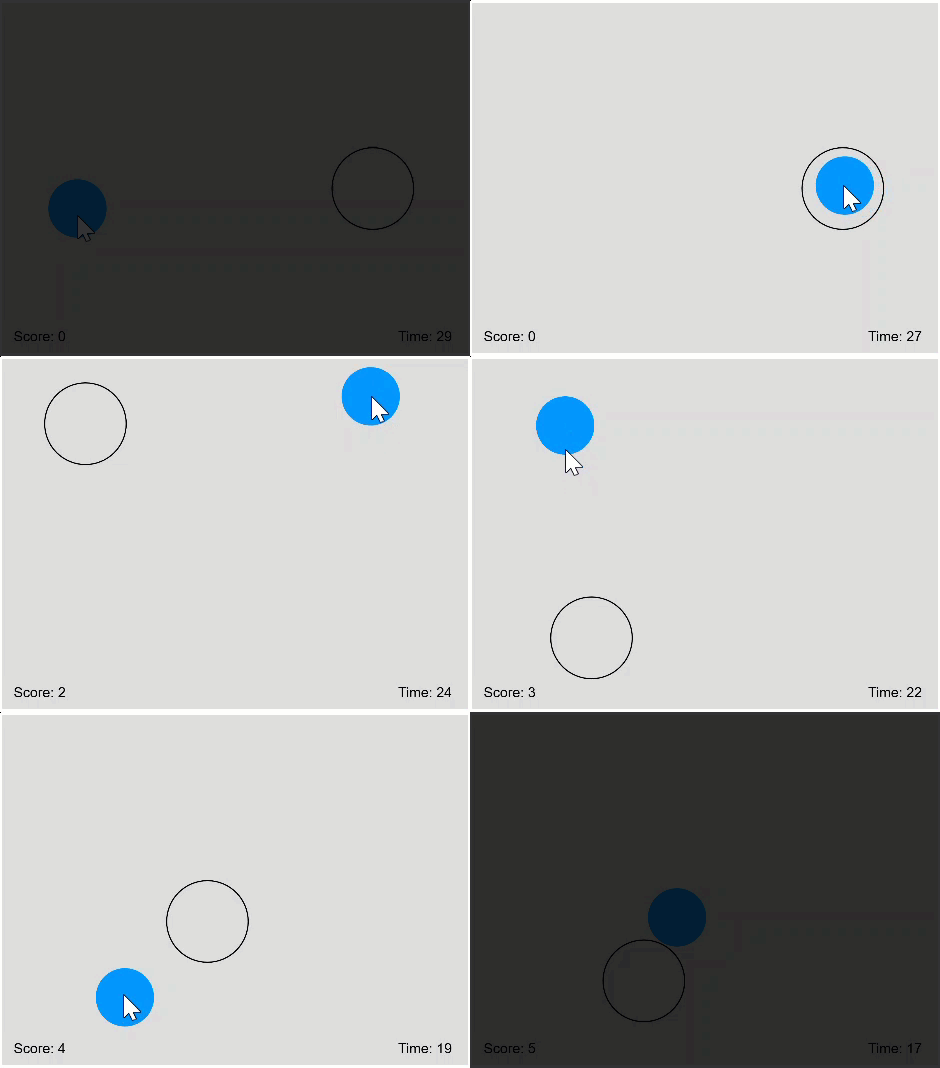
mousePressed has to answer one question before anything moves. Is the mouse pointer inside the filled circle? That is the hit test from Bubble Buster (Section 53.8), the point in a circle. Measure the distance between the pointer and the center of the circle, and compare it to the radius. Anything shorter than the radius lies inside.
The distance comes from the Pythagorean theorem, and it is worth its own function, because the game needs it three times:
function distance(x1: number, y1: number, x2: number, y2: number): number {
    return sqrt(pow(x2 - x1, 2) + pow(y2 - y1, 2));
}
The two differences are the legs of a right triangle and the distance is its hypotenuse. With that tool in hand, the grab test is one comparison:
distance(mouseX, mouseY, circleX, circleY) <= CIRCLE_RADIUSCompare this with the button hit test of the silo dashboard (Section 44.5), where four comparisons boxed the mouse into a rectangle. Round shapes are easier, because a circle asks only one question, and that is how far away the point is.
60.4 Fully inside: a circle in a circle
Dropping is a harder question than grabbing. The player scores only when the filled circle lies completely inside the target, so a circle that pokes over the outline is not enough. One line decides it:
distance(circleX, circleY, targetX, targetY) + CIRCLE_RADIUS <= TARGET_RADIUSThink about the point of the filled circle that sits farthest away from the target’s center. It lies one radius behind the center of the filled circle, so its distance from the target center is the distance between the two centers plus CIRCLE_RADIUS. When even that point stays within TARGET_RADIUS, every other point does too.
Two tests, two formulas. A point is inside a circle when its distance is at most the radius. A circle is inside a circle when the centers’ distance plus the small radius is at most the big radius. Mixing them up gives a game that scores far too easily.
The task speaks about radii, 50 pixels for the filled circle and 70 for the target, but p5’s circle(x, y, d) wants a diameter as its third number. Write circle(circleX, circleY, CIRCLE_RADIUS * 2), and keep the constants as radii, because every distance comparison in the game needs radii. A circle that looks half the size of the picture is almost always this mistake.
60.5 Random positions that behave
Both circles start at random positions, and both have rules. A circle must be fully visible, so its center keeps one radius of distance from every edge, which random with a range takes care of:
let x: number = random(TARGET_RADIUS, width - TARGET_RADIUS);
let y: number = random(TARGET_RADIUS, height - TARGET_RADIUS);
The target also must not overlap the filled circle, at the start and after every point. Two circles stay apart when the distance between their centers is larger than the two radii together, so draw a random position and check it, and if it fails, draw another one:
while (distance(x, y, circleX, circleY) < CIRCLE_RADIUS + TARGET_RADIUS) {
    x = random(TARGET_RADIUS, width - TARGET_RADIUS);
    y = random(TARGET_RADIUS, height - TARGET_RADIUS);
}
Keep drawing until the position is good: that is the loop pattern for any random value with a condition attached. One warning about packing this into a function. A function returns one value, not two, so a position finder either returns a number[] with the x and the y in it, like the array-returning functions of the train station, or you write two smaller functions instead.
60.6 The clock: 60 seconds
The game ends after 60 seconds, and the remaining time counts down on the canvas. That is a job for setInterval from the callbacks chapter (Section 52.8), which calls a function of yours once per second:
const GAME_SECONDS: number = 60;
let remainingSeconds: number = GAME_SECONDS;
let timer: number;

function setup(): void {
    createCanvas(800, 600);
    timer = setInterval(countDown, 1000);
}

function countDown(): void {
    remainingSeconds--;
    if (remainingSeconds <= 0) {
        clearInterval(timer);
    }
}
setInterval(countDown, 1000) hands the function over by name, without parentheses, because p5 has to call it later. And notice what countDown does not do. It draws nothing. It changes one number, and draw decides every frame whether to paint the game or the “Game Over!” message, based on that number.
60.7 What the grading looks at
The Target Game is an exam task, so the exercise page lists quality criteria next to the game rules. All four are course rules you have been following for a while.
- All drawing happens in
draw. Mouse handlers and the timer change data,drawpaints it. - Repeated logic becomes its own function. The distance, the inside test, and the search for a free position are the obvious ones.
- Your functions take parameters instead of reading globals. A
distanceon four numbers is useful everywhere; one that secretly readscircleXis useful once. - No magic numbers.
CIRCLE_RADIUS,TARGET_RADIUS, andGAME_SECONDSat the top of the file, not 50, 70, and 60 spread through the code.
60.8 Your exercise: Target Game
This exercise is an exam from a previous year, and the exercise page shows it twice, in English and in German, so you can read the tasks in whichever language is faster for you. Tasks 1 and 2 are the ones you must pass, tasks 3 and 4 make it a real game. There is no sample solution here, and none is needed, because a finished Target Game proves itself when you play it.
- Plan your functions first. Write down the jobs before the code, with the method from the crossword chapter (Section 59.2). The task text even names three good candidates for you.
- Task 1: the draggable circle. Draw the filled circle at a random position, fully visible, then add
mousePressed,mouseDragged, andmouseReleasedwith theisDraggingvariable between them (Section 60.2). - Task 2: the target. An outlined circle with radius 70 at a random position that does not overlap the filled circle. Use
noFill()so only the outline shows. - Task 3: scoring. On release, check whether the filled circle lies completely inside the target (Section 60.4). If so, count a point, move the target to a new free position, and show the score in the lower left corner.
- Task 4: the clock. Count 60 seconds down with
setInterval, show the remaining time in the lower right corner, and paint the game over message with the final score when the time runs out. - Play it, then read your own code. Does every drawing call sit in
draw? Does any of your functions read a global it could have taken as a parameter? Fixing that now is exam training.
60.9 Check your understanding
When your circle follows the mouse, lands in the target, and the clock runs out on you, take the short quiz below. You answer six questions about this chapter in your own words, and an AI reads your answers and tells you what you understand and what you should read again. The quiz is anonymous, and answering in German is fine too.