47 Your own commands: functions
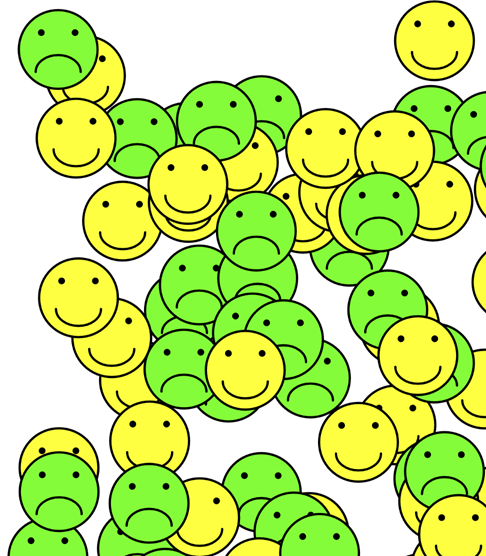
You have been writing code inside functions since your very first program. setup is a function, draw is a function, and mouseClicked is one as well. What you have never done is build one of your own. This part of the book changes that. You’ll learn to teach the computer new commands, give them names, hand them values to work with, and grow big programs out of small named pieces instead of one long block of statements. The first command you invent draws a smiley face.
In the Arrays part, Word Swirrel handed you a finished line, function guess(textInput: string), and asked you to fill in nothing but the body (Section 37.6). The book left that line unexplained on purpose and promised a later part for it. This is that part. Back then you got the signature; today you write your own.
47.1 AI tutor
Your first own function brings two new kinds of mistakes. A function that is defined but never called draws nothing at all, and a function called with the wrong value draws the wrong thing. If your canvas stays empty or every face looks the same, paste your definition and your call and tell the tutor what you expected.
Hints and questions instead of finished programs, in English or German.
47.2 A function is a command you teach
You already give the computer commands all day. circle(200, 200, 50) is one, fill("yellow") is another. Those commands come with p5.js, someone else wrote them, and you use them by writing their name and a pair of parentheses.
A function of your own works exactly the same way, with one difference. You write the recipe. You collect a group of statements under a name you invent, once, and from then on that name is a command like circle or fill. Writing the recipe down is called defining the function. Saying the name later to make it run is called calling it.
Defining and calling are two separate things, and the order on the page does not matter. A definition anywhere in your file can be called from anywhere else, even from a line above it.
A function also changes what you do when a program needs the same work twice. Back in the cat chapter, copying a line and changing its numbers was the fastest way to draw a second ear (Section 4.2), and the clipboard stays a useful typing tool for that. Copying a whole block of statements is a different story. Ten pasted lines are ten places to fix when the drawing changes, and the reader of your program has to compare them character by character to see what is different. From this part on, work that repeats gets a name and becomes a function, and the copies become calls.
47.3 The anatomy of a function
A function definition and a function call look similar, and they have different jobs. Here are both, with every part named:
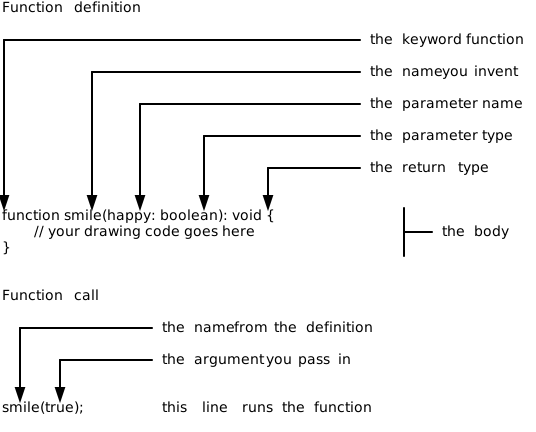
The definition starts with the keyword function, then the name you invent, then a pair of parentheses, then the body between braces. The body is the recipe, the statements that run whenever somebody calls the function.
Inside the parentheses of the definition sits happy: boolean. That is a parameter, a variable that exists only inside this function and has no value of its own. Whoever calls the function decides what goes in.
Inside the parentheses of the call sits true. That is an argument, the value that fills the parameter for this one run. Parameter and argument are two names for the two ends of the same handover. The parameter is written in the definition, the argument is written in the call, and the argument’s type has to match what the parameter asks for.
When the computer reaches smile(true); it does not simply read on. It remembers where it was, jumps into the body of smile, runs the statements there from top to bottom, and then comes back to the line right after the call. Your program continues as if nothing had happened, only a face has appeared on the canvas.
47.4 A complete signature, every time
The first line of a function definition is called its signature. The signature says the name, what the function needs, and what it gives back. In function smile(happy: boolean): void, the part happy: boolean is what the function needs, and : void is what it gives back.
void means “nothing”. The smile function draws on the canvas and then it is done; it hands no value back to whoever called it. Not every function is like that, and a later chapter of this part shows functions that answer with a value. Until then, every function you write ends its signature with : void.
Every function you write in this course names a type for each parameter and a type for the result. That is the “every variable gets a type” rule from the Variables part, applied to functions. Now you can also read the line you have typed a hundred times without understanding it, because function setup(): void says exactly that: no parameters, nothing given back. Loop variables carry their type in the same spirit (Section 28.3), so a for header reads for (let i: number = 0; i < 10; i++).
47.5 One function, two faces
A parameter is worth the trouble because it makes one function do several jobs. The smile function takes a single boolean, and that boolean decides between a happy face and a sad one:
function smile(happy: boolean): void {
    stroke("black");
    strokeWeight(10);
    if (happy) {
        fill("yellow");
    } else {
        fill("lime");
    }

    circle(200, 200, 350);

    fill("black");
    circle(125, 125, 20);
    circle(275, 125, 20);

    noFill();
    if (happy) {
        arc(200, 250, 200, 150, 0, 180);
    } else {
        arc(200, 300, 200, 150, 180, 360);
    }
}
The condition is written as if (happy), without a comparison. A boolean already is the answer to a yes-or-no question, so there is nothing left to compare it against. Writing if (happy === true) works too and says the same thing twice.
Two decisions and one function, and the caller picks a face with a single word. Without the parameter you would need two functions, drawHappyFace and drawSadFace, with almost identical bodies. Every time you changed the eyes you would have to change them twice. That is what parameters are for.
47.6 Drawing at a fixed spot, appearing anywhere
Look at the numbers in the face above. The eyes sit at 125 and 275, the head is a circle of diameter 350 around (200, 200). Those numbers never change, so on its own this face would always land in the same corner of the canvas at the same size. The move that frees it is one you know from the Loops part, where the origin started to wander (Section 34.2):
function smile(happy: boolean): void {
    push();
    translate(random(0, width), random(0, height));
    scale(0.2);

    // ... the drawing code from above ...

    pop();
}
translate moves the origin to a random point of the canvas, so the fixed coordinate (200, 200) now means “200 to the right and 200 down from there”. scale(0.2) multiplies every following coordinate and length by 0.2 (Section 40.2), which turns a 350 pixel head into a 70 pixel one. The push and pop around them put the coordinate system back the way it was (Section 34.4), so the next call starts from the same place as the first one.
Here is the habit worth taking from this chapter. A function that draws with fixed numbers can still draw anywhere, because a translate in front of the drawing decides where those numbers land. Every drawing function in this part is built like that.
47.7 Flipping a boolean back and forth
The finished program should alternate, so a happy face, then a sad one, then a happy one again. Alternating means the program has to remember what it drew last, and a variable that survives between two mouse clicks lives outside every function:
let nextSmiling: boolean = true;

function mouseClicked(): void {
    nextSmiling = !nextSmiling;
    smile(nextSmiling);
}
nextSmiling is declared outside the braces of any function, so setup and mouseClicked both see the same variable. The line nextSmiling = !nextSmiling; flips it with the not operator you met in the parsing chapter (Section 41.6). A true becomes false, a false becomes true, and the value goes straight back into the variable it came from. That single line is the standard way to toggle a boolean, and you will write it often.
47.8 Your exercise: Face Function
The starter code contains the signature of smile and one call in setup, both with the parts labeled in comments. Your job is the body and the clicking.
- Read the starter code. Find the definition, find the call, and say out loud which is which. The comment arrows point at the same parts as the anatomy figure above (Section 47.3).
- Draw one happy face. Fill the body of
smilewith the head, the two eyes, and the smiling arc, using the fixed coordinates from this chapter. Ignore thehappyparameter for a moment and run the program; one face has to appear before anything else is worth trying. - Wrap it in push, translate, and scale, so the face lands at a random position and comes out small. Run it a few times and watch the face jump around.
- Use the parameter. Add the two
if (happy)decisions for the fill color and the mouth arc. Test both faces by callingsmile(true);and thensmile(false);insetup. - Add the clicking. Write
mouseClickedand callsmilefrom it. Only then addnextSmilingabove all functions, flip it inmouseClicked, and hand it to both calls, the one insetupand the one inmouseClicked. One change, one run, exactness first. - Experiment. Give the sad face a different color, change
scale(0.2)toscale(0.5), or callsmilethree times insetupand see three faces from one function.
47.9 Check your understanding
When your canvas fills with faces and you can point at a definition and a call and name them correctly, take the short quiz below. You answer six questions about this chapter in your own words, and an AI reads your answers and tells you what you already understand and what you should read again. The quiz is anonymous, and answering in German is fine too.