59 Design your own functions: Crossword
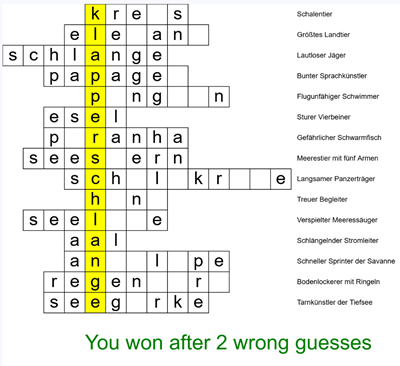
Somebody has always told you which functions to write. The domino exercise named drawDice and drawDomino, the temperature chart listed its four functions, and the train station told you what parseTrain had to return. The crossword task says one thing about functions and nothing more: do not write all the code in a single function. Which functions exist and what each does is your decision now, and that decision is the exercise.
59.1 AI tutor
Designing your own functions feels wobbly the first time, because there is no single right answer and every exercise before this one had one. Describe your planned function names to the tutor before you write code and ask what it thinks of the split. It will not design the program for you, but it says so when one of your functions is doing three jobs at once.
Hints and questions instead of finished programs, in English or German.
59.2 From jobs to functions
The method has four steps, and the first one happens on paper.
- Say what the program does, in plain sentences, one per job. Not code, not names, just the work.
- Turn every sentence into a function. One job, one function.
- Name each function after its job, so the name answers “what does this do?” before anyone reads the body.
- Build one function at a time, run it, look at the canvas.
For the crossword, the sentences come straight out of the task. The program takes the data apart, paints the yellow column, draws the cells with the known letters and the hints, reacts to a key, decides whether that key was a good guess, and decides whether the player has won. Six sentences, six functions:
| The job | A function for it |
|---|---|
| Take the data apart into arrays | function splitInput(): void |
| Paint the yellow solution column | function drawSolutionHighlight(): void |
| Draw cells, known letters, and hints | function drawCrossword(): void |
| Show wrong guesses or the win message | function drawResult(): void |
| Decide whether a typed key counts | function isValidGuess(key: string): boolean |
| Decide whether the game is over | function hasWon(): boolean |
Two kinds of function sit in that table. Four of them do something and return nothing, so their return type is void. Two answer a question and return boolean, and you can hear it in the names isValidGuess and hasWon. draw becomes a short list of orders:
function draw(): void {
    background('white');

    drawSolutionHighlight();
    drawCrossword();
    drawResult();
}
The order of the three calls is not decoration. The yellow rectangle goes down first and the cells are painted on top of it, like the bars-then-axes rule of the temperature chart. Turn the first two around and the grid vanishes under a yellow block.
Now step 4 pays off. Write splitInput alone, draw the parsed values as text, look, then write the next function. Six checked steps rarely need a long bug hunt, because you always know which function you touched last. That is the temperature chart workflow (Section 50.10), applied to your own plan.
59.3 The data: two splits
The starter code hands you the crossword as one long string with one animal per line, here shortened to its first three of 15 lines:
const crossword: string = `krebs,0,Schalentier
elefant,-1,Größtes Landtier
schlange,-4,Lautloser Jäger`;
Each line holds three fields separated by commas, the animal name, a start position, and a hint. (The animals and hints are German words.) Two levels of separators mean two levels of split, the tool from the Sokoban chapter (Section 58.7). Cut the text into lines, then each line into fields:
function splitInput(): void {
    const words: string[] = crossword.split('\n');
    for (let i: number = 0; i < words.length; i++) {
        const parts: string[] = words[i].split(',');
        animals.push(parts[0]);
        startPos.push(parseInt(parts[1]));
        hints.push(parts[2]);
    }
}
The three parallel arrays animals, startPos, and hints are globals, and after one call of splitInput they hold 15 entries each. parseInt turns the middle field into a number, because the start position is used for arithmetic, not for text.
59.4 Where does each letter go?
The whole picture hangs on one number. The solution word klapperschlange stands vertically in column 4, and every animal name contains one letter of it. The start position says how far a word is shifted so that its solution letter lands in that column. krebs starts with its k and is not shifted, so its start position is 0. In schlange the a sits at index 4, so that word starts four columns further left, at -4.
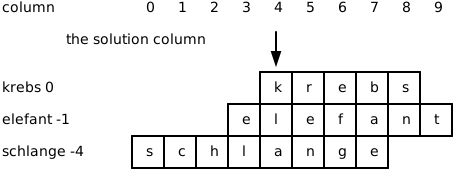
That gives you the formula for the whole grid. Letter j of animal i sits in column 4 + startPos[i] + j and in row i. Multiply the column by the cell width and the row by the cell height for the position on the canvas, a job translate can do for you:
for (let i: number = 0; i < animals.length; i++) {
    push();
    translate(0, i * letterHeight);
    for (let j: number = 0; j < animals[i].length; j++) {
        push();
        translate((4 + startPos[i] + j) * letterWidth, 0);
        // draw the cell border, and the letter if it is known
        pop();
    }
    pop();
}
Inside the inner push, the origin sits in the top left corner of one cell, so the cell is a plain rect(0, 0, letterWidth, letterHeight) and its letter goes to the same spot. A function that draws at the origin can draw anywhere, the rule from the first chapter of this part.
59.5 Does it contain that? includes
The guessing logic asks the same question over and over. Is this character inside that word, and is it already in the list of guessed characters? One tool answers both, includes, on strings and on arrays:
// 'krebs'.includes('e') is true, 'krebs'.includes('x') is false
// guessedCharacters.includes('e') is true once 'e' was guessed
For a string, includes asks whether the text contains that piece of text, and for an array whether one of the elements is that value. Both answer with a boolean, so both fit into an if. A guess is worth something when the character appears in at least one animal name and has not been guessed before:
function isValidGuess(key: string): boolean {
    for (let i: number = 0; i < animals.length; i++) {
        if (animals[i].includes(key) && !guessedCharacters.includes(key)) {
            return true;
        }
    }
    return false;
}
The loop stops at the first animal that contains the character, because return true leaves the function immediately, and only when no animal matched does the program reach the last line and answer false. Return early on a hit, return the opposite after the loop. That shape fits every “is there any element with …” question. The win check is the same shape upside down, because one missing letter is enough to answer false:
function hasWon(): boolean {
    for (const letter of solution) {
        if (!guessedCharacters.includes(letter)) {
            return false;
        }
    }
    return true;
}
for...of walks arrays, and it walks strings too, one character per round. It beats a counting loop here, because the function needs every letter but never an index.
59.6 One key, one guess
The player types, so the program listens with keyPressed and reads the character out of key, the pair from the melting snowman (Section 54.7). The handler stays tiny, because both decisions already live in functions:
function keyPressed(): void {
    if (!hasWon()) {
        if (isValidGuess(key)) {
            guessedCharacters.push(key);
        } else {
            wrongGuesses++;
        }
    }
}
Read it as a sentence. If the game is still running and the guess is valid, remember the character, otherwise count a wrong guess. Both ways of guessing wrong, a character in no animal name and one that was already used, end in the else branch, because isValidGuess answers false for both. The typed character travels into isValidGuess as an argument, and the parameter there is called key as well, which is allowed and common. Notice that nothing here draws. The handler changes the data, and the next frame of draw paints the new truth.
59.7 Your exercise: Crossword
Levels 1 and 2 build the picture, levels 3 and 4 are the advanced ones that make it a game.
- Plan first, on paper. Write your list of jobs in plain sentences, then a function name for each, with its parameters and its return type. Five minutes here save an hour later.
- Check the columns on paper. Take
schlangewith start position -4 and write down the column of each of its eight letters using4 + startPos[i] + j(Section 59.4). Does thealand in column 4? A wrong idea of the start position puts every cell in the wrong place. - Level 1: the empty grid. Parse the data, then draw the yellow column, the empty cells at their computed positions, and the hints on the right. Run right after the parser and show
animals.lengthon the canvas, so you know the arrays are full. - Level 2: all letters visible. Draw every letter into its cell, with no guessing logic yet. Now you can check the alignment, because the solution word must read downwards in the yellow column.
- Level 3 (advanced): guessing. Start with an empty
guessedCharactersarray, show a letter only when the array contains it, and addkeyPressedandisValidGuess. - Level 4 (advanced): counting and winning. Count the wrong guesses, show the number below the grid, and write
hasWonso the message becomes a victory line.
59.8 Check your understanding
When your crossword fills up letter by letter, take the short quiz below. You answer six questions about this chapter in your own words, and an AI reads your answers and tells you what you understand and what you should read again. The quiz is anonymous, and answering in German is fine too.