52 Callbacks: a function you hand over
A circle appears every second, without a draw loop and without anybody clicking. The program behind it fits on one screen, and it rests on an idea that changes how you see functions. A function is not only something you call. You can also hand it to somebody else as a value, so that they call it for you, at a moment you never have to think about again.
52.1 AI tutor
The classic mistake in this chapter is a pair of parentheses too many, and it produces no error message, just a canvas that stays empty or fills up once and never again. If your circles do not appear, or all of them appear at the same moment, show the tutor the line where you set the interval up.
Hints and questions instead of finished programs, in English or German.
52.2 You have used callbacks since your first program
Look at setup and draw with fresh eyes. You write both of them, and you have never called either of them. mouseClicked is the same story, and so is guess from Word Swirrel (Section 37.6). Someone else calls those functions. The p5.js library knows the names, calls setup once when the program starts, calls draw about 60 times a second, and calls mouseClicked when the mouse is clicked (Section 23.2).
A function that you write and that somebody else calls for you is called a callback function. Every event function you have written so far is a callback where the name did the work. p5.js looks for a function named draw, so a function with that exact name gets called.
This chapter turns that around. Instead of using a name that somebody already listens for, you hand your function over yourself, and you can name it whatever you like.
52.3 Handing a function over: setInterval
setInterval is a command of the browser, not of p5.js, and it means “call this function again and again, with this much time in between”:
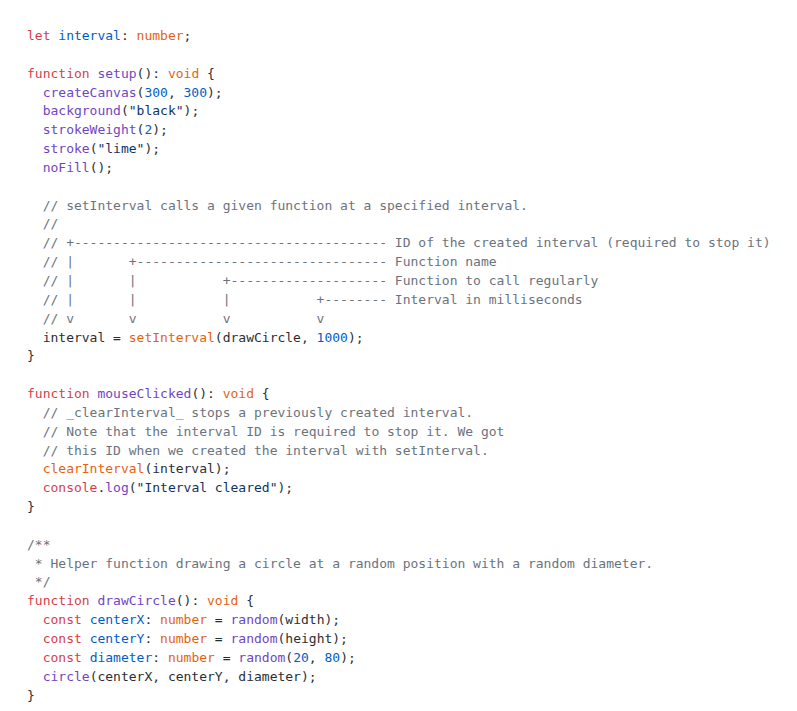
interval = setInterval(drawCircle, 1000);The second argument is the pause in milliseconds, so 1000 stands for one second. The first argument is the interesting one. It is the function drawCircle, written by its bare name, with no parentheses behind it. That name is a value now, like a number or a string, and it travels into setInterval as an argument. setInterval stores it and calls it every second from then on.
Your job stops after that single line. You never call drawCircle anywhere in the program, and it still runs once per second, forever, until somebody stops it.
setInterval(drawCircle, 1000) hands the function over. setInterval(drawCircle(), 1000) does something completely different. The parentheses mean “call it now”, so your program calls drawCircle itself, once, right there, and then hands the result of that call over to setInterval. The result is nothing, because drawCircle returns nothing, and setInterval sits there with nothing to call. You get one circle and never another one, and the editor may underline the line in red, because the result of a call is not something setInterval can call later. Parentheses call a function. The bare name is the function itself.
52.4 Stopping it again: clearInterval
setInterval answers too, so it is a function with a return value like the ones from the previous chapter (Section 51.2). Its answer is a number, an identity card for the interval it has just started. You need that number later, so it goes into a global variable:
let interval: number;The variable is declared outside every function, because setup stores the number and mouseClicked reads it, and a variable declared inside setup would be gone the moment setup ends. Stopping the interval then takes one line:
function mouseClicked(): void {
  clearInterval(interval);
  console.log("Interval cleared");
}
clearInterval needs the identity card, because a program can have several intervals running at the same time and the browser has to know which one you mean. After that call, the circles stop appearing.
The second line is an old friend with a new job. console.log writes its message into the playground’s console, as in the value-or-reference experiments (Section 45.2), and nothing of it appears on the canvas. Here it works as a debugging tool: the message proves that this piece of code really ran, and you will reach for that trick whenever a program does nothing and you want to know how far it got.
52.5 The function that gets called
The callback itself holds no surprises. It is a normal function with a normal signature, and it draws one circle at a random place:
/**
 * Helper function drawing a circle at a random position with a random diameter.
 */
function drawCircle(): void {
  const centerX: number = random(width);
  const centerY: number = random(height);
  const diameter: number = random(20, 80);
  circle(centerX, centerY, diameter);
}
Nothing in this function knows that it is a callback. It has no parameters, returns nothing, and would work exactly the same if you called it yourself from mouseClicked. Being a callback is not a property of the function; it is a property of the way the function is used.
random(width) hands back a decimal, and this program keeps it that way, because a circle at x = 143.7 looks no different from one at x = 144. Rounding with floor matters when a number is used as an index or shown as text, not when it is a position on the canvas.
52.6 Two ways to say “every so often”
You now know two ways to make something happen at regular times, and they are worth comparing, because you will choose between them in every animated program from here on.
The deadline pattern stores the next due time and checks it in draw (Section 43.4). The check happens 60 times a second, and the work runs when the clock has passed the deadline. It fits when each round should have a different length, like bubbles that appear after half a second to two seconds, and when the work belongs to the drawing anyway.
setInterval hands the job to the browser and keeps draw free. It fits a fixed rhythm, and it comes with an off switch, because clearInterval stops the whole thing without a flag variable and without an if. The program of this chapter has no draw function at all. Between two calls of drawCircle nothing in your code runs.
52.7 The canvas keeps everything
background("black") runs once, in setup, and nothing repaints it afterwards. So every circle that drawCircle paints stays on the canvas, and after a minute the canvas is full of overlapping lime rings.
That is the painting style of the early parts of this book, where the canvas itself was the memory. The bubbles program showed the other one, with the arrays as the truth and the whole picture repainted from them every frame (Section 43.5). The intervals program has no memory of its circles at all, because the paint on the canvas is all there is. Both styles are correct, and the choice follows from the question “can this picture change?”. A circle that will never move again is fine as paint. Anything that moves, grows, or disappears needs to live in variables.
52.8 Your exercise: Intervals
This exercise is a type-in. The whole program is short, and every line of it appeared in the sections above.
- Type in the program. The starter code gives you
setupwith the black background and the lime stroke. Add the globalintervalvariable, thesetIntervalline at the end ofsetup, thedrawCirclefunction with its doc comment, andmouseClickedwithclearInterval. Type it, don’t paste it. - Watch and stop. Run it and count the circles for ten seconds. Then click once. The canvas keeps what is there, and nothing new arrives.
- Break it on purpose. Change the line to
setInterval(drawCircle(), 1000)and look at what the editor says about it. Run it anyway. One circle appears right away and no other one follows. Read the warning about parentheses again, then undo the change. - Experiment. Try 100 milliseconds instead of 1000. Then write a second function
drawBigCircleand start a second, slower interval for it, so two intervals run side by side. Each one hands back its own identity card, so you need a second global variable to keep it.
52.9 Check your understanding
When your circles arrive once a second and stop on a click, and you can say what the parentheses would change, take the short quiz below. You answer six questions about this chapter in your own words, and an AI reads your answers and tells you what you already understand and what you should read again. The quiz is anonymous, and answering in German is fine too.