9 Practice projects: flowers and a soccer field
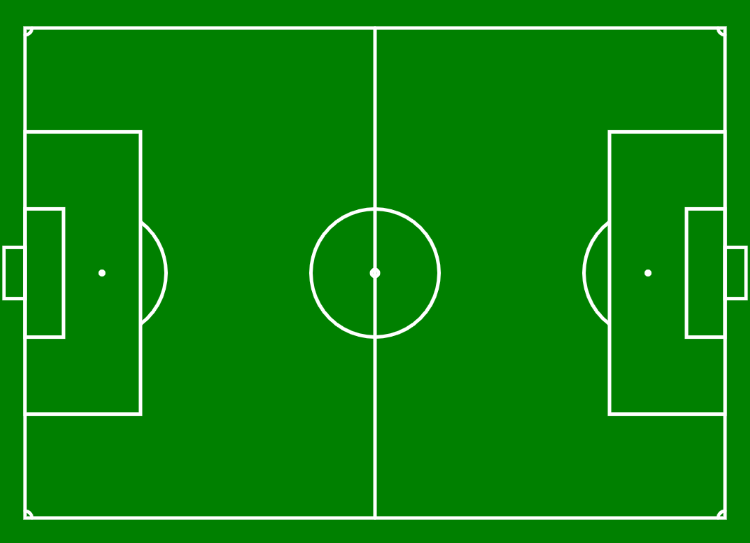
Two projects close out this part, both written like real job briefings. First you’ll draw two flowers side by side, each petal placed exactly where a designer’s figure says it belongs. Then you’ll draw the soccer field above, with its penalty areas, center circle, and corner arcs, sized to match a real field down to the meter.
You now know everything you need for bigger tasks: shapes, arcs, colors, coordinates, planning on paper, and a careful way of working. Time to put it all together. This chapter contains two larger practice projects. Both are written like real job briefings. In one you’re part of a game development team, in the other you work for a TV station.
Take these projects seriously. They are practice for exactly the kind of task you’ll get in an assessment, and the flower project even states the areas you’d be graded on. Plan on paper, work in small steps, and hand in formatted code, just as you’ve learned.
9.1 AI tutor
Both projects in this chapter are practice for the kind of task you get in an assessment, so get as far as you can on your own first. When you’re truly stuck, the AI tutor of this part gives you the next hint, never the finished project.
Hints and questions instead of finished programs, in English or German.
9.2 Coordinates come in many forms
With the house and the cat, you invented the coordinates yourself. With the Olympic rings, you read them from a symbol. These two projects add the two forms that professionals meet most often:
- A dimensioned drawing. The flower project gives you a designer’s figure with guide lines, diameters, and distances, the way technical drawings do. Nobody hands you ready-made x and y values; you have to compute them. For example, if a petal with a diameter of 40 sits directly on top of a flower center with a diameter of 60, then the petal’s center lies 50 pixels above the flower’s center: half of 60 plus half of 40. Working out coordinates like this, from sizes and distances, is a core skill this project trains.
- Real-world measurements. The soccer field project gives you the dimensions of a real field, in meters. Your job is to bring them onto a canvas that is measured in pixels, without distorting the proportions. You’ll get two new tools for that in a moment.
In both cases, your graph paper sketch is the bridge: draw the figure, write the given measurements next to it, and turn them into canvas coordinates before you type a single statement.
9.3 Project 1: Flowers
Your team’s designers have specified two flowers. The right flower is the easier one: it’s symmetrical both horizontally and vertically, so once you know one petal’s position, the mirrored petals follow by symmetry. The left flower is only vertically symmetrical, which makes its petal positions trickier to work out. The stem of each flower is an arc, drawn by eye; not every part of a design is specified to the pixel, and deciding the unspecified parts tastefully is part of the job too.
Use the symmetry when you compute your coordinates: mirrored parts lie at the same distance from the flower’s center line, once to the left and once to the right, or once above and once below. If you compute the top petal’s position, you get the bottom petal’s position almost for free.
9.4 Project 2: A soccer field
The TV station wants a background graphic of a soccer field, true to the real thing: penalty areas, center circle, penalty points, corner arcs. The task links to a diagram with the real measurements in meters. A real field is about 100 meters wide and 70 meters deep, and your drawing must keep those proportions.
Converting every measurement from meters to pixels by hand would be painful. The starter code of this exercise shows you a much better way, and it introduces three new ideas.
9.4.1 Constants give numbers a name
At the top of the starter code, outside the setup function, you’ll find lines like these:
const SCALE = 5;
const MARGIN = 4;
The keyword const creates a constant: a value with a name. From then on you write SCALE in your code instead of the number 5. That has two advantages. First, MARGIN tells a reader what the number means, where a bare 4 explains nothing. Second, the value lives in exactly one place: if you change the 5 to a 10, every part of the program that uses SCALE changes with it. By convention, constant names are written in capital letters.
9.4.2 scale multiplies everything
The statement scale(SCALE) stretches everything that is drawn after it by that factor. This is the trick that makes the meter measurements usable: you write all coordinates and sizes in meters, as if a meter were a pixel, for example a line of length 70 for the halfway line. With scale(5), that line is drawn 350 pixels long. Want a bigger graphic? Change the constant SCALE from 5 to 10, and the whole field doubles, proportions intact, without touching a single coordinate.
9.4.3 translate moves the origin
Normally the origin (0, 0) sits in the top left corner of the canvas. The statement translate(MARGIN, MARGIN) moves it to the right and down by the margin. After that, the point (0, 0) is the top left corner of the field, not of the canvas, and the grass margin around the field appears by itself. You can then use the field’s own measurements directly as coordinates, which keeps all your numbers simple.
One more thing you’ll see in the starter code: a statement called push(). It saves the current drawing state, and it belongs to the scale and translate machinery. Leave it where it is; you’ll learn the details behind it later in the course.
9.5 Check your understanding
When you’ve finished the exercise, take the short quiz below. You answer five questions about this chapter in your own words, and an AI reads your answers and tells you what you already understand and what you should read again. The quiz is anonymous, and answering in German is fine too.