24 Binary and hexadecimal conversions
Deep inside, a computer stores everything as numbers written with only the digits 0 and 1: your dice rolls, the colors on your canvas, this very text. In this chapter you learn to read and write that notation yourself. You start from the decimal system you use every day, build the binary system from it, and then meet hexadecimal, the compact notation programmers use when binary gets too long to read.
This chapter is pure pen and paper: no new p5.js functions, no TypeScript. Get a pencil, because every conversion here is a small calculation you do by hand. The next chapter turns these calculations into working programs.
Maybe you already know these conversions from math class. Test yourself: jump to the mixed practice at the end of this chapter (Section 24.13) and work through the six conversions there. If they all come out right, you can move on to the next chapter with a clear conscience.
24.1 AI tutor
Converting between number systems is a skill you build by doing, and a book chapter can only print a handful of practice numbers. Ask the AI tutor for a fresh number whenever you want one more round. Show your calculation, not only your final answer. The tutor can then help you find the exact step that went wrong.
Hints and questions instead of finished programs, in English or German.
24.2 Decimal, the system you already know
You read decimal numbers without thinking about the process. Still, that process is the key to every number system in this chapter, so let’s slow it down once.
Why do people count with ten digits? We can’t know the origin for certain, but a likely explanation is right in front of you: humans have ten fingers. Fingers are always available, so people probably used them as early counting tools, and our base-10 system may have grown from that habit.
Take the decimal number 352. Your brain reads it in one glance, but behind that glance sits a small calculation: each digit is worth its face value times a place value, and the place values are the powers of ten.
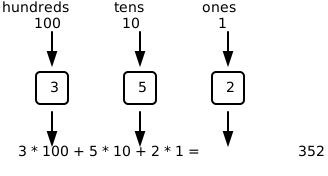
Decimal is a base-10 system. It has ten digits, 0 to 9, and each place is worth ten times as much as the place to its right: 1, then 10, then 100, then 1000, and so on.
Every nonzero number to the power of 0 is 1. You may have learned this rule before, but it is easy to forget:
- \(10^0 = 1\)
- \(2^0 = 1\)
- \(16^0 = 1\)
That is why the rightmost place has the value 1 in decimal, binary, and hexadecimal.
Binary and hexadecimal follow exactly the same place-value idea. Only the base and the available digits change. Everything you calculate in this chapter is this one rule, applied to different bases.
24.3 Binary: counting with two digits
Now imagine an alien with only one finger. The finger has two states: it can be inactive or active. With that finger, the alien can show 0 or 1, but it can’t continue to 2, 3, and all the way to 9. After 1, the alien already needs a new place to keep counting.
A computer is a little like this one-finger alien. A tiny electronic switch inside a computer also has exactly two states, off and on. Computers therefore write all their numbers with two digits instead of ten.
Binary is this base-2 system. It uses only the digits 0 and 1, and one binary digit is called a bit. Each binary place is worth twice as much as the place to its right:
| Position from the right | Power of 2 | Place value |
|---|---|---|
| 0 | \(2^0\) | 1 |
| 1 | \(2^1\) | 2 |
| 2 | \(2^2\) | 4 |
| 3 | \(2^3\) | 8 |
| 4 | \(2^4\) | 16 |
| 5 | \(2^5\) | 32 |
| 6 | \(2^6\) | 64 |
| 7 | \(2^7\) | 128 |
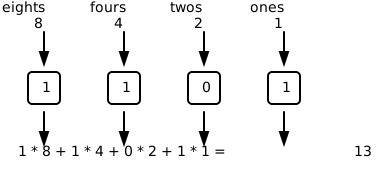
A 1 means the place value is present, a 0 means it is absent. The binary number 1101 contains one 8, one 4, no 2, and one 1:
24.4 Convert binary to decimal
The picture of 1101 is already the whole method. To convert any binary number to decimal:
- Write the place values under the bits, from right to left: 1, 2, 4, 8, 16, and so on.
- Multiply each bit by its place value.
- Add the contributions.
Convert binary 101010 to decimal. Start with the rightmost bit, whose place value is 1:
| Step | Bit | Place value | Contribution | Running total |
|---|---|---|---|---|
| 1 | 0 | 1 | 0 × 1 = 0 | 0 |
| 2 | 1 | 2 | 1 × 2 = 2 | 0 + 2 = 2 |
| 3 | 0 | 4 | 0 × 4 = 0 | 2 + 0 = 2 |
| 4 | 1 | 8 | 1 × 8 = 8 | 2 + 8 = 10 |
| 5 | 0 | 16 | 0 × 16 = 0 | 10 + 0 = 10 |
| 6 | 1 | 32 | 1 × 32 = 32 | 10 + 32 = 42 |
Binary 101010 is decimal 42.
In Douglas Adams’s novel The Hitchhiker’s Guide to the Galaxy, 42 is the “Answer to the Ultimate Question of Life, the Universe, and Everything.” The book is popular among software developers, so 42 appears frequently in coding examples, puzzles, and exercises.
If you enjoy fantasy or science fiction novels, consider reading the book. You’ll understand the reference the next time 42 appears in a programming exercise.
24.4.1 Practice binary to decimal
Convert these five binary numbers on paper. Draw the same columns as in the worked example: bit, place value, contribution. The first row is filled in as a model.
| Binary | Contributions | Decimal |
|---|---|---|
| 101 | 1 × 4 + 0 × 2 + 1 × 1 | 5 |
| 1110 | ||
| 10011 | ||
| 110101 | ||
| 11111111 |
Compare only when your table is complete: the results are 14, 19, 53, and 255.
Look closely at the last one. 255 should feel familiar: it’s the largest value of a color channel (Section 14.3). That’s no coincidence, and a few sections from now you’ll see exactly why.
24.5 Convert decimal to binary
The opposite direction uses division instead of multiplication. Divide by 2 repeatedly. Each division gives you a whole-number quotient and a remainder, and because you divide by 2, every remainder is either 0 or 1. Those remainders are the bits.
Convert decimal 45 to binary:
| Step | Number to divide | Division by 2 | Quotient | Remainder |
|---|---|---|---|---|
| 1 | 45 | 45 = 22 × 2 + 1 | 22 | 1 |
| 2 | 22 | 22 = 11 × 2 + 0 | 11 | 0 |
| 3 | 11 | 11 = 5 × 2 + 1 | 5 | 1 |
| 4 | 5 | 5 = 2 × 2 + 1 | 2 | 1 |
| 5 | 2 | 2 = 1 × 2 + 0 | 1 | 0 |
| 6 | 1 | 1 = 0 × 2 + 1 | 0 | 1 |
The divisions produce the bits from right to left, so read the remainder column from bottom to top: 1, 0, 1, 1, 0, 1. Decimal 45 is binary 101101.
Use the same process every time:
- Divide the decimal number by 2.
- Write down the whole-number quotient and the remainder.
- Divide the quotient by 2 again.
- Stop when the quotient is zero.
- Read the remainders from bottom to top.
Here is a second, shorter run. Convert decimal 26:
| Step | Number to divide | Division by 2 | Quotient | Remainder |
|---|---|---|---|---|
| 1 | 26 | 26 = 13 × 2 + 0 | 13 | 0 |
| 2 | 13 | 13 = 6 × 2 + 1 | 6 | 1 |
| 3 | 6 | 6 = 3 × 2 + 0 | 3 | 0 |
| 4 | 3 | 3 = 1 × 2 + 1 | 1 | 1 |
| 5 | 1 | 1 = 0 × 2 + 1 | 0 | 1 |
Read the remainders from bottom to top: decimal 26 is binary 11010.
24.5.1 No answer key needed
Here’s the best thing about conversions. You never have to wonder whether your result is right, because you can always convert it back. Take the 11010 from the last example and send it in the opposite direction, multiplying bits by place values:
| Bit | Place value | Contribution |
|---|---|---|
| 0 | 1 | 0 × 1 = 0 |
| 1 | 2 | 1 × 2 = 2 |
| 0 | 4 | 0 × 4 = 0 |
| 1 | 8 | 1 × 8 = 8 |
| 1 | 16 | 1 × 16 = 16 |
The contributions add up to 0 + 2 + 0 + 8 + 16 = 26, the number we started from. The conversion is confirmed.
Make this reverse trip a habit: finish every conversion by traveling back. If you land on your starting number, both directions were right. If you don’t, one of the two trips holds a mistake, and finding it is exactly the practice you need.
24.5.2 Practice decimal to binary
Convert 21, 37, and 52 to binary with the division table. Then check each result yourself with the reverse trip: multiply the bits by their place values and confirm that you land back on the starting number. Only after that self-check, compare with the results 10101, 100101, and 110100.
24.6 Powers of two are everywhere
In decimal, you know the round numbers 10, 100, and 1000 by heart. For computers, the round numbers are the powers of two, and they show up everywhere in computing. You must be able to name the powers of two from \(2^0\) through \(2^{16}\) without calculating each one. Practice until they feel as familiar as 10, 100, and 1000.
| Power | Value | Power | Value |
|---|---|---|---|
| \(2^0\) | 1 | \(2^9\) | 512 |
| \(2^1\) | 2 | \(2^{10}\) | 1,024 |
| \(2^2\) | 4 | \(2^{11}\) | 2,048 |
| \(2^3\) | 8 | \(2^{12}\) | 4,096 |
| \(2^4\) | 16 | \(2^{13}\) | 8,192 |
| \(2^5\) | 32 | \(2^{14}\) | 16,384 |
| \(2^6\) | 64 | \(2^{15}\) | 32,768 |
| \(2^7\) | 128 | \(2^{16}\) | 65,536 |
| \(2^8\) | 256 |
Two larger powers are especially important:
- \(2^{31} = 2,147,483,648\), which is approximately 2.15 billion.
- \(2^{32} = 4,294,967,296\), which is a little less than 4.3 billion.
Why do these numbers matter so much? A group of \(n\) bits can form exactly \(2^n\) different patterns. A group of eight bits is called a byte, and a byte can form \(2^8 = 256\) patterns. Remember the color basics chapter (Section 14.3)? It said a color channel is stored in one byte and runs from 0 to 255, and now you know where those numbers come from: 256 patterns, one of them used for zero, so the largest value is 255. The binary number 11111111 from your practice table is one full color channel.
The same rule scales up. An unsigned 16-bit number has \(2^{16}\) patterns and holds the values 0 through 65,535. With 32 bits there are \(2^{32}\) patterns. What a 32-bit number can hold depends on one more idea: whether one of its bits is spent on the sign.
24.7 Shorten binary with hexadecimal
Binary is honest but long-winded: even a small number like 214 needs the eight bits 11010110, and long rows of ones and zeros are hard to scan. Hexadecimal, usually shortened to hex, is the compact notation programmers use instead.
Hexadecimal is a base-16 system, so it needs 16 digits. The symbols 0 to 9 cover the first ten values, and the letters A to F cover the values 10 to 15:
| Decimal value | Binary | Hex digit | Decimal value | Binary | Hex digit |
|---|---|---|---|---|---|
| 0 | 0000 | 0 | 8 | 1000 | 8 |
| 1 | 0001 | 1 | 9 | 1001 | 9 |
| 2 | 0010 | 2 | 10 | 1010 | A |
| 3 | 0011 | 3 | 11 | 1011 | B |
| 4 | 0100 | 4 | 12 | 1100 | C |
| 5 | 0101 | 5 | 13 | 1101 | D |
| 6 | 0110 | 6 | 14 | 1110 | E |
| 7 | 0111 | 7 | 15 | 1111 | F |
The counting continues past F the same way it does in decimal past 9. The next number after hex F is hex 10, which has the decimal value 16. The place values of hex are the powers of 16: 1, 16, 256, 4096, and so on. The calculation rule itself never changes. Multiply each digit by its place value, then add the contributions. Only the base is different.
The binary column in the digit table shows why programmers love hex. Exactly four bits can represent the values 0 to 15, so one hex digit always matches one group of four bits, and two hex digits match one byte. That makes hex a perfect abbreviation for binary: divide the bit count by four and you have the hex digit count.
24.8 Convert binary to hexadecimal
To convert binary to hex, split the bits into groups of four, starting at the right, and translate each group with the digit table (Section 24.7). Add zeros on the far left if the first group is too short.
Convert binary 10110110 to hex:
| Step | What you do | Result |
|---|---|---|
| 1 | Group four bits from the right | 1011 0110 |
| 2 | Convert 1011 to its value | 11 |
| 3 | Write decimal 11 as a hex digit | B |
| 4 | Convert 0110 to its value | 6 |
| 5 | Write both hex digits in the same order | B6 |
Binary 10110110 is hex B6.
For a shorter example, binary 10110 becomes 0001 0110 after you add leading zeros. The groups are hex 1 and hex 6, so the result is hex 16. The added zeros don’t change the value.
24.8.1 Practice binary to hexadecimal
Group and translate these binary numbers on paper. The first row is filled in as a model.
| Binary | Grouped binary | Hex |
|---|---|---|
| 1010 | 1010 | A |
| 1111 | ||
| 101101 | ||
| 11001010 | ||
| 11111111 |
The results, for after your own attempt: F, 2D, CA, and FF. The last row is an old friend by now. 11111111, 255, and FF are three ways to write one full color channel.
24.9 Convert hexadecimal to binary
The reverse direction is even quicker: replace every hex digit with its four-bit group from the digit table (Section 24.7).
Convert hex 3D to binary:
| Step | Hex digit | Four-bit group | Result so far |
|---|---|---|---|
| 1 | 3 | 0011 | 0011 |
| 2 | D | 1101 | 0011 1101 |
Hex 3D is binary 00111101. You may remove zeros only from the far left, so binary 111101 has the same value. Inside the number, every group keeps all four bits.
24.9.1 Practice hexadecimal to binary
Translate these hex numbers into binary, keeping the four-bit groups visible. The first row is filled in as a model.
| Hex | Binary in four-bit groups |
|---|---|
| 7 | 0111 |
| B | |
| 2F | |
| A5 | |
| FF |
The results, for after your own attempt: 1011, 0010 1111, 1010 0101, and 1111 1111.
24.10 Convert decimal to hexadecimal
You can convert decimal to hex in two ways.
The first way travels through binary:
- Convert decimal to binary with repeated division by 2.
- Group the bits in groups of four from the right.
- Replace each group with one hex digit.
For example, decimal 45 is binary 101101. Group it as 0010 1101, and the groups become hex 2 and hex D: decimal 45 is hex 2D.
For larger numbers, the direct road is shorter: divide by 16 repeatedly, exactly like the repeated division by 2, and translate remainders from 10 to 15 into the letters A to F.
Convert decimal 713 directly to hex:
| Step | Number to divide | Division by 16 | Quotient | Remainder | Hex digit |
|---|---|---|---|---|---|
| 1 | 713 | 713 = 44 × 16 + 9 | 44 | 9 | 9 |
| 2 | 44 | 44 = 2 × 16 + 12 | 2 | 12 | C |
| 3 | 2 | 2 = 0 × 16 + 2 | 0 | 2 | 2 |
Read the hex digits from bottom to top: decimal 713 is hex 2C9.
24.11 Convert hexadecimal to decimal
Again there are two roads. Through binary: hex 2D becomes binary 0010 1101, which has the decimal value 32 + 8 + 4 + 1 = 45.
The direct road uses the hex place values 1, 16, and 256. Multiply every digit value by its place value and add the contributions, exactly like in decimal and binary.
Convert hex 2D7 to decimal:
| Step | Hex digit | Digit value | Place value | Contribution | Running total |
|---|---|---|---|---|---|
| 1 | 7 | 7 | 1 | 7 × 1 = 7 | 7 |
| 2 | D | 13 | 16 | 13 × 16 = 208 | 7 + 208 = 215 |
| 3 | 2 | 2 | 256 | 2 × 256 = 512 | 215 + 512 = 727 |
Hex 2D7 is decimal 727.
On the web, colors are usually written as hex codes such as #FF8800. That code is three bytes side by side, two hex digits each: FF for red, 88 for green, 00 for blue. With this chapter, you can decode it. FF is 15 × 16 + 15 = 255, red at full power. 88 is 8 × 16 + 8 = 136, a medium green. 00 is no blue at all. In p5.js, the same color is fill(255, 136, 0), a strong orange. You can now read every color code you meet on the web, two hex digits per channel.
24.12 The conversion map
You now have a path for every direction. Binary sits in the middle of the map, because both neighbors connect to it so easily:
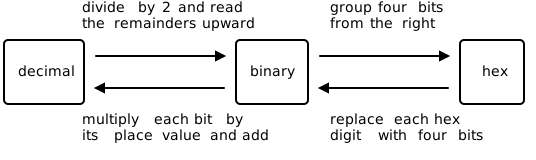
| Starting system | Target system | Process |
|---|---|---|
| Binary | Decimal | Multiply bits by powers of 2, then add |
| Decimal | Binary | Repeatedly divide by 2, then read remainders upward |
| Binary | Hex | Group four bits from the right |
| Hex | Binary | Replace every hex digit with four bits |
| Decimal | Hex | Convert through binary or repeatedly divide by 16 |
| Hex | Decimal | Convert through binary or use powers of 16 |
And remember the built-in answer key (Section 24.5.1): whatever direction you travel, travel back to check. If decimal 45 becomes binary 101101, convert 101101 back to decimal. If hex A5 becomes binary 10100101, group those bits again and check that you get A5.
24.13 Mixed practice
One conversion per direction, in mixed order. For each line, show every step on paper, and then do the reverse trip before you look anything up.
| Start | Direction | Your result | Reverse check |
|---|---|---|---|
| decimal 31 | decimal to binary | ||
| binary 111100 | binary to decimal | ||
| binary 10011110 | binary to hex | ||
| hex 6C | hex to binary | ||
| decimal 128 | decimal to hex | ||
| hex A5 | hex to decimal |
When both trips agree, compare with the results:
| Start | Result |
|---|---|
| decimal 31 | binary 11111 |
| binary 111100 | decimal 60 |
| binary 10011110 | hex 9E |
| hex 6C | binary 01101100 |
| decimal 128 | hex 80 |
| hex A5 | decimal 165 |
To finish, treat yourself to a real-world conversion: the web color #40E0D0. Decode its three channels to decimal, then check your result in the playground with a quick background call using your three numbers. If a friendly turquoise fills the canvas, your conversion was right. Enjoy the moment. You just read a color the way a computer does.
24.14 Check your understanding
When your conversion table is filled in and checked, take the short quiz below. You answer six questions about this chapter in your own words, and an AI reads your answers and tells you what you already understand and what you should practice again. Show your calculation steps, not only the final answer. The quiz is anonymous, and answering in German is fine too.