25 Number systems in code
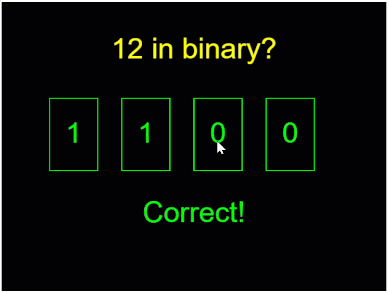
In the previous chapter you converted numbers with pen and paper. Now the conversions become working TypeScript. You’ll take decimal, binary, and hexadecimal numbers apart digit by digit, and the chapter ends with a game you can challenge your friends with: the program shows a decimal number, the player clicks together its binary representation, and when the guess is right, the display flashes green. Three smaller exercises prepare you for the game. First you take an ordinary decimal number apart, then a binary number, and finally a hexadecimal number.
These number systems are everyday tools in programming, not just theory. Bits represent switches, flags, and pixel data. Hex codes such as #FF8800 name colors on the web, and debugging tools show memory addresses in hex. Whenever you meet them, the digit-by-digit thinking from this chapter is what makes them readable.
25.1 AI tutor
Use the tutor from the conversion chapter (Section 24.1) when a conversion step is still unclear. Use the Conditions tutor below when you need help applying the conversion in TypeScript, laying out the digit boxes, or checking the binary guesser.
Hints and questions instead of finished programs, in English or German.
25.2 Taking a number apart
The first challenge sounds almost silly: the program rolls a random number, stores it in a variable named num, and must draw each digit in its own box. For 4711 that means a 4, a 7, a 1, and a 1. But num holds the single value 4711, not four separate digits. How do you get single digits out of a number? With two operations you already know, working as a team.
The % operator from the color worm gives the remainder of a division, and that makes it a digit extractor: num % 10 is the remainder when dividing by 10, which is exactly the last digit. 4711 % 10 is 1.
floor from the dice chapter rounds down, and that makes it a digit remover: floor(num / 10) chops off the last digit. 4711 / 10 is 471.1, and flooring it leaves 471.
Chain the two and you can reach every digit. Divide first to shift the digit you want to the last place, then % 10 to grab it:
const digit1: number = num % 10;                     // ones
const digit2: number = floor(num / 10) % 10;    // tens
const digit3: number = floor(num / 100) % 10;   // hundreds
Why 10, 100, and their bigger siblings? Because that’s how our number system is built. The digits of 352 are worth their face value times a place value, and the place values are the powers of ten:
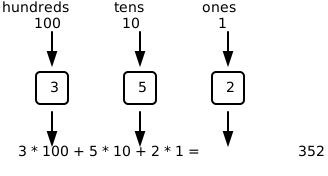
Check the recipe against the picture. Dividing 352 by 100 and flooring gives 3, the hundreds digit. Dividing by 10 and flooring gives 35, and 35 % 10 is 5, the tens digit. The recipe works for any place: divide by the place value, floor, take % 10.
The number to take apart comes from a roll, using the fair-whole-number recipe from the dice chapter: floor(random(0, 1_000_000)) gives a whole number from 0 to 999999. Those underscores are not a typo. TypeScript lets you group the digits of a long number the same way you would group them with spaces on paper. They mean nothing to the computer and everything to human eyes.
25.3 A row of boxes, placed by formula
All three digit exercises in this chapter show the same picture: a row of boxes on a black canvas 300 pixels high, each box 50 pixels wide and 75 pixels high, the row starting 100 pixels below the top edge, one digit per box. Decimal and binary need six boxes and a canvas 550 pixels wide; hexadecimal needs only three boxes on a 300 pixel wide canvas.
The interesting part is the x coordinate of each box. You could work the six numbers out by hand, 50, 125, 200, and so on, and type them in. Better not. Write each position as a formula with the box number in it:
rect(50 + 0 * 75, 100, 50, 75);
rect(50 + 1 * 75, 100, 50, 75);
rect(50 + 2 * 75, 100, 50, 75);
The 50 is the left margin, the 75 is the step from one box to the next (50 pixels of box plus a 25 pixel gap), and the 0, 1, 2 count the boxes from the left. TypeScript works out the numbers for you, and the code shows the rule behind the layout instead of six finished results. Want wider boxes later? Change one number per line instead of recomputing everything. The binary guesser at the end of this chapter reuses this layout, and there the formula earns its keep a second time: it tells you exactly where each box starts and ends when you have to find out which box the player clicked.
25.4 Your exercise: Digits
Now build it: a random number up to six digits, each digit drawn in its own yellow box.
Play computer first. Complete this table on paper for
num= 4711. The first two rows are filled in as a model.Constant Formula Result for 4711 digit1num % 101 digit2floor(num / 10) % 101 digit3digit4digit5digit6The last two rows are worth predicting carefully: what do
digit5anddigit6hold when the number has only four digits?Read the starter code. The roll is already there, and so is a small
textcall that prints the whole number at the bottom of the canvas, so you can check your digits against it at a glance.Extract the six digits into constants
digit1todigit6, with explicit data types.Draw the six boxes with
rect, using the50 + i * 75formula. You’ll thank yourself in the next two exercises.Draw the digits into the boxes with
text, largest place value on the left:digit6in the leftmost box,digit1in the rightmost.Test with the paper number. Force
numto 4711 for a moment, like you forced the dice, and compare every box with your paper table. Numbers with fewer than six digits show leading zeros,004711, and that’s correct: the empty places hold zeros.
25.5 Apply binary in code
You already practiced the conversion. Binary uses the digits 0 and 1, and its place values are 1, 2, 4, 8, 16, 32, and so on. A single binary digit is called a bit. The binary number 1101 means one 8, one 4, no 2, and one 1:
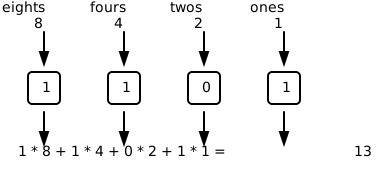
With six binary digits, the largest number you can write is 111111, which is 32 + 16 + 8 + 4 + 2 + 1 = 63. If that conversion is not clear yet, return to the previous chapter (Section 24.4) before you continue. In this exercise, the new question is how your program can extract those six bits.
And the digit-extraction recipe? It carries over beautifully. In decimal you divided by the place values, the powers of ten, and took % 10. In binary you divide by the powers of two and take % 2:
const digit1: number = num % 2;
const digit2: number = floor(num / 2) % 2;
const digit3: number = floor(num / 4) % 2;
25.6 Your exercise: Binary digits
Same picture, new number system: six boxes, but now they show the random number in binary.
Paper first. Convert three numbers to binary by hand with the table below. Go from left to right: does a 32 fit into the number? Put a 1 under it and subtract, otherwise put a 0. Then ask the same about the 16, and so on down to the 1. The first row is filled in as a model.
Number 32 16 8 4 2 1 Binary 13 0 0 1 1 0 1 001101 42 63 Check each row by adding the place values under your ones back together: 8 + 4 + 1 is 13, so the first row is right.
Copy your digits solution into the empty starter and change the number range: the boxes can show at most 63, so the roll becomes
floor(random(0, 64)).Change the extraction from base ten to base two: the divisors 1, 10, 100, … become 1, 2, 4, 8, 16, 32, and every
% 10becomes% 2.Test against your paper conversions, again by forcing
numto your three practice values. The small decimal number at the bottom is your reference.
25.7 Apply hexadecimal in code
You also practiced the hexadecimal system in the previous chapter. Hex uses 16 digits, with A to F standing for the values 10 to 15. Its place values are 1, 16, 256, and so on. One hex digit represents four bits, so two hex digits represent one byte, from 00 to FF.
Now apply those facts in code. The program must extract three hex digits as numbers, and then translate the values 10 to 15 into the visible letters A to F. This is where number conversion meets the if and else if chains from this part.
Extracting hex digits is the same recipe a third time, with the divisors 1, 16, and 256, and % 16 at the end. Typing those place values by hand gets tiring, so here is one more p5.js function, pow. A call to pow(base, exponent) computes a power, so pow(16, 0) is 1, pow(16, 1) is 16, and pow(16, 2) is 256. Written that way, the place number stays visible in the code instead of hiding inside a finished result:
const digit1: number = floor(num / pow(16, 0)) % 16;
const digit2: number = floor(num / pow(16, 1)) % 16;
const digit3: number = floor(num / pow(16, 2)) % 16;
One thing is genuinely new. Such a digit is a number from 0 to 15, but on the screen, 10 to 15 must appear as the letters A to F. A number-to-symbol translation with exact cases is an if/else if chain, like the dice faces. The two position arguments of text are the center of the box the digit belongs in, from your layout formula:
if (digit1 < 10) {
  text(digit1, boxCenterX, boxCenterY);
} else if (digit1 === 10) {
  text("A", boxCenterX, boxCenterY);
} else if (digit1 === 11) {
  text("B", boxCenterX, boxCenterY);
} // ... and so on up to F
25.8 Your exercise: Hex digits
Three boxes this time, showing the random number in hex.
Paper first. Convert three numbers to hex by hand with the table below: divide by 256, then by 16, then by 1, each time taking
% 16of the result, and translate 10 to 15 into A to F. The first row is filled in as a model.Number 256s 16s 1s Hex 47 0 2 15 -> F 02F 255 3000 Adapt your solution: three digits instead of six on a 300 pixel wide canvas, divisors 1, 16, and 256, extraction with
% 16. The three boxes keep their size and their50 + i * 75positions. The biggest three-digit hex number is FFF, which is 4095, so the roll isfloor(random(0, pow(16, 3))).Write the translation chain for each box: digits below 10 are printed as they are, 10 to 15 as A to F.
Test with forced values, at least 255 (should read 0FF) and 4095 (FFF).
25.9 The project: Binary guesser
Time to put everything from this part into one game. The computer shows a number from 1 to 15 and four boxes holding 0000. The player clicks boxes to flip their bits between 0 and 1 until the four bits show the number in binary. After every click the program checks the guess, and when it’s right, the display turns lime green and announces “Correct!”. Random numbers, drawing, conditions, binary: everything you’ve built in this part, working together.
One tool is still missing, and it’s the sibling of || from the bouncing ball. To decide whether a click landed inside a box, two things must both be true: the horizontal position must be in the box’s x range and the vertical position in its y range. The AND operator && combines two boolean questions and is true only when both parts are true. Keep the box layout from the digits exercise (Section 25.3) and the vertical test writes itself. The row of boxes starts 100 pixels below the top edge and the boxes are 75 pixels high, so their lower edge sits at 175.
if (mouseY >= 100 && mouseY <= 175) {
  // the click is at the height of the boxes
}
Compare the two siblings. || is satisfied by at least one true part; && insists on both. For the boxes, that means two && checks per click: first whether mouseY is in the boxes’ row, then, for each box, whether mouseX lies between the box’s left and right edge. The box-position formula gives you those edges too. Box i starts at 50 + i * 75 and, being 50 pixels wide, ends at 50 + i * 75 + 50.
&& and || stop asking as soon as the answer is certain. Take mouseY >= 100 && mouseY <= 175 and a click at y = 40: the first comparison is false, and && needs both parts, so the condition can no longer become true and the second comparison is never even looked at. || does the mirror image. In the bouncing ball’s circleCenterX >= width || circleCenterX <= 0, a ball past the right wall makes the first part true, one true part is already enough, and the second comparison is skipped. Programmers call this short-circuit evaluation. It never changes the result and only saves work, so it costs you nothing to put the question that decides most often on the left.
Two smaller building blocks complete the plan. Flipping a bit is a two-case decision on a global variable:
if (guessedDigit1 === 1) {
  guessedDigit1 = 0;
} else {
  guessedDigit1 = 1;
}
And checking the guess means converting the four bits back into a number, place value times digit, exactly like the diagrams in this chapter:
let guessedNumber: number = guessedDigit4 * 8;
guessedNumber += guessedDigit3 * 4;
guessedNumber += guessedDigit2 * 2;
guessedNumber += guessedDigit1 * 1;
Then one === comparison against the target number decides between yellow and lime.
The playground gives you an almost empty file for this project, just the roll and the canvas. Build the game in five steps, testing after each:
The start screen. The starter already rolls the target number into a global variable, because that number has to survive from
setupintomouseClicked. Check its range: a rolled 0 means the four zeros on screen are already the right answer, so make the roll run from 1 to 15. Then draw the question, the four boxes, and the four zeros.Before you write the click test, work out the four boxes’ edges on paper. Each box is 50 pixels wide and starts at
50 + i * 75:Box iLeft edge 50 + i * 75Right edge, 50 further 0 50 100 1 2 3 These eight numbers are exactly what your
&&conditions comparemouseXagainst, so a mistake here shows up as a box that ignores every click.The boxes. Place the four boxes with the
50 + i * 75formula, so their edges match the numbers in your click test.Click detection. In
mouseClicked, write the&&conditions, and before any game logic, just print which box was hit. Verify all four boxes and, importantly, that clicks outside the boxes do nothing. Only then continue: debugging click ranges is much easier while the program does nothing else.Flip the bits. Add the four global bit variables, flip the right one on each click, and redraw the boxes and digits so the player sees the change.
Check the guess. After each click, convert the bits to a number and compare with the target. On a match, redraw everything in lime and print “Correct!”. Play a few rounds, and then hand the game to someone else: watching another person use your program is the oldest and best test in software.
25.10 Check your understanding
When your binary guesser has survived its first player, take the short quiz below. You answer seven questions about this chapter in your own words, and an AI reads your answers and tells you what you already understand and what you should read again. The quiz is anonymous, and answering in German is fine too.