34 Moving the origin: translate, push, and pop
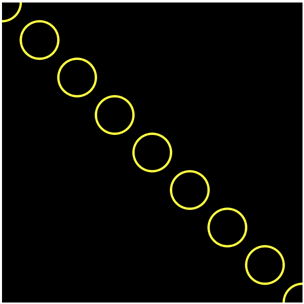
Way back in the practice projects of part 1, the soccer field came with a recipe, a few lines with push, translate, and scale that you copied without questions, magic words with a promise that the details would come later. Later is now. In this chapter the magic words become tools you understand. translate moves the origin of the coordinate system, and push and pop save and restore it. Combined with loops, they open a new way of drawing: instead of computing every position, you draw in one place and move the paper under the pen. Both exercises are discovery scripts, in which you uncomment code line by line, predict, and watch.
34.1 AI tutor
Moving the origin confuses everyone at first, because the code names one position and the shape appears at another. When that happens to you, tell the tutor which line you uncommented and where the circle landed; the tutor knows the way of thinking that untangles it.
Hints and questions instead of finished programs, in English or German.
34.2 The origin moves
Every coordinate you have ever written is measured from the origin, the point (0, 0), and so far the origin has always been the top left corner of the canvas. The translate command moves it:
translate(100, 100);
circle(0, 0, 50);
After the translate, the point (0, 0) sits 100 pixels right and 100 pixels down from the corner, and every drawing command that follows measures from there. The circle names the position (0, 0), and appears at the center of what used to be (100, 100). The command did not move the circle; it moved the ruler the circle is measured with.
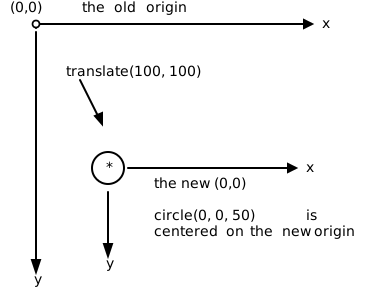
Three facts complete the picture, and the first exercise will let you discover each one:
- translate is relative. A second
translate(100, 100)moves the origin another 100 right and down, measured from where it currently is. Translations add up. - Negative values move back.
translate(-50, 0)moves the origin 50 pixels to the left,translate(0, -50)moves it up. - resetMatrix starts over.
resetMatrix()puts the origin back in the top left corner of the canvas, as if notranslatehad ever happened.
34.3 Drawing without coordinates
Now combine translate with a loop. The goal picture at the top of the chapter shows a diagonal of circles, and the rule is that you draw every circle with the very same command, circle(0, 0, CIRCLE_DIAMETER), no other coordinates allowed. SIZE is the canvas size and CIRCLE_DIAMETER the diameter of one circle, both constants:
circle(0, 0, CIRCLE_DIAMETER);
for (let i: number = 0; i <= SIZE; i += CIRCLE_DIAMETER) {
    translate(CIRCLE_DIAMETER, CIRCLE_DIAMETER);
    circle(0, 0, CIRCLE_DIAMETER);
}
Each round moves the origin one step down the diagonal and draws “here”. The position is nowhere in the code; it lives in the canvas itself, accumulated by all the translates so far, the way the hue accumulated in the colored rays. Notice the loop variable i: it appears nowhere in the body. Its only job is counting rounds, so that the loop runs often enough to cross the canvas. A loop that just counts rounds is perfectly normal from now on.
You could draw this diagonal with the pixel X technique instead, computing circle(i, i, ...). Same picture, two ways of thinking: move the pen, or move the paper. For a single diagonal, both are fine. For the patterns of the next chapter, moving the paper wins, and you’ll see why.
34.4 A note before you wander: push and pop
Translating is a one-way street. After five translates, how do you get back? resetMatrix goes all the way back to the corner, but usually you want something gentler, a “remember this spot, let me wander, then bring me back”. That is exactly what push and pop do:
push()writes a note: it saves the current origin and the current style settings (fill,stroke,strokeWeight, and the other style commands).pop()takes the most recent note and restores everything on it.
One concrete timeline shows the note-taking at work:
| statement | origin afterward |
|---|---|
translate(100, 100); |
(100, 100) |
push(); |
(100, 100), and a note saves this spot |
translate(100, 0); |
(200, 100) |
translate(0, 100); |
(200, 200) |
pop(); |
(100, 100) again, restored from the note |
translate(0, 100); |
(100, 200) |
The wandering between push and pop leaves no trace: after the pop, the program continues as if the detour never happened. And because pop also restores the styles, a color change inside the detour vanishes with it.
Notes stack. If you push twice, you hold two notes, and each pop takes back the most recent one: the first pop returns you to the second push, the next pop to the first. Like sticky notes piled on a desk, you always take the top one.
Treat push and pop as a pair, like opening and closing braces. A push without its pop leaks: every drawing command that runs later inherits your moved origin and changed styles, and the bug shows up far away from its cause. Write the pop immediately after the push, then fill the middle.
34.5 Your exercise: Move Origin
- Task 1: uncomment and predict. The starter code is a stack of commented blocks. Before you uncomment each one, play computer: write down where you expect the next circle, then uncomment, run, and compare. Work through all the blocks, including the negative translate and the
resetMatrixat the end. - Task 2: write the loop. The goal is a diagonal of circles: diameter 50, the first centered at the corner (0, 0), each next one 50 right and 50 down. One circle at (0, 0) before the loop, then a for loop whose body is exactly two statements, the translate and the circle, as in the section above (Section 34.3). No computed coordinates allowed.
- Experiment. Change the translate to
(CIRCLE_DIAMETER, 0)for a horizontal chain, then try a negative y for an upward staircase from the bottom (you’ll need a translate before the loop to start at the bottom left).
34.6 Your exercise, part 2: Push and Pop
The second discovery script has no drawing task and no sample solution; its only goal is that you see the note-taking happen.
- Uncomment and predict, block by block, like in task 1. The script translates to (100, 100), pushes, wanders right and down, pops, and continues from the saved spot. Before each run, say out loud where the next circle will appear.
- Check the styles. Add
stroke("red")somewhere betweenpushandpop, and see that the circles after thepopare yellow again: the note restored the stroke color along with the origin. - Stack two notes. Add a second
push/poppair inside the first one, with its own small translate, and confirm: eachpopreturns to the most recentpush.
34.7 Check your understanding
When your diagonal runs on translate alone and the push-pop script holds no more surprises, take the short quiz below. You answer six questions about this chapter in your own words, and an AI reads your answers and tells you what you already understand and what you should read again. The quiz is anonymous, and answering in German is fine too.