48 Refactoring: from dice to domino
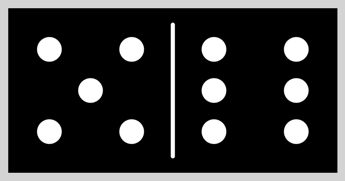
Not every program starts as an empty file. This one starts finished. The starter code draws a single dice face with the right number of dots, and it works. Your job is to change how the program is built while the picture stays the same, and only then to grow it into a domino piece with two faces. Programmers do this every day and they have a name for it, refactoring. It is the move that turns one long program into named building blocks.
48.1 AI tutor
Moving code into a function is where “it worked a minute ago” happens for the first time. A dot lands in the wrong half, or the canvas comes out empty because the new function is defined but never called. Tell the tutor which step you were on and what changed in the picture.
Hints and questions instead of finished programs, in English or German.
48.2 Refactoring means restructuring, not rewriting
Refactoring means changing the structure of working code while what it does stays exactly the same. Nothing new appears on the canvas, nothing disappears, nothing moves by a pixel. You are not fixing a bug and you are not adding a feature, you are making the code easier to read and easier to reuse.
That constraint sounds limiting, and it is the best part of the deal. Because the result has to look identical, you always have a test in front of you. Run the program, look, change, run again, compare. If the two pictures differ, your refactoring broke something and you know it within seconds.
Refactor in small steps and run after every single one. One extracted function, one run, one look. Refactorings that are checked only at the end are how programmers lose whole afternoons.
48.3 The dice, all in one block
The starter code draws a black square and puts white dots on it, all of it inside setup. The dots are the interesting part:
fill("white");
if (dice === 1 || dice === 3 || dice === 5) {
    circle(diceSize / 2, diceSize / 2, dicePointDiameter);
}
if (dice !== 1) {
    circle(diceSize / 4, diceSize / 4, dicePointDiameter);
    circle(3 * diceSize / 4, 3 * diceSize / 4, dicePointDiameter);
}
// ... two more if blocks, for the 4 and up and for the 6 ...
You built these six faces once already, in the dice exercise of the Conditions part (Section 22.6). Only the arithmetic changed. Positions are fractions of diceSize instead of fixed pixel numbers, so diceSize / 4 is the quarter line and 3 * diceSize / 4 the three quarter line. Each if adds one group of dots, and the four of them together cover all six faces.
Four if statements, ten circle calls, and a comment on top saying what the block is about. That comment is a hint. Whenever a group of statements needs a comment to explain it, it wants to be a function with that comment as its name.
48.4 Extracting a function
Pulling a block of statements out of its surroundings and giving it a name is called extracting a function. It always runs through the same five steps.
- Choose the statements that do one job together. Here, the four
ifblocks with the dots. - Write a new function whose name says that job,
drawDice. - Make sure the moved code still reaches everything it needs. This is the only step that requires thinking.
- Put a call where the statements used to be.
- Run and compare with the picture from before.
Step 3 splits the values the block uses into two groups. dice is different every time somebody wants a dice face, so it becomes a parameter. diceSize and dicePointDiameter are the same for the whole program, so they move to the top of the file, above all functions, where everything can read them.
const dicePointDiameter: number = 30;
const diceSize: number = 200;

function drawDice(dice: number): void {
    fill("white");
    // ... the four if blocks with the dots, unchanged ...
}
That split is a rule you can reuse forever. A value that changes from call to call is a parameter, and a value that is the same everywhere is a constant at the top of the program. Guessing wrong is harmless, because turning one into the other later is refactoring too.
48.5 Two dice make a domino
A domino piece is two dice faces on one tile, so with drawDice in place it needs one more function around it:
function drawDomino(dice1: number, dice2: number): void {
    push();

    fill("black");
    noStroke();
    rect(0, 0, diceSize * 2, diceSize);

    drawDice(dice1);

    translate(diceSize, 0);
    drawDice(dice2);

    stroke("white");
    strokeWeight(5);
    line(0, 20, 0, diceSize - 20);

    pop();
}
Read it from the top. The black tile is drawn once and is twice as wide as a single face. The first drawDice paints the left half, because the origin still sits in the tile’s top left corner. Then translate(diceSize, 0) moves the origin one face width to the right, and the second drawDice runs with the very same fixed numbers, which now land in the right half.
You met this habit in the face function chapter, and here it does real work. A function that draws with fixed numbers can draw anywhere, because the translate in front of it decides where those numbers land. The dividing line proves it from the other side. It is drawn at x = 0 and still lands in the middle of the tile, because after the translate the origin is the middle. The push and pop around everything put the coordinate system back, so whoever called drawDomino never notices that the origin moved.
48.6 Values flow down the call chain
Somebody has to decide the two numbers, and that somebody is setup:
function setup(): void {
    createCanvas(diceSize * 2 + 20, diceSize + 20);
    background("lightgray");
    translate(10, 10);

    const dice1: number = floor(random(1, 7));
    const dice2: number = floor(random(1, 7));

    drawDomino(dice1, dice2);
}
The two rolls happen in setup, travel into drawDomino as arguments, and travel one step further from drawDomino into drawDice. Values flow down the chain of calls, from the function that decides them to the function that finally uses them.
You could roll the dice inside drawDice instead and save yourself two lines. Don’t. A function that receives its numbers can draw any piece you ask for, including a fixed 3:5 for testing, while a function that invents its own numbers can only ever do one thing.
One detail is easy to trip over. The constant in setup is called dice1, the parameter of drawDomino is also called dice1, and the parameter of drawDice is called dice. Those names have nothing to do with each other, because only the value travels.
48.7 Your exercise: Domino
The starter code is the working dice program, everything inside setup. Refactor it in two steps and keep looking at the picture.
- Run the starter code first a few times and look at the dice. That picture is your test for the next step.
- Extract
drawDice. Follow the five steps from the extraction section above (Section 48.4), move the two constants to the top of the file, and give the function its parameter and its: void. Run it. The picture has to be the same dice as before. - Add
drawDomino. Write the function with its two parameters, let it draw the wide black tile, calldrawDicetwice with atranslatein between, and add the white dividing line. Enlarge the canvas insetupso the wider tile fits. - Roll in setup. Move the two
randomrolls intosetupand pass them down as arguments. Test withdrawDomino(3, 5);first and check that the left half shows three dots and the right half five, then put the rolls back. - Experiment. Change
diceSizeat the top of the file and run again. One number, and the whole piece scales.
48.8 Five pieces from one loop

drawDomino function drew all of them, called five times by a for loop.Once drawDomino exists, a row of pieces costs almost nothing. The five pieces 1:2, 2:3, 3:4, 4:5, and 5:6 have a pattern, since the right number is always the left number plus one. A for loop counting from 1 to 5 already holds both numbers you need, and a new constant gap at the top of the file holds the distance between two pieces:
for (let i: number = 1; i <= 5; i++) {
    drawDomino(i, i + 1);
    translate(diceSize * 2 + gap, 0);
}
The loop variable becomes an argument. In the first round i is 1 and the piece is 1:2, in the last round i is 5 and the piece is 5:6. After each piece, translate moves the origin right by one whole tile plus a gap, so the next call starts where the previous piece ended.
Five tiles of 400 pixels are far wider than any comfortable canvas, so the row is shrunk with scale(0.2) before the loop starts. Everything inside the loop then draws at a fifth of its size, including the translate steps, so the spacing shrinks along.
48.9 Your exercise, part 2: Domino (Advanced)
The starter code is your finished domino program, with drawDomino and drawDice already in place. Only setup changes.
- Add a gap constant at the top of the file, next to the other two, with a value of about 20.
- Make the canvas fit. Five pieces are ten face widths plus four gaps, shrunk to 20 percent, plus a small margin. Work the number out on paper before you type it.
- Write the loop with the
translateat its end, as in the section above (Section 48.8). Start with two pieces if that makes the first run easier to read. - Experiment. Let the loop count down from 5 to 1 and watch the row reverse. Then try
drawDomino(i, i);for five doubles.
48.10 Check your understanding
When your row of five dominoes stands and you can explain why drawDice needs no idea where it is drawing, take the short quiz below. You answer six questions about this chapter in your own words, and an AI reads your answers and tells you what you already understand and what you should read again. The quiz is anonymous, and answering in German is fine too.