17 Strings that grow: the click protocol
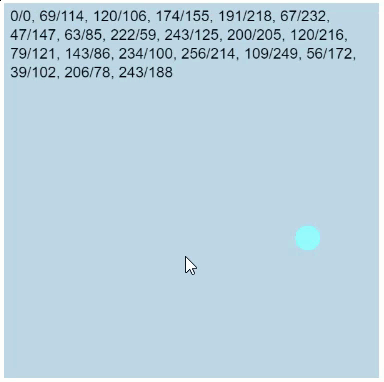
The color worm counted with numbers; now you’ll make text grow. You’ll build a program that keeps a written record of everything the user does: each click draws a circle at the click position and adds that position to a protocol at the top of the canvas. Click by click, the protocol gets longer, until it fills line after line, and the program never forgets a single entry.
17.1 AI tutor
A growing string goes wrong in small ways: a missing space, a protocol that resets, a line that never gets longer. The AI tutor of this part helps you work out which of them you’re looking at.
Hints and questions instead of finished programs, in English or German.
17.2 An event for clicks
The click protocol reacts to clicks with the event function mouseClicked, the same one that froze the color in the color picker: p5.js calls it automatically once per click, and inside it, mouseX and mouseY hold the position where the click happened.
function mouseClicked() {
  circle(mouseX, mouseY, 20);
}
As with every event function, the name is an agreement between you and p5.js: a typo like mouseclicked gives you a function that is never called, without any error message.
17.3 Chaining strings together
Sticking two strings together into one longer string is called concatenation, from the Latin word catena, a chain. You’ve already built strings from pieces: in the snapping exercise, the template string `${x}/${y}` chained two numbers and a slash into a string like 120/80.
The new idea of the click protocol is that the old value of a variable can be one of the pieces. The protocol lives in a global variable, and every click builds a longer string out of it:
let clickPositions: string = "0/0";

function mouseClicked() {
  clickPositions = `${clickPositions}, ${mouseX}/${mouseY}`;
  // ...
}
Look closely at the assignment. It’s the exact same pattern as colorHue = (colorHue + 5) % 360 in the color worm, just with text instead of a number. The computer first builds the string on the right side, starting with whatever clickPositions holds right now, and then stores the result back into the variable. Say the protocol is 0/0 and the user clicks at (120, 80): the right side becomes 0/0, 120/80, and that’s the new content of the box. The next click at (30, 190) turns it into 0/0, 120/80, 30/190. The string grows with every click.
And like the worm’s hue, the protocol must survive between event calls, so clickPositions has to be a global variable, declared with let outside of every function. Its data type is string, because a variable isn’t limited to numbers. It can hold a value of any type.
17.4 A text box that wraps
A growing protocol soon becomes wider than the canvas, and text with three parameters would happily keep writing past the right edge. For long text, text accepts five parameters:
text(clickPositions, 5, 5, width - 10, height - 10);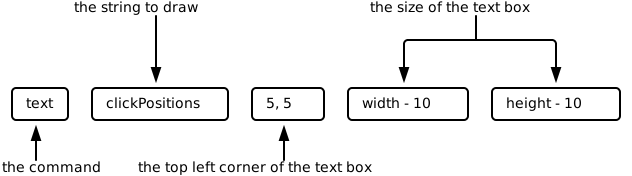
text: the string to draw, the corner where the text box starts, and the size of the box.The two extra numbers turn the position into an invisible text box, and inside the box, p5.js wraps the text for you: when a line reaches the box’s right edge, the text continues in the next line, just like in a word processor. In the call above, the box starts at (5, 5) and is 10 pixels smaller than the canvas in each direction, which leaves a 5 pixel margin on every side. Text is drawn in the current fill color, so pick one that reads well on your background.
17.5 The variable remembers, the canvas forgets
There’s one decision in the click protocol program worth a moment of thought. Each run of mouseClicked starts by repainting the background, exactly like the crosshairs did, so the circle of the previous click is erased and only the newest circle is visible. And yet the protocol at the top still lists every click since the program started.
The two behaviors don’t contradict each other. Whatever you draw on the canvas is just paint: repaint the background and it’s gone. The protocol survives because it isn’t stored on the canvas at all. It’s stored in the variable clickPositions, and it’s drawn onto the canvas again, freshly and completely, after every click. Drawing something is not the same as remembering it. Variables remember, and the canvas only shows.
17.6 Your exercise: String concat
Build the click protocol:
- Declare the global variable
clickPositionswith the explicit typestringand the starting value"0/0". - Simulate the first click in
setup. The starter code already creates the canvas and paints the background. Add what a click at (0, 0) would leave behind: a circle with diameter 20 at (0, 0), of which only a quarter is visible in the corner, and the protocol text. The circle and text colors are yours to choose; in the sample the circle is"aqua"and the text is"black". - Fill
mouseClicked. Repaint the background, draw the circle at the click position, extendclickPositionswith a template string, and draw the protocol into a wrapping text box. Mind the order: extend the protocol before drawing it, or the newest click will always be missing from the display. - Test the protocol. Click a few positions and read the text on screen character by character: every position separated by a comma and a space, x and y separated by a slash, and the newest click at the end. The protocol is a format promise, and exactness decides whether your output matches it. Then keep clicking until the protocol wraps into a second and third line.
17.7 Check your understanding
When you’ve finished the exercise, take the short quiz below. You answer five questions about this chapter in your own words, and an AI reads your answers and tells you what you already understand and what you should read again. The quiz is anonymous, and answering in German is fine too.