32 Chessboard: rows, columns, and one clever loop
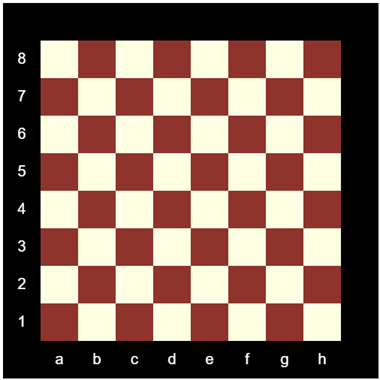
A chessboard is a small exam in disguise. It needs nested loops for the 64 squares, the parity trick for the two colors, text for the markings in the margin, and a switch to turn the numbers 1 to 8 into the letters a to h. Every one of those tools is already in your toolbox; this chapter is about making them work together. And at the end, for the ambitious, comes a clever connection: you can draw a chessboard with a single loop, using the same arithmetic you used to take numbers apart in the number systems chapter.
32.1 AI tutor
This drawing has many small parts: squares, colors, numbers, letters. Work on one part at a time, and when a part misbehaves, show the tutor only that part. “My colors are striped instead of checkered” is a great opening sentence.
Hints and questions instead of finished programs, in English or German.
32.2 Rows and columns
The board is a grid of cells, and for grids of cells the counting style of loop (Section 30.4) is the natural choice: an outer loop counts the rows 0 to 7, an inner loop counts the columns 0 to 7. The size of one square gets a constant, SQUARE_SIZE, worth 50 pixels here. You then compute the positions from the counts, like the zebra stripes, only in two directions:
x = SQUARE_SIZE + col * SQUARE_SIZE
y = SQUARE_SIZE + row * SQUARE_SIZE
The extra SQUARE_SIZE at the front shifts the whole board one square in from the edge. On the 500 pixel canvas the board covers 400, and the remaining border leaves room for the letters and numbers. Row 0, column 0 is the top left square at (50, 50); row 7, column 7 is the bottom right square at (400, 400).
32.3 Coloring by parity
Which squares are brown? Walk along a row and the colors alternate with every step, so the column’s parity decides. Walk down a column and they alternate again, so the row’s parity matters too. The neat trick is to add the two counts. Moving one square in any direction changes row + col by exactly one, so the sum flips between even and odd just like the colors flip:
if ((row + col) % 2 === 0) {
    fill("lightyellow");
} else {
    fill("brown");
}
This is the zebra’s % 2 (Section 30.5), grown into two dimensions. Check it against the goal picture: the top left square has row + col equal to 0, even, and is indeed light yellow.
32.4 Letters and numbers in the margin
The markings need one more loop, counting i from 1 to 8. Each round places two things: the rank number i in the left margin, and a file letter at the bottom.
The numbers are positions to compute. Chess counts its ranks from the bottom, so rank 1 sits next to the lowest row. Rank i sits i squares above the bottom margin, centered in the margin column; work the expression out before you type it, and test it with i = 1 and i = 8 like you tested the mirror expression of the pixel X.
The letters are a translation, where 1 becomes “a”, 2 becomes “b”, and so on, one exact case per value. That is exactly what the switch statement is for (Section 27.2):
let file: string = "";
switch (i) {
    case 1: file = "a"; break;
    case 2: file = "b"; break;
    // ... the cases 3 to 8 ...
}
text(file, SQUARE_SIZE * i + SQUARE_SIZE / 2, height - SQUARE_SIZE / 2);
The variable starts as the empty string, the “nothing yet” value you know from rock-paper-scissors, and the switch fills it. A switch inside a loop body runs once per round, with the current i, so each round translates its own number.
For the rank numbers, pass i to text directly: text(i, x, y) draws the number without any template string around it. Set textSize(20), textAlign(CENTER, CENTER), and fill("white") once, before the loop; they apply to every marking.
32.5 Advanced: one loop for the whole board
Now the clever part, for the ambitious. Number the squares 0 to 63, row by row, so squares 0 to 7 form the top row, 8 to 15 the next, and so on. Can one loop over i from 0 to 63 recover the row and column from the number alone? You did exactly this in the number systems chapter, splitting a number into digits with % and floor (Section 25.2). A square number works like a two-digit number in base 8:
const row: number = floor(i / 8);
const col: number = i % 8;
floor(i / 8) counts how many complete rows of eight fit below i, and i % 8 is what’s left over, the position inside the row. Check it with a small table:
i |
floor(i / 8) |
i % 8 |
square |
|---|---|---|---|
| 0 | 0 | 0 | first row, first column |
| 7 | 0 | 7 | first row, last column |
| 8 | 1 | 0 | second row, first column |
| 42 | 5 | 2 | sixth row, third column |
| 63 | 7 | 7 | last row, last column |
One warning for later, when you compare your work with the playground’s sample solution. That solution rounds with Math.floor. You know the chore from the switch chapter (Section 27.6): this course always uses the p5.js helper floor, which does the same job.
32.6 Your exercise: Chessboard
The starter code contains only the canvas, the two constants, and noStroke(). Build the board in the exercise’s three steps.
- Step 1: the squares. Nested counting loops over
rowandcol, the parityif, onerectper square. Run and compare corners with the goal picture. - Step 2: the markings. The 1-to-8 loop with the rank number and the switch-translated letter, text settings before the loop. Getting the rank numbers to count from the bottom is the fiddly part; the margin section above (Section 32.4) shows how to find the expression.
- Step 3 (advanced): one loop. Replace the nested square loops with a single loop over the square numbers 0 to 63, and compute
rowandcolwithfloorand%as shown above (Section 32.5). The picture must not change at all.
32.7 Check your understanding
When your board is checkered and labeled, take the short quiz below. You answer six questions about this chapter in your own words, and an AI reads your answers and tells you what you already understand and what you should read again. The quiz is anonymous, and answering in German is fine too.