15 The color worm: a variable of your own
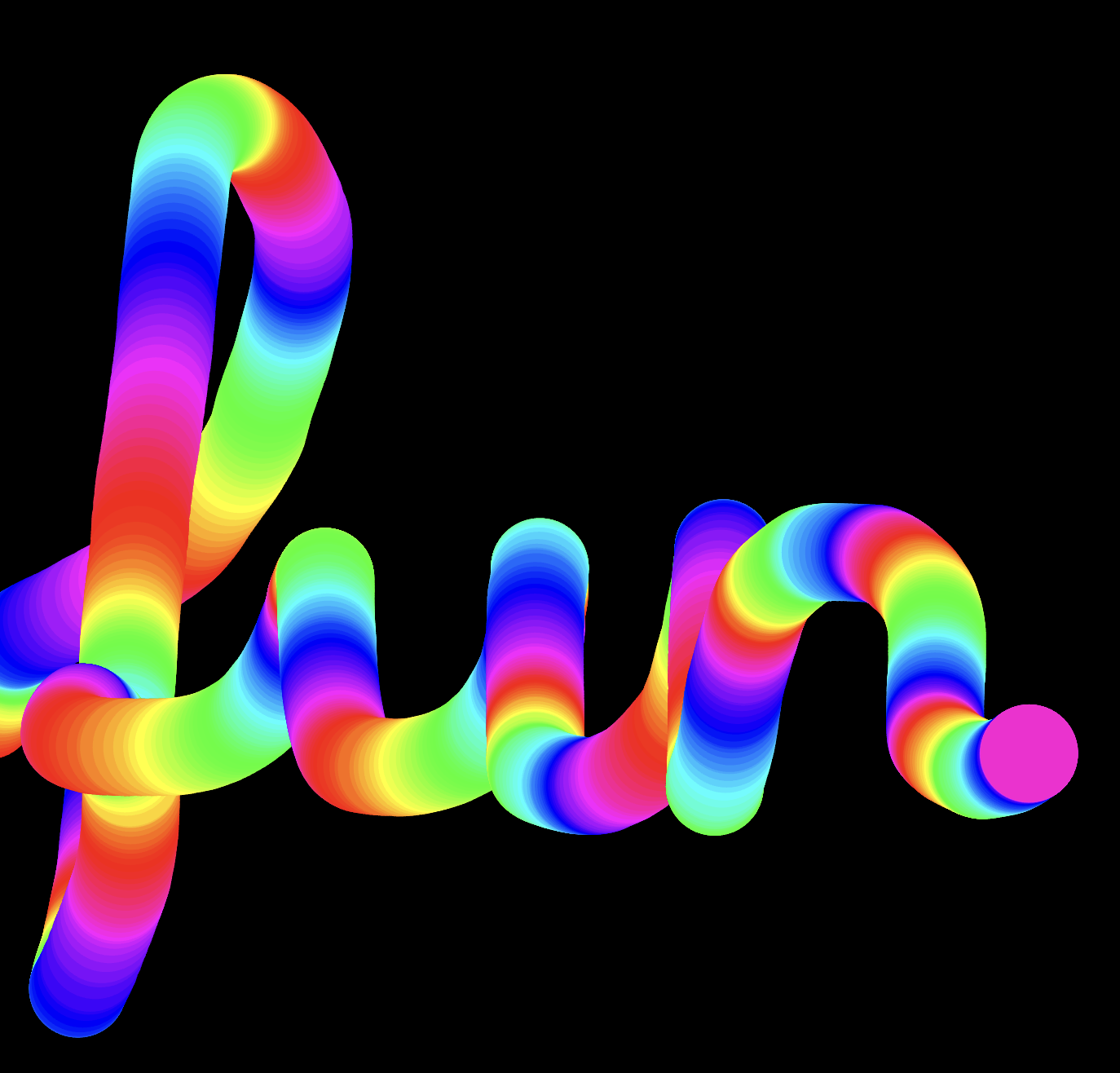
Drag your mouse across a black canvas and a glowing worm grows behind it: circle after circle, and every circle has a slightly different color than the one before. The colors wander through the entire rainbow and then start over, as long as you keep moving. To build the worm, you’ll create your first variable of your own, one whose value changes while the program runs.
15.1 AI tutor
Your first variable of your own carries a big idea: a value that survives from one call of a function to the next. If that idea stays slippery, the AI tutor of this part is the place to ask about it.
Hints and questions instead of finished programs, in English or German.
15.2 A value that must survive
Think back to the crosshairs: p5.js runs mouseMoved again and again, once for every movement of the mouse. Any constant you declare inside mouseMoved is created fresh in every run and forgotten the moment the run ends. For the crosshairs that was fine, because every run computed everything it needed from mouseX and mouseY.
The color worm needs something more. Its hue should move along the hue scale step by step: 0 in the first run of mouseMoved, then 5, then 10, and so on. Each run must know where the previous run stopped, and a const can’t provide that, because its value is set once and never changes, and inside a function it doesn’t even survive to the next call. You need a box whose content can be replaced, and one that stays alive between calls.
15.3 let declares a variable
In the snapping chapter you read that TypeScript has a keyword for values that must change. Here let is in action:
let colorHue: number = 0;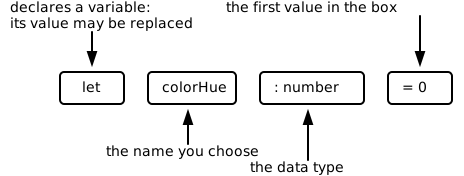
let declaration piece by piece. As always in this course, the declaration names its data type.The pattern is exactly the pattern of a const declaration; only the keyword changed, and with it the promise. const says “this value never changes”, and let says “this value may be replaced later”. A named place whose value can change while the program runs is a variable, and unlike mouseX and mouseY, which p5.js manages for you, this one is entirely yours.
Old JavaScript code declares variables with a third keyword, var. It comes from the language’s early days, and this course doesn’t use it: declare every value with const or let, never with var.
Replacing the value is called an assignment, and it’s just the name, an equals sign, and the new value:
colorHue = 90;No let here. The variable is declared exactly once, and every later assignment only uses its name. The assignment the worm needs looks stranger:
colorHue = colorHue + 5;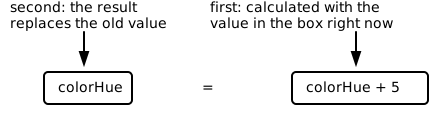
In math class, colorHue = colorHue + 5 would be nonsense: no number equals itself plus five. But an assignment is not an equation; it’s an order, carried out in the two steps of the picture. If colorHue holds 40, the right side gives 45, and 45 replaces the 40. Run the line again and 50 replaces the 45. That’s the stepping-forward you were missing.
15.4 Global variables
The declaration must not go inside mouseMoved. There the variable would be newly created, set to 0, in every single run, and the hue would be stuck at the start of the scale forever. The declaration has to sit outside of every function, at the top of your program:
let colorHue: number = 0;

function setup() {
  // ...
}

function mouseMoved() {
  // ...
}
A variable declared outside of every function is called a global variable. It’s created once, when the program starts. Every function in your program can read and change it, and, most importantly here, it keeps its value between function calls. When one run of mouseMoved sets colorHue to 45, the next run finds the 45 still in the box.
That power comes with a warning. In a large program, a global variable can be changed from anywhere, and finding out who changed it when becomes detective work. So professionals follow a clear rule, and you should too: prefer const, prefer local declarations inside functions, and reach for a global variable only when a value must survive between function calls. The color worm is exactly such a case.
15.5 Counting in circles: the % operator
One problem is left. colorHue + 5 grows without end: 350, 355, 360, 365, and up and up, right past the end of the hue scale. What the worm wants instead is a counter that runs in circles, like the hue scale itself. After 355 it should return to 0 and start the rainbow again.
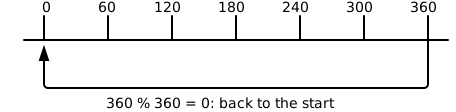
TypeScript has an operator for exactly that. The % operator (called modulo) gives the remainder of a division: 7 % 3 is 1, because 7 divided by 3 is 2 with a remainder of 1. Two properties make it right for the worm. As long as a value is smaller than 360, % 360 changes nothing, so 355 % 360 is simply 355. But the moment the value reaches 360, the remainder wraps around to the start, and 360 % 360 is 0.
colorHue = (colorHue + 5) % 360;The parentheses matter, because they make sure the addition happens before the % is applied. Follow the line through the interesting spot: colorHue holds 355, the right side computes 355 + 5 = 360, then 360 % 360 = 0, and 0 lands in the box. The next circle is red again, and the rainbow starts over.
15.6 Smears, this time on purpose
One last design decision, and it’s an old friend. In the crosshairs program, mouseMoved started with a background statement to erase the previous drawing, and when you removed it, the canvas filled up with smears. The color worm is that experiment turned into art: there is no background call inside mouseMoved at all, so every circle stays where it was drawn, and the smears are the worm. The background is painted exactly once, in setup.
15.7 Your exercise: Color worm
So far, the main job of pen and paper in this course was sketching your picture on graph paper before you code. The color worm gives them a second job, and it’s just as important: playing computer. You step through the code by hand, write down the value of a variable after every step, and predict what the program will do before you run it. If the screen later matches your notes, you know you understood the code. If it doesn’t, you’ve found a bug or a misunderstanding, and both are worth finding.
The hue counter is a good first case. On screen, the wrap from 355 back to 0 flashes by in a single mouse movement, far too fast to see. On paper, you can slow it down: put 355 into the formula and watch the modulo do its work.
Time to grow the worm:
Play computer first. Copy the table below on paper and complete it. The first four rows are the first four runs of
mouseMoved, the last two rows jump ahead to the interesting spot, where the counter reaches the end of the hue scale. The first row is filled in as a model.Run of mouseMovedcolorHueat the startcolorHue + 5(colorHue + 5) % 3601 0 5 5 2 3 4 71 350 72 355 The last row is the one you can’t see on screen, because the wrap flashes by in a single mouse movement. Your table also answers a question the program never tells you: how many mouse movements does one full rainbow take when the hue grows in steps of 5?
Set the stage in
setup. Create a 500 by 500 canvas, switch to HSB withcolorMode(HSB), and paint the background black withbackground(0)(a single number is a gray value, and 0 is black). AddnoStroke()so the circles have no outlines and melt into one worm.Declare the global variable
colorHueoutside of every function, starting at 0, with an explicit data type.Fill
mouseMoved. Set the fill color tofill(colorHue, 100, 100)(the current hue at full saturation and full brightness), draw a circle at the mouse position with a diameter of 40, and finish with the assignment that moves the hue forward and wraps it at 360.Test and play. Move the mouse slowly, then quickly: fast movements leave gaps between the circles, because
mouseMovedruns once per movement event, not once per pixel. Then check your paper prediction. Does the rainbow really repeat? To finish, change the step of 5 to 1 and then to 20, and watch what happens to the worm’s stripes.
15.8 Check your understanding
When you’ve finished the exercise, take the short quiz below. You answer seven questions about this chapter in your own words, and an AI reads your answers and tells you what you already understand and what you should read again. The quiz is anonymous, and answering in German is fine too.