57 Trains from strings: parsing functions
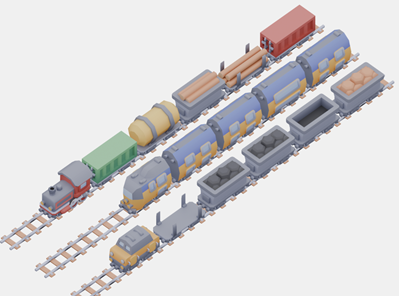
A real train station gets its data from another computer system, as text. A line like TLB,TCCG,TCTL,TCW,TCL,TCCR says which wagons stand on a track, one abbreviation per wagon. You know how to pick a string apart character by character, and you know how to draw an image. This chapter packages both into functions that hand back arrays.
57.1 AI tutor
A parser that returns pictures fails quietly, because a wrong index gives you the wrong wagon instead of an error message. If a wagon looks unexpected, tell the tutor the input string and which abbreviation should have produced it. If the canvas stays empty, say how many images your loading loop pushed into the array.
Hints and questions instead of finished programs, in English or German.
57.2 Loading many images with for…of
This exercise needs 41 wagon images. Three things come with the starter code: the array imageUrls with the file names, the constant BASE_URL with the address they hang on, and the empty array trainCars for the loaded pictures. A loop fills the last one. With the counting loop you already know, it looks like this.
for (let i: number = 0; i < imageUrls.length; i++) {
    const wagonImage: p5.Image = await loadImage(`${BASE_URL}/${imageUrls[i]}`);
    trainCars.push(wagonImage);
}
Look at what i is used for. It appears once, to get imageUrls[i] back out of the array. That is pure bookkeeping, and TypeScript has a loop that does it for you.
for (const imageUrl of imageUrls) {
    const wagonImage: p5.Image = await loadImage(`${BASE_URL}/${imageUrl}`);
    trainCars.push(wagonImage);
}
for...of walks through an array and hands you one element per round, directly in a constant you name yourself. No counter, no length, no square brackets, and no chance of an off-by-one mistake. Read the head out loud as “for each imageUrl of imageUrls”.
Use for...of when you need every element and no index arithmetic. Use the classic for when the position itself matters, for example to count, to walk backwards, or to compare two arrays position by position.
Every declaration in this course carries its data type, and the head of a for...of loop is the single place where TypeScript refuses one. for (const imageUrl: string of imageUrls) is a syntax error, so the head keeps the short form you see above. TypeScript still knows the type, because it reads it off the array. The counter of a classic for loop is a normal declaration and keeps its : number (Section 28.3).
Inside the loop, await waits for one image before the next one starts. When the loop ends, trainCars holds as many images as imageUrls holds names, in the same order.
57.3 The abbreviation table
The file wagons.ts contains two arrays that belong together. imageUrls holds the 41 file names, abbreviations holds the 41 short codes that arrive in the data, and both are in the same order. They are parallel arrays, the technique from the soccer field chapter (Section 42.2), so abbreviations[1] is "TCC" and imageUrls[1] is the coal wagon. Because trainCars was filled in the order of imageUrls, the index carries over one step further, from abbreviations straight into trainCars. That gives you the whole job in one sentence. Find the position of an abbreviation, then take the image at the same position.
57.4 A search you write yourself
Searching an array is one of the oldest jobs in programming, and the simplest method is what a person does with a printed list. Start at the top, compare, and stop at the first match.
function getWagonIndex(wagonAbbreviation: string): number {
    for (let i: number = 0; i < abbreviations.length; i++) {
        if (wagonAbbreviation === abbreviations[i]) {
            return i;
        }
    }

    // This should NEVER happen!
    return -1;
}
This is called a linear search, because it walks the array in a line from front to back. Two details make it work. return inside a loop leaves the whole function immediately, so the remaining rounds never run and no “found it” variable is needed. And the second return is reached only when the loop ran through without a match. It answers with -1, the usual convention for “not found”, because no array position is ever negative.
The exercise forbids the built-in search function indexOf on purpose. Searching is a skill, not a button, and later courses compare this simple search against faster ones.
57.5 A function that returns an array
Now the parser. parseTrain takes one train string and hands back the images of its wagons in drawing order, which its return type p5.Image[] says exactly. The loop inside is the collecting loop from the parsing chapter (Section 41.3). A buffer variable collects characters until a separator arrives, the separator here is the comma, and the last abbreviation is still in the buffer when the loop ends (Section 41.4).
One line at the end is new. reverse() turns an array around, so the first element becomes the last one. The train needs that, because the wagons are drawn from right to left and the locomotive, first in the string, has to end up at the front of the train.
function parseTrain(trainString: string): p5.Image[] {
    const result: p5.Image[] = [];

    let wagon: string = "";
    for (let i: number = 0; i < trainString.length; i++) {
        if (trainString[i] === ",") {
            result.push(trainCars[getWagonIndex(wagon)]);
            wagon = "";
        } else {
            wagon += trainString[i];
        }
    }

    result.push(trainCars[getWagonIndex(wagon)]);

    // The locomotive stands first in the string and must be drawn last.
    return result.reverse();
}
Read trainCars[getWagonIndex(wagon)] from the inside out. The call getWagonIndex(wagon) returns a number, and that number is used straight away as the index into trainCars. One function feeds the next, and no extra variable is needed. Notice also that result is declared with const and still grows, because const only forbids pointing the variable at a different array.
57.6 Drawing the parsed train
Once setup has called the parser, the array holds ready-to-draw images and draw only walks through it. That loop is already in the starter code.
for (let ix: number = 0; ix < train.length; ix++) {
    drawTrainWagon(train[ix], ix);
}
The given function drawTrainWagon(wagon: p5.Image, ix: number): void wants two things, the picture and the position number that decides where the wagon lands, and it places the image like the railroad segments in the orthographic chapter (Section 56.6). The wagon arrives as a parameter, so this one function draws all 41 wagon types.
57.7 An array of arrays
A station has more than one track, and the data says so. In the advanced part of the exercise, one string describes all tracks, with semicolons between the trains and commas between the wagons.
const TRACKS: string = "TLB,TCCG,TCTL,TCW,TCL,TCCR;TEDA,TEDB,TEDB,TEDC,TEDB;TDA,TCF,TCC,TCC,TCB,TCD";Three trains means three arrays of images, kept in one variable of the type p5.Image[][]. Read the two pairs of brackets as “an array whose elements are arrays”. This is your first two-dimensional array.
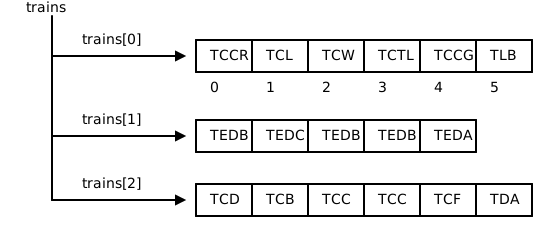
Indexing works in two steps. trains[1] is a whole train, an array of images, and a second pair of brackets lands you inside that train, so trains[1][2] is one single image. First index picks the track, second index picks the wagon.
The parser for the whole station has the same shape as parseTrain, one level up. It cuts at semicolons, and instead of an image it pushes the result of parseTrain.
function parseTracks(tracksString: string): p5.Image[][] {
    const result: p5.Image[][] = [];

    let track: string = "";
    for (let i: number = 0; i < tracksString.length; i++) {
        if (tracksString[i] === ";") {
            result.push(parseTrain(track));
            track = "";
        } else {
            track += tracksString[i];
        }
    }

    result.push(parseTrain(track));
    return result;
}
Drawing then needs two loops, one over the tracks and one over the wagons of the current track. The translate(125, 100) at the end of each round moves the origin to the next track, as in the orthographic exercise.
for (const track of trains) {
    for (let i: number = 0; i < 5; i++) {
        drawRailroad(i);
    }

    let ix: number = 0;
    for (const wagon of track) {
        drawTrainWagon(wagon, ix);
        ix++;
    }

    translate(125, 100);
}
The wagon loop shows an honest compromise. for...of gives the picture, but drawTrainWagon also wants a position number, so a counter runs alongside. A classic for does the same job here, so pick whichever you find easier to read.
57.8 Your exercise: Train Station
The starter code gives you the constants, the two drawing functions, and wagons.ts with the parallel arrays. The three base tasks build one train.
- Load all wagon images. In
setup, loop overimageUrlsandawait loadImagefor each name, pushing every image intotrainCars. AfterwardstrainCars.lengthmust equalimageUrls.length. Draw both numbers withtextto check. - Write getWagonIndex. A linear search over
abbreviations, with-1when nothing matches. Test it before you go on by drawing the result ofgetWagonIndex("TCW")on the canvas. - Write parseTrain. The collecting loop, the push after the loop, and the
reverseat the end. Call it insetupwith theTRAINconstant and store the result intrain.
The advanced tasks add the other two tracks.
- Write parseTracks. Same pattern one level up, semicolon instead of comma, and
parseTrainfor each piece. Store the result intrains. - Draw all tracks. Replace the drawing code in
drawwith the two nested loops, and end each round withtranslate(125, 100).
Paper helps in step 3. Take the short string "TLB,TCW", write one row per character, and note what the buffer holds, when a push happens, and what the array looks like before and after reverse.
57.9 Check your understanding
When your three trains stand in the station and you can explain what trains[1][2] is, take the short quiz below. You answer six questions about this chapter in your own words, and an AI reads your answers and tells you what you already understand and what you should read again. The quiz is anonymous, and answering in German is fine too.