39 Your first array
Word Swirrel can still only play one word; whoever read the code knows the answer forever. Level 3 fixes that with the idea this whole part is named after. An array is a variable that holds a whole list of values: twenty words, and the program picks one at random on every start. The change to your code is tiny, three lines, but the idea is one of the biggest in programming. From now on, “many things” no longer means “many variables”.
39.1 AI tutor
Arrays bring new syntax: brackets, commas, a strange type annotation. If the red squiggles pile up when you type your first array, show the tutor your lines; the tutor finds a lost comma or bracket in seconds.
Hints and questions instead of finished programs, in English or German.
39.2 From one string to many
Here is an array that holds four strings:
const WORDS: string[] = [
    "apple",
    "banana",
    "cherry",
    "orange"
];
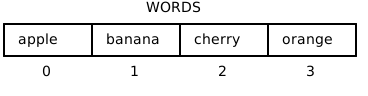
Read it in three parts. The type annotation string[] says that this variable holds an array of strings, a row of values where each one is a string. The square brackets on the right are the array literal: the elements, separated by commas, between [ and ]. Writing each element on its own line is not required, but for long lists it keeps the code readable, and you may leave a comma after the last element too. The name is in ALL_CAPS because the word list is configuration, like SIZE and GRID were, so the naming rules don’t change.
The picture at the top of the chapter shows how to think about it, a row of boxes, each box numbered, counting from 0. That should feel familiar, because a string is exactly the same picture with characters in the boxes. The last chapter’s sentence “a string is a row of characters” now gets its general form: an array is a row of anything. There are arrays of numbers too, written number[]; they carry the soccer players’ shirt numbers in a later chapter.
39.3 Picking one at random
You know random as a number machine. random(6) returns a random decimal number. Hand it an array instead, and it does something much friendlier:
wordToGuess = random(WORDS);random(WORDS) returns one random element of the array, not a number. With the four-word array above, the result is "apple", "banana", "cherry", or "orange", each equally likely. No index arithmetic, no floor: p5.js picks the element for you. One call per program start, and every run plays a different word.
39.4 A variable declared empty
The third change is the sneakiest. In level 2, the secret word was const wordToGuess = "apple". Now the word is only known once setup has rolled the dice, so the declaration and the assignment split up:
let wordToGuess: string;   // declared, no value yet

function setup() {
    // ...
    wordToGuess = random(WORDS);
    // ...
}
You have seen this shape once before, with let message: string; in the Conditions part: declare with a type, assign before you read. A const cannot do this split, because a const must get its value at the declaration. Level 3 therefore switches the keyword to let, and you will find that change already made when you open the exercise.
It is tempting to write const wordToGuess = random(WORDS); inside setup, and the scramble loop even works. But then the variable belongs to setup alone, and the guess function, which compares the player’s input against wordToGuess, gets the red squiggle “Cannot find name ‘wordToGuess’”. The word must live in a global variable, declared outside every function, so that setup can write it and guess can read it. That is exactly the global- variable rule from the Variables part: global only when two functions need the same value, and here they do.
39.5 Your exercise: Word Swirrel (Level 3)
The starter code is the finished level 2. Three changes make it level 3:
- Type the array. Above the constants, declare
const WORDS: string[]with about 20 words from the exercise page, one per line. Type it; your fingers learn where the commas, quotes, and brackets go. - Split the declaration. Change
let wordToGuess = "apple";to the empty declarationlet wordToGuess: string;and assignwordToGuess = random(WORDS);at the top ofsetup, before the letter loop. - Run it a few times. A different word should scatter on every start. Guess a few yourself; with 20 words, even you won’t always know the answer.
- Experiment. Add your own words, short and long; the letter loop follows
wordToGuess.length, so nothing else needs to change. Then shrinkWORDSto a single word and run twice, because with one element,randomhas no choice.
39.6 Check your understanding
When your game plays a fresh word on every run, take the short quiz below. You answer six questions about this chapter in your own words, and an AI reads your answers and tells you what you already understand and what you should read again. The quiz is anonymous, and answering in German is fine too.