27 The switch statement: many cases, one question
Look back at this part for a moment. The dice program picked one face out of six with a chain of === comparisons. The hex exercise translated the digit values 10 to 15 into the letters A to F with a chain (Section 25.7). The rock-paper-scissors game turned the computer’s roll into a symbol, with a chain again (Section 26.7). Three programs share one shape, a single variable compared against one exact value after another. Programmers meet this shape so often that TypeScript has a statement built just for it: switch. This closing chapter of the Conditions part teaches you nothing new to compute, only a tidier way to write decisions you already make. And you’ll practice it on an old friend, the dice.
27.1 AI tutor
The tutor of this part knows the switch statement too. If a case never seems to run or a message comes out wrong, show the tutor your switch and tell it what you rolled and what appeared.
Hints and questions instead of finished programs, in English or German.
27.2 From chain to switch
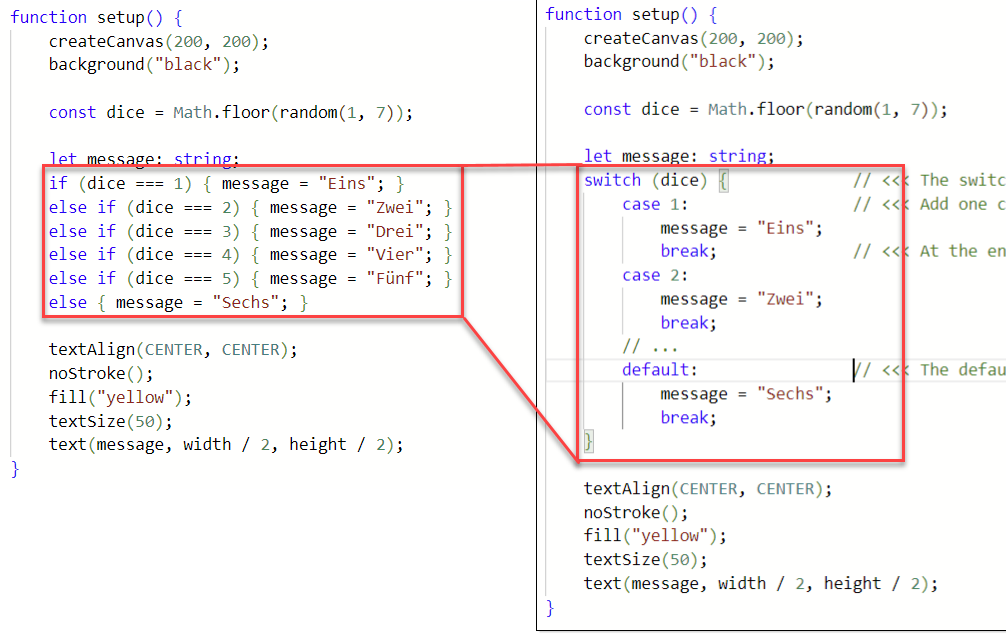
To have something concrete to rewrite, here is a small variant of the dice program. It rolls the die exactly like the dice chapter (Section 22.3), but instead of drawing a face, it prints the rolled number as a German word:
const dice: number = floor(random(1, 7));

let message: string;
if (dice === 1) { message = "Eins"; }
else if (dice === 2) { message = "Zwei"; }
else if (dice === 3) { message = "Drei"; }
else if (dice === 4) { message = "Vier"; }
else if (dice === 5) { message = "Fünf"; }
else { message = "Sechs"; }
Nothing in this chain is new: exact comparisons with === (Section 22.4), a final else that is safe because dice can only hold 1 to 6, and every branch with its braces, even on one line.
But read the chain out loud and you’ll hear the repetition, “dice equals, dice equals, dice equals”, five times the same variable, five times the same question. The switch statement says the repeated part once:
switch (dice) {
    case 1:
        message = "Eins";
        break;
    case 2:
        message = "Zwei";
        break;
    // ... the cases 3, 4, and 5 ...
    default:
        message = "Sechs";
        break;
}
Read it top to bottom:
switch (dice)names the value to look at, once. Everything inside the braces asks questions aboutdice.- Each case is one exact comparison: the line
case 3:asks the same question asdice === 3. The computer walks the cases from top to bottom and jumps to the first one that matches. - After the colon come the statements of that case, and
breakends the case: leave the switch, continue after its closing brace. defaultis the case without a value. More about it below.
27.3 break: the way out
A case does not end by itself. The break statement is what sends the computer out of the switch, and forgetting it is the classic switch mistake. Without a break, the computer finishes the case’s statements and simply keeps running, straight into the statements of the next case, without asking whether that case matches. Programmers say the execution falls through.
Play computer with it: delete the break after message = "Eins"; and roll a 1. The computer jumps to case 1, stores "Eins", and then, with no break to stop it, runs on into case 2 and stores "Zwei". Only the break there ends the switch. The program shows “Zwei” although it rolled a 1.
A missing break is not an error for TypeScript: the program runs, there is no red squiggle, and the drawing simply shows the wrong result. When a switch behaves strangely, check the ends of your cases first, one break per case.
27.4 default: the else of the switch
The default case runs when no other case matched. That is exactly the job the plain else did at the end of the chain: after five nos, only the 6 is left, so the word dice can write default instead of case 6. Like every case, the default ends with a break, so all branches of the switch look the same.
The default case is optional. A switch without one is fine: when no case matches, the switch simply does nothing, and the program continues after the closing brace. You’ll see both designs in this chapter’s exercises, one switch with a default and one without.
27.5 When switch fits, and when it doesn’t
A switch asks only one kind of question: “is the value exactly this?”, the === question. That makes it great for chains of exact cases, and useless for everything else. A range like mouseX < 100 from the color areas cannot be a case, and neither can the || conditions of the bouncing ball or the && box tests of your games. Those decisions stay with if.
Here’s the rule of thumb. When you catch yourself writing three or more else if lines that compare the same variable with ===, the chain is a switch candidate. The compared value doesn’t have to be a number, by the way: a switch can also ask about a string, with the same character-for-character exactness you know from comparing strings with ===.
One more reason to learn the shape by heart: a similar switch exists in C, Java, and C#, the languages your semicolon habit is already preparing you for. Some languages grow the idea further. C# and Rust, for example, offer more powerful variants that can match whole patterns, not just single values. The shape you learn here is the foundation for all of them.
27.6 Your exercise: the dice in words
The first exercise is the word dice from this chapter. The starter code contains the finished if/else if chain; your job is to replace it with a switch.
- Read the starter code. Two small chores while you read: the starter rounds with
Math.floor, a spelling you haven’t met. It does the same as theflooryou know, but this course always uses the p5.js helpers, so change it tofloor. And thedicedeclaration is missing its data type; add: number, like every declaration in this course. - Rewrite the chain as a switch, one case at a time. Start with
switch (dice) {and the case for the 1, run the program, and only then add the next case. One change, one run: exactness first. - Turn the final else into the default. The chain’s last branch has no condition, and the switch’s
defaultis its twin. - Test with forced rolls, like you tested the dice faces (Section 22.6): replace the roll with
const dice: number = 1;for a moment, check the word, and work through all six values. Then put therandomline back.
27.7 Your exercise: the dice faces with switch
The second exercise is a program you have already built once: the dice with its six faces from the dice exercise (Section 22.6). The roll, the anchors, and the circle calls all stay as they were; only the decision around them changes from a chain to a switch. Get your paper table of the nine anchor points out again; it is still the plan.
- Read the starter code. The switch is started, and the cases for the 1 and the 2 are done. Compare the case for the 2 with your own dice solution: the
circlecalls are identical, only the frame around them changed. Add the missing: numberto thedicedeclaration while you’re there. - Add the cases 3 to 6, one at a time, with a
breakat the end of each. Your table tells you which anchors each face uses, and the reuse you found on paper still works: the 3 is the 2 plus the center, the 5 is the 4 plus the center. - Write the 6 as a normal case. This switch has no
default, and it doesn’t need one:dicealways holds one of the six values, so one case per value covers every roll. - Test with forced rolls, face by face, against your paper table. Then restore the roll and enjoy a die that runs on a switch.
27.8 For fast finishers: one more chain
One switch candidate from this part is still out there. The rock-paper-scissors game translates the computer’s roll into a symbol with an if/else if chain (Section 26.7), three exact cases on one variable. Open your finished game and rewrite that chain as a switch. The game must behave exactly as before, and you have a tester who knows it well: you.
27.9 Check your understanding
When both dice run on a switch, take the short quiz below. You answer six questions about this chapter in your own words, and an AI reads your answers and tells you what you already understand and what you should read again. The quiz is anonymous, and answering in German is fine too.